







Question: In MATLAB (please type it out -- handwriting is difficult to read): I know how to load both xt.mat and t.mat, but I need some
In MATLAB (please type it out -- handwriting is difficult to read):
I know how to load both xt.mat and t.mat, but I need some help developing the code to locate the position of the two spikes to remove them to get figure 2.
t.mat is a 1x401 double filled with small decimal numbers
xt.mat is a 1x401 double fille with small decimal numbers
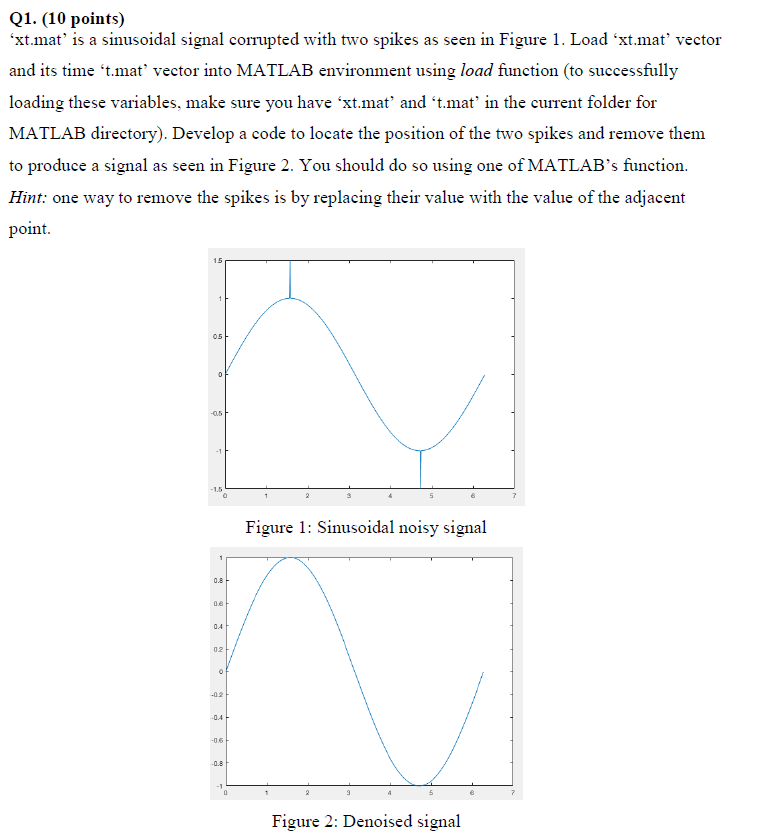
Q1. (10 points) Xtmat, s a sinusoidal signal corrupted with two spikes as seen in Figure 1 . Load Xtmat, vector and its time 't.mat' vector into MATLAB environment using load function (to successfully loading these variables, make sure you have 'xt.mat' and t.mat in the current folder for MATLAB directory). Develop a code to locate the position of the two spikes and remove them to produce a signal as seen in Figure 2. You should do so using one of MATLAB's function. Hint: one way to remove the spikes is by replacing their value with the value of the adjacent point. Figure 1: Sinusoidal noisy signal 0.4 0.4 Figure 2: Denoised signal Q1. (10 points) Xtmat, s a sinusoidal signal corrupted with two spikes as seen in Figure 1 . Load Xtmat, vector and its time 't.mat' vector into MATLAB environment using load function (to successfully loading these variables, make sure you have 'xt.mat' and t.mat in the current folder for MATLAB directory). Develop a code to locate the position of the two spikes and remove them to produce a signal as seen in Figure 2. You should do so using one of MATLAB's function. Hint: one way to remove the spikes is by replacing their value with the value of the adjacent point. Figure 1: Sinusoidal noisy signal 0.4 0.4 Figure 2: Denoised signal
Step by Step Solution
There are 3 Steps involved in it

Get step-by-step solutions from verified subject matter experts
 Study Help