







Question: IN MATLAB. Problem 1. Write a function named custom_blocks that takes an n-by-m matrix as an input argument (the function does not have to check
IN MATLAB.
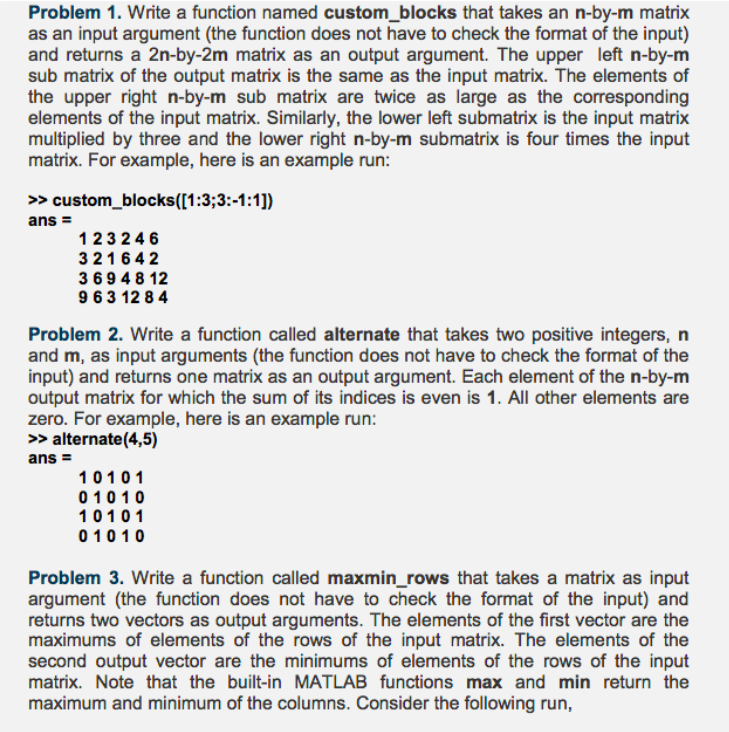
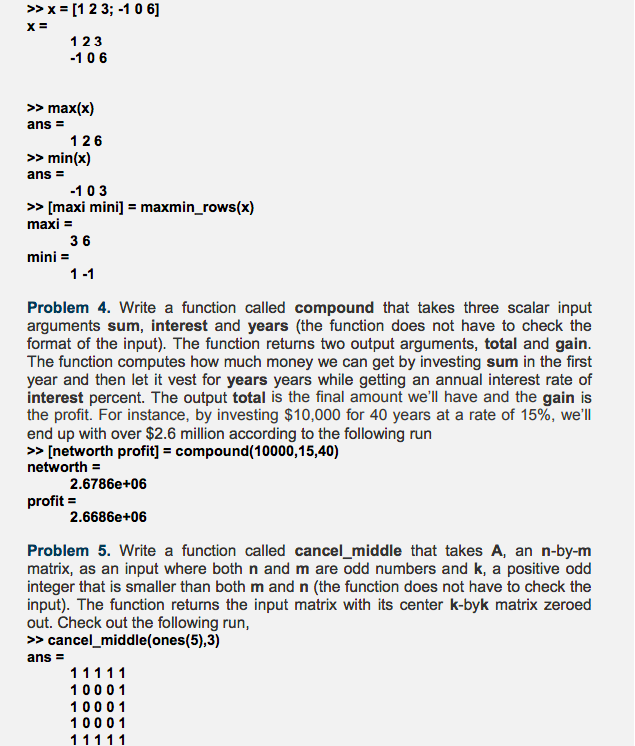
Problem 1. Write a function named custom_blocks that takes an n-by-m matrix as an input argument (the function does not have to check the format of the input) and returns a 2n-by-2m matrix as an output argument. The upper left n-by-m sub matrix of the output matrix is the same as the input matrix. The elements of the upper right n-by-m sub matrix are twice as large as the corresponding elements of the input matrix. Similarly, the lower left submatrix is the input matrix multiplied by three and the lower right n-by-m submatrix is four times the input matrix. For example, here is an example run: >>custom_blocks([1:3:3:-1:1]) ans 123246 321642 3 694 8 12 9 6 3 12 8 4 Problem 2. Write a function called alternate that takes two positive integers, n and m, as input arguments (the function does not have to check the format of the input) and returns one matrix as an output argument. Each element of the n-by-m output matrix for which the sum of its indices is even is 1. All other elements are zero. For example, here is an example run: >>alternate(4,5) 10101 01010 10101 01010 Problem 3. Write a function called maxmin_rows that takes a matrix as input argument (the function does not have to check the format of the input) and returns two vectors as output arguments. The elements of the first vector are the maximums of elements of the rows of the input matrix. The elements of the second output vector are the minimums of elements of the rows of the input matrix. Note that the built-in MATLAB functions max and min return the maximum and minimum of the columns. Consider the following run
Step by Step Solution
There are 3 Steps involved in it

Get step-by-step solutions from verified subject matter experts
 Study Help