







Question: In matlab Problem 2 The Babylonian algorithm, described below, can be used to compute the square root of a positive number. Given a positive number
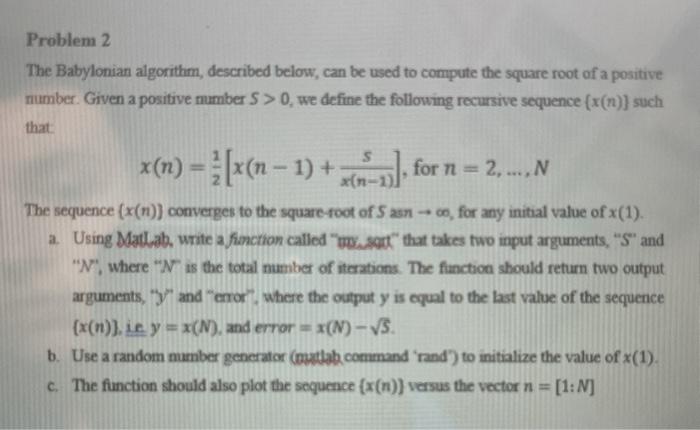
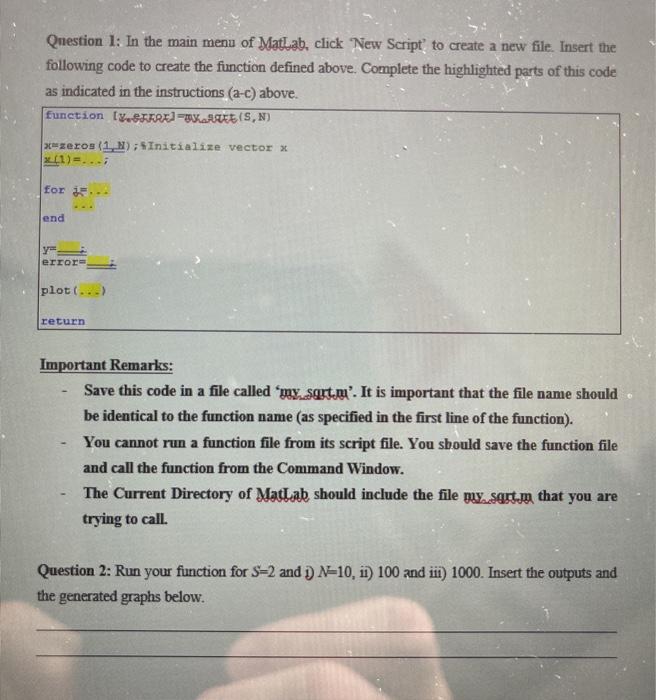
Problem 2 The Babylonian algorithm, described below, can be used to compute the square root of a positive number. Given a positive number 5 > 0, we define the following recursive sequence (x(n)) such that s for n = 2, ..., The sequence (x(n)) converges to the square-root of 5 an, for any initial value of x(1). a. Using Matlab, write a fimction called " mot" that takes two input arguments, "S" and "N", where "Ns the total number of iterations. The function should return two output arguments, "y" and "error where the output y is equal to the last value of the sequence (x(n)), it y = x(N), and error = x(N) - V3. b. Use a random mamber generator (mulla command 'rand') to initialize the value of x(1) c. The function should also plot the sequence (x(n)) versus the vector n = [1:N] Question 1: In the main menu of Matlab, click New Script to create a new file. Insert the following code to create the function defined above. Complete the highlighted parts of this code as indicated in the instructions (a-c) above. function (Y.SKRE=REES, N) zeros(1.1) ; Initialize vector x (1)=... for ... end Y error plot(...) return Important Remarks: Save this code in a file called 'my. sart.n'. It is important that the file name should be identical to the function name (as specified in the first line of the function). You cannot run a function file from its script file. You sbould save the function file and call the function from the Command Window. The Current Directory of Matlab should include the file my.sart that you are trying to call. Question 2: Run your function for S=2 and N=10, 11) 100 and iii) 1000. Insert the outputs and the generated graphs below
Step by Step Solution
There are 3 Steps involved in it

Get step-by-step solutions from verified subject matter experts
 Study Help