







Question: In Matlab, the prompt command can be used to ask the user for an input while the code is running. Look at the example code
In Matlab, the prompt command can be used to ask the user for an input while the code is running. Look at the example code attached in this quest instruction. In the first line of the example, the prompt asks for the user to give the radius of a circle. The user then has to go to the Matlab command window and give that radius value. In the second line of code, the inputed radius is saved as r. In the third line the area of a the circle is calculated. Finally, the last 2 lines are used to give feedback to the user of what the area of the circle is equal to. The disp command displays text or variable values in the command window for the user to see.
To complete this quest, answer the following questions in the submission box below.
- Following this example, write a code that asks the user for their favorite number, and then outputs that the number they had entered "is my favorite number too!!", as if the program was conversing with the user.
- Upload a screenshot of the MATLAB code. Keep in mind that the image must also include a timestamp showing when you completed the quest.
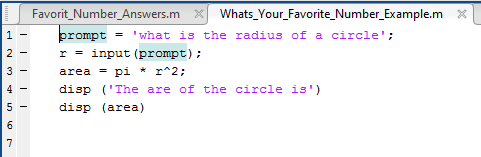
Favorit_Number_Answers.m XWhats_Your_Favorite Number_Example.mX rompt "what is the radius of a circle r = input (prompt) ; area = pi * r^2; disp 'The are of the circle is' disp (area) 2- 3
Step by Step Solution
There are 3 Steps involved in it

Get step-by-step solutions from verified subject matter experts
 Study Help