







Question: In Python 8 . 1 2 LAB: Grade Summary Write a program that reads student grade information from a text file. Each row of the
In Python LAB: Grade Summary
Write a program that reads student grade information from a text file. Each row of the file contains the student's Last Name, First Name,
and then some numbers representing exam scores for that student, all separated by tab characters. A sample of the student information is
provided in StudentInfo.tsv Assume the grade information will have at least one student and one exam and that each student listed will
have the same number of exam grades. Assume also the first and last names contain no whitespace. Your program then creates an output
text file that reports the exam grades and letter grade for each student and then reports the average score for each exam.
The program performs the following task:
Prompts the user for the grade information file name.
Open that file and read the student information.
Compute the average exam score of each student.
Assign a letter grade to each student based on the average exam score in the following scale:
A: :
:
Compute the average score for each exam.
Output the last names, first names, exam scores, and letter grades the students into a text file named report. Output one
student per row and separate the values with a tab character.
Send a blank line the output file after the last student line.
one line, send the output file one line with the average each exam, with two digits after the decimal point. Label the exams
'exam 'exam etc. Use the text string interpolation with the sodes that discussed lecture
imported modules should used.
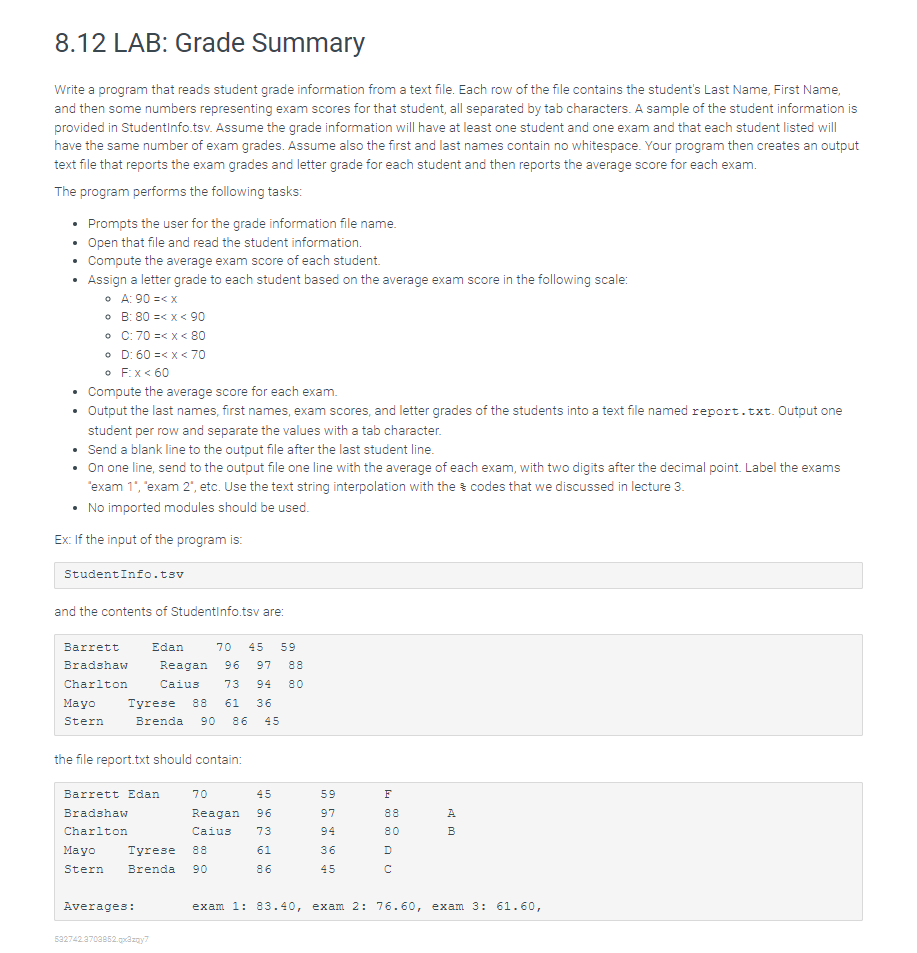
: the input the program :
StudentInfo.
and the contents StudentInfo. are:
the file report. should contain:
Averages: exam : exam : exam :
:
:
Compute the average score for each exam.
Output the last names, first names, exam scores, and letter grades the students into a text file named report. Output one
student per row and separate the values with a tab character.
Send a blank line the output file after the last student line.
one line, send the output file one line with the average each exam, with two digits after the decimal point. Label the exams
'exam 'exam etc. Use the text string interpolation with the sodes that discussed lecture
imported modules should used.
: the input the program :
StudentInfo.
and the contents StudentInfo. are:
the file report. should contain:
Averages: exam : exam : exam :
:
:
:
Compute the average score for each exam.
Output the last names, first names, exam scores, and letter grades the students into a text file named report. Output one
student per row and separate the values with a tab character.
Send a blank line the output file after the last student line.
one line, send the output file one line with the average each exam, with two digits after the decimal point. Label the exams
'exam 'exam etc. Use the text string interpolation with the sodes that discussed lecture
imported modules should used.
: the input the program :
StudentInfo.
and the contents StudentInfo. are:
the file report. should contain:
Averages: exam : exam : exam :
:
:
:
:
Compute the average score for each exam.
Output the last names, first names, exam scores, and letter grades the students into a text file named report. Output one
student per row and separate the values with a tab character.
Send a blank line the output file after the last student line.
one line, send the output file one line with the average each exam, with two digits after the decimal point. Label the exams
'exam 'exam etc. Use the text string interpolation with the sodes that discussed lecture
imported modules should used.
: the input the program :
StudentInfo.
and the contents StudentInfo. are:
the file report. should contain:
Averages: exam : exam : exam :
Step by Step Solution
There are 3 Steps involved in it
1 Expert Approved Answer
Step: 1 Unlock

Question Has Been Solved by an Expert!
Get step-by-step solutions from verified subject matter experts
Step: 2 Unlock
Step: 3 Unlock
 Study Help