







Question: In Python: A systems administrator keeps track of student activities logged into a system log file via a tracking application. The tracking application logs information
In Python: A systems administrator keeps track of student activities logged into a system log file via a tracking application. The tracking application logs information to the studentActivity.log file in the following format.Traceback most recent call last:
File C:UsersDesktopEventpy line in
if option :
NameError: name 'option' is not defined
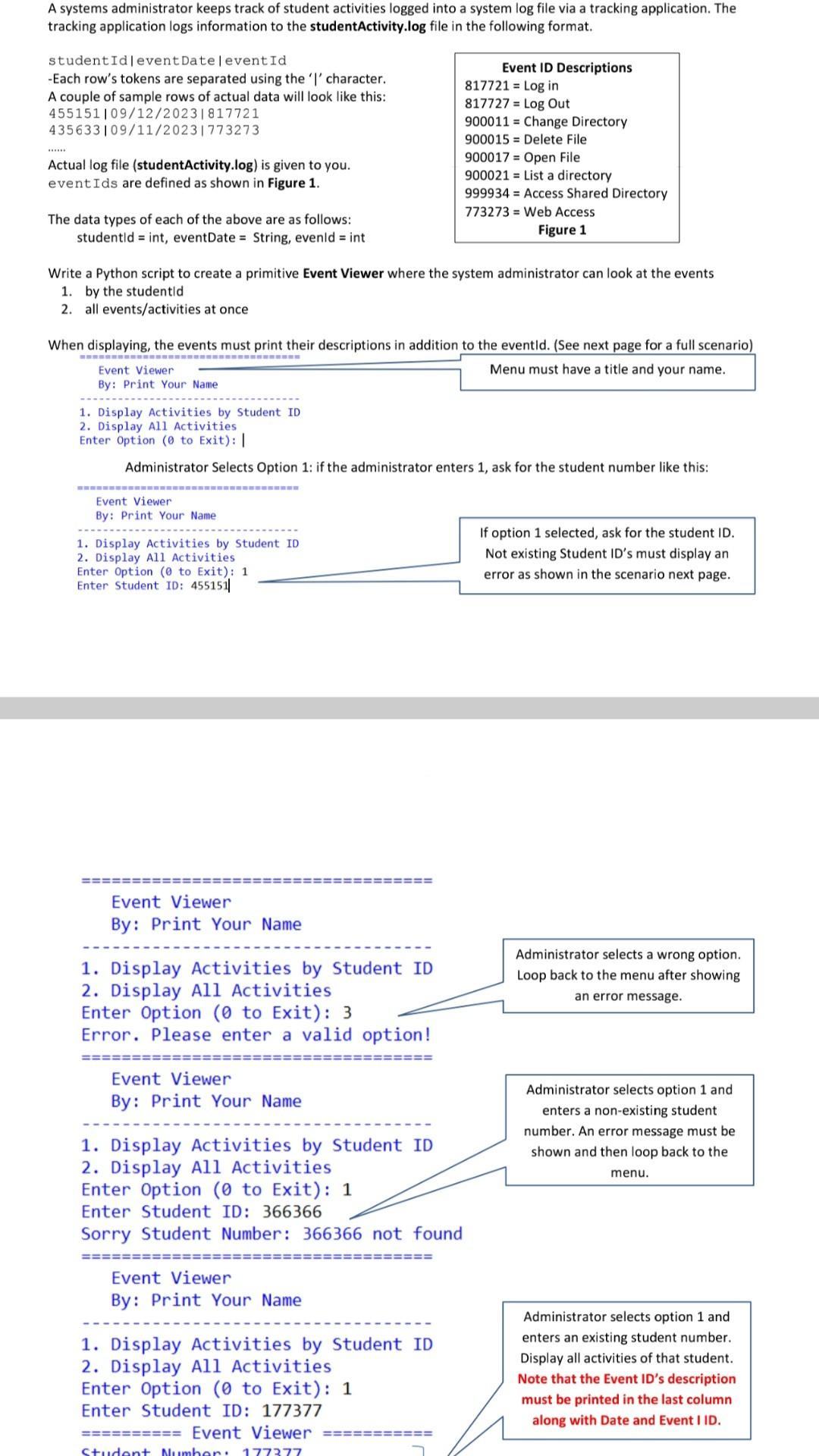
studentId leventDate l event Id
Each row's tokens are separated using the character. A couple of sample rows of actual data will look like this:
Actual log file studentActivitylog is given to you. eventIds are defined as shown in Figure
The data types of each of the above are as follows: studentld int, eventDate String, evenld int
Event ID Descriptions
in
Log Out
Change Directory
Delete File
Open File
List a directory
Access Shared Directory
Web Access
Figure
Write a Python script to create a primitive Event Viewer where the system administrator can look at the events
by the studentld
all eventsactivities at once
When displaying, the events must print their descriptions in addition to the eventld. See next page for a full scenario
Event Viewer
Event Viewer
By: Print Your Name
Display Activities by Student ID
Display All Activities
Enter Option to Exit:
Administrator Selects Option : if the administrator enters ask for the student number like this: Event Viewer By: Print Your Name
Display Activities by Student ID
Display All Activities Enter Option to Exit: Enter Student ID:
If option selected, ask for the student ID Not existing Student ID's must display an error as shown in the scenario next page.
Event Viewer
By: Print Your Name
Display Activities by Student ID
Display All Activities
Enter Option to Exit:
Menu must have a title and your name.
Error. Please enter a valid option!
Event Viewer
By: Print Your Name
Display Activities by Student ID
Administrator selects a wrong option. Loop back to the menu after showing an error message.
Display All Activities Enter Option to Exit:
Administrator selects option and enters a nonexisting student number. An error message must be shown and then loop back to the menu.
Enter Student ID:
Sorry Student Number: not found
Event Viewer
By: Print Your Name
Display Activities by Student ID
Display All Activities
Enter Option to Exit:
Enter Student ID:
Administrator selects option and enters an existing student number. Display all activities of that student. Note that the Event ID's description must be printed in the last column EVent Viewer along with Date and Event I ID
Step by Step Solution
There are 3 Steps involved in it
1 Expert Approved Answer
Step: 1 Unlock

Question Has Been Solved by an Expert!
Get step-by-step solutions from verified subject matter experts
Step: 2 Unlock
Step: 3 Unlock
 Study Help