







Question: In python, please fill the following pseudocode within the format provided. It is critical that it uses get_game_options() and import_dictionary(). Your source file should be
In python, please fill the following pseudocode within the format provided. It is critical that it uses get_game_options() and import_dictionary().
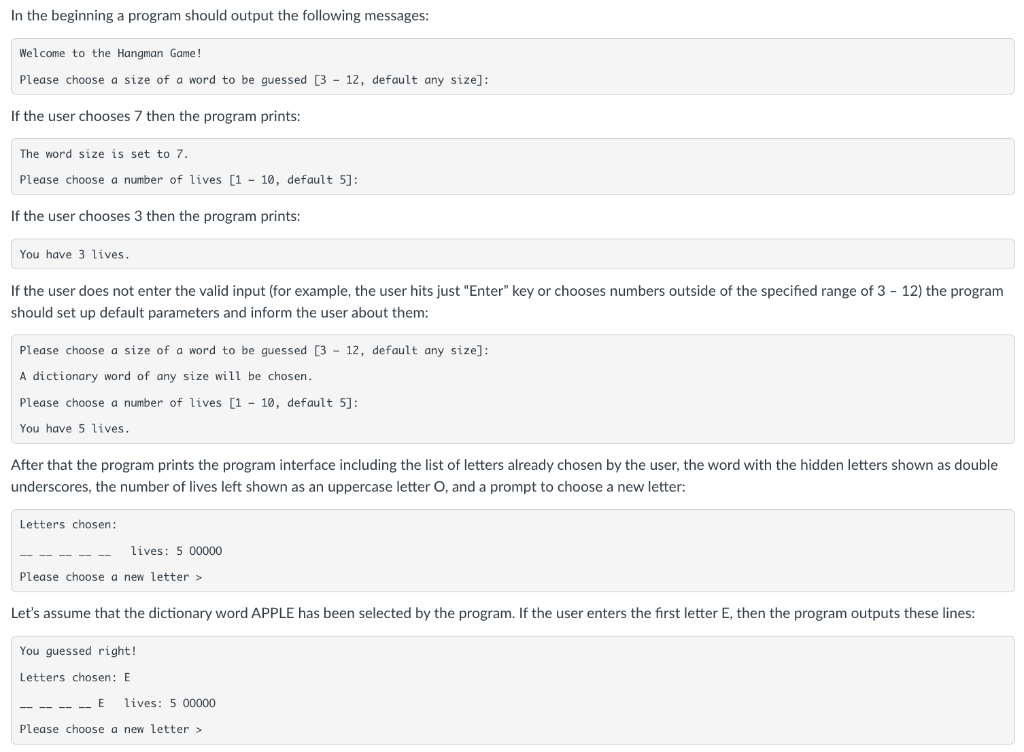
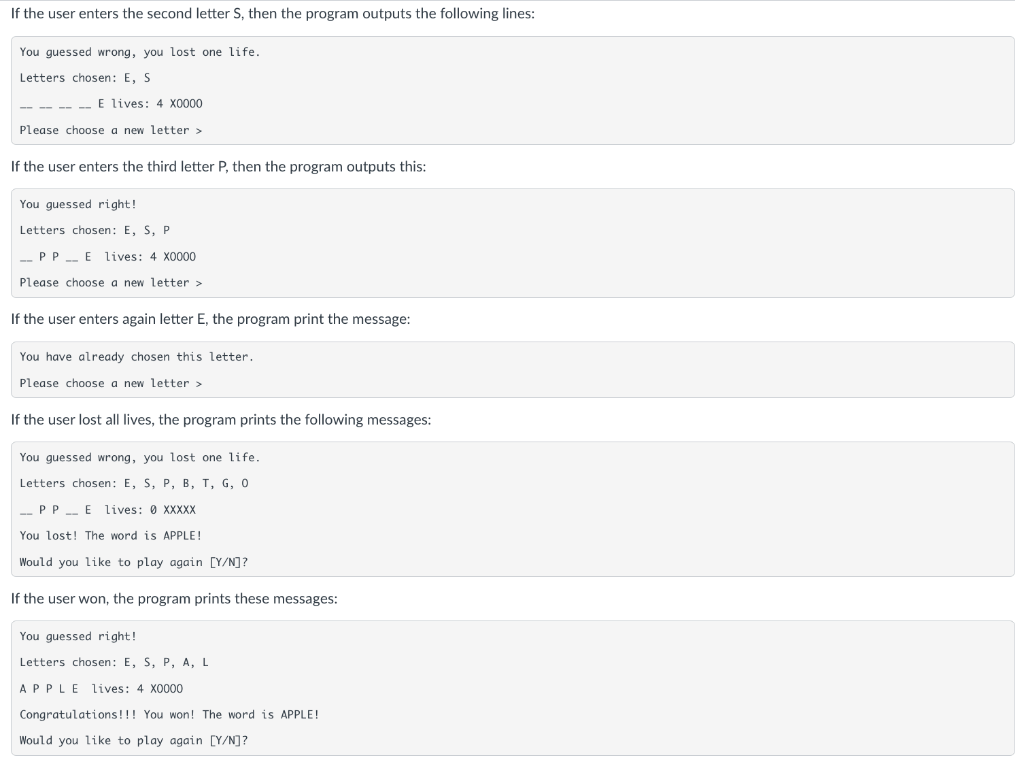
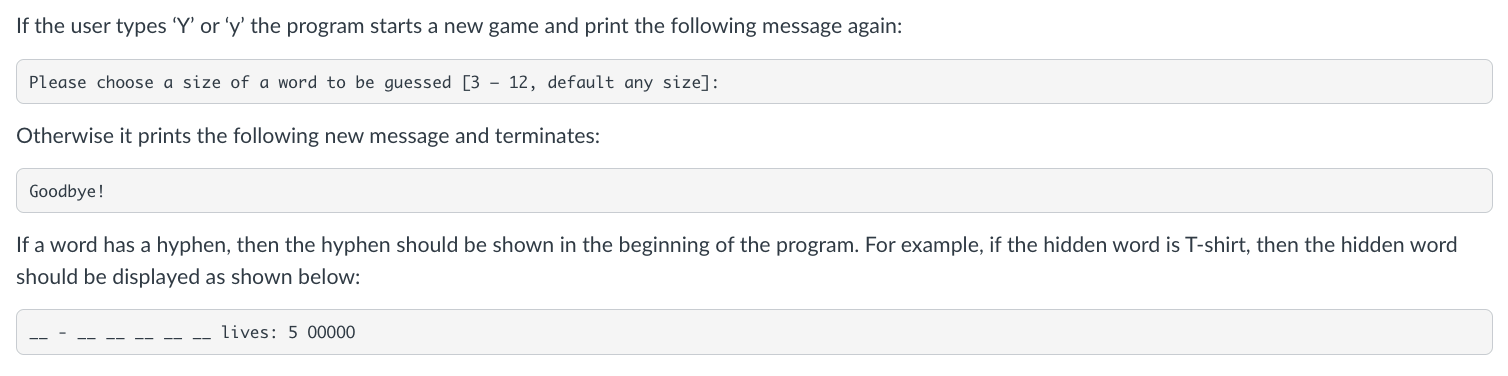
Your source file should be named hangman.py and should start with the header (a comment block) where you write important information about the source file including who created it, when it is created, what the purpose of it, and how to use it. You are also required to implement two functions: import_dictionary(filename) and get_game_options().
The function import_dictionary(filename) should create a dictionary from a text file (a dictionary file) that is provided to you (See below). The dictionary file contains legitimate 2,542 words from an English vocabulary, each word is written on a separate line. Your program should read the file line by line and add words to the dictionary. The function should return the dictionary.
The function get_game_options() should ask the user to select game options such as a dictionary word size and a number of lives. The function should return a tuple of selected game options (a word size and a number of lives).
The general control flow structure of your program should be based on a nested while loop where the outer loop is used to play a game several times and the inner loop is used to run one game (Read the code below). You need to use an elif statement (for the analysis of menu options), a for loop (for reading a file), and at least one string method such as strip(), join(), isalpha(), upper(), or lower(). You also need to use a list and a dictionary in your program to get the full credit. A dictionary is used for storing a vocabulary sorted by word size, and at least three lists are used for storing letters of the hidden word, guessed letters, and words of the same size (as dictionary values).
---------- pseudocode -----------
from random import choice, random
dictionary_file = "dictionary.txt" # make a dictionary.txt in the same folder where hangman.py is located
# write all your functions here
# make a dictionary from a dictionary file ('dictionary.txt', see above)
# dictionary keys are word sizes (1, 2, 3, 4, , 12), and values are lists of words
# for example, dictionary = { 2 : ['Ms', 'ad'], 3 : ['cat', 'dog', 'sun'] }
# if a word has the size more than 12 letters, put it into the list with the key equal to 12
def import_dictionary (filename) :
dictionary = {}
max_size = 12
try :
pass
except Exception :
pass
return dictionary
# print the dictionary (use only for debugging)
def print_dictionary (dictionary) :
max_size = 12
pass
# get options size and lives from the user, use try-except statements for wrong input
def get_game_options () :
pass
return (size, lives)
# MAIN
if __name__ == '__main__' :
# make a dictionary from a dictionary file
dictionary = import_dictionary(dictionary_file)
# print the dictionary (use only for debugging)
print_dictionary(dictionary) # remove after debugging the dictionary function import_dictionary
# print a game introduction
# START MAIN LOOP (OUTER PROGRAM LOOP)
# set up game options (the word size and number of lives)
# select a word from a dictionary (according to the game options)
# use choice() function that selects an item from a list randomly, for example:
# mylist = ['apple', 'banana', 'orange', 'strawberry']
# word = choice(mylist)
# START GAME LOOP (INNER PROGRAM LOOP)
# format and print the game interface:
# Letters chosen: E, S, P list of chosen letters
# __ P P __ E lives: 4 XOOOO hidden word and lives
# ask the user to guess a letter
# update the list of chosen letters
# if the letter is correct update the hidden word,
# else update the number of lives
# and print interactive messages
# END GAME LOOP (INNER PROGRAM LOOP)
# check if the user guesses the word correctly or lost all lives,
# if yes finish the game
# END MAIN LOOP (OUTER PROGRAM LOOP)
# ask if the user wants to continue playing,
# if yes start a new game, otherwise terminate the program
Welcome to the Hangman Game! Please choose a size of a word to be guessed [3 - 12, default any size]: If the user chooses 7 then the program prints: The word size is set to 7. Please choose a number of lives [1 - 10, default 5]: If the user chooses 3 then the program prints: You have 3 lives. If the user does not enter the valid input (for example, the user hits just "Enter" key or chooses numbers outside of the specified range of 3 - 12) the program should set up default parameters and inform the user about them: Please choose a size of a word to be guessed [3 - 12, default any size]: A dictionary word of any size will be chosen. Please choose a number of lives [1 - 10, default 5]: You have 5 lives. After that the program prints the program interface including the list of letters already chosen by the user, the word with the hidden letters shown as double underscores, the number of lives left shown as an uppercase letter O, and a prompt to choose a new letter: Letters chosen: lives: 500000 Please choose a new letter > Let's assume that the dictionary word APPLE has been selected by the program. If the user enters the first letter E, then the program outputs these lines: You guessed right! Letters chosen: E .. - ... E lives: 500000 Please choose a new letter > If the user enters the second letter S, then the program outputs the following lines: You guessed wrong, you lost one life. Letters chosen: E,S E lives: 40000 Please choose a new letter > If the user enters the third letter P, then the program outputs this: You guessed right! Letters chosen: E,S,P _. P P _. E lives: 40000 Please choose a new letter > If the user enters again letter E, the program print the message: You have already chosen this letter. Please choose a new letter > If the user lost all lives, the program prints the following messages: You guessed wrong, you lost one life. Letters chosen: E, S, P, B, T, G, 0 _- PP _. E lives: 0xXX You lost! The word is APPLE! Would you like to play again [Y/N] ? If the user won, the program prints these messages: You guessed right! Letters chosen: E,S,P,A,L A P P L E lives: 4 X0000 Congratulations!!! You won! The word is APPLE! Would you like to play again [Y/N] ? If the user types ' Y ' or ' y ' the program starts a new game and print the following message again: Please choose a size of a word to be guessed [3 - 12, default any size]: Otherwise it prints the following new message and terminates: Goodbye If a word has a hyphen, then the hyphen should be shown in the beginning of the program. For example, if the hidden word is T-shirt, then the hidden word should be displayed as shown below: _- - - .- .- _-_ lives: 500000
Step by Step Solution
There are 3 Steps involved in it

Get step-by-step solutions from verified subject matter experts
 Study Help