







Question: In python, please follow the starter code: Starter code banner.py: Print some text in large letters, 5x7, on the terminal. import sys from
In python, please follow the starter code:
Starter code banner.py:
""" Print some text in large letters, 5x7, on the terminal. """
import sys from typing import Dict, List, Tuple
def get_text() -> str: ''' Create and return a single string, using the words in sys.argv Method: use " ".join(some list)
Returns: a single string, with all the letters in the command-line arguments ''' # replace the following line return "Abc"
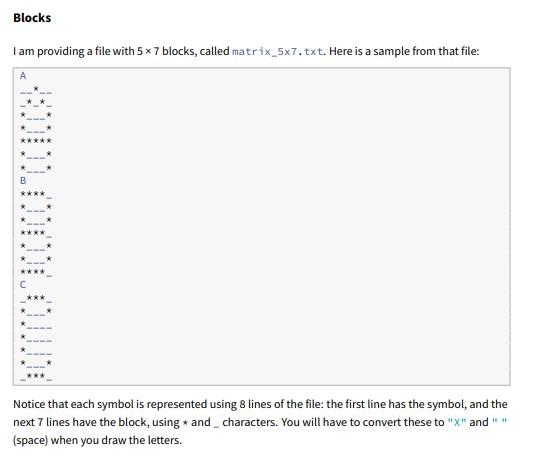
def get_blocks(filename: str) -> Dict[str, List[str]]: """ Read a file containing 96 5x5 blocks, which are pictures for all the characters used in English text: punctuation, upper-case and lower-case letters.
Parameter: filename : name of the file containing the blocks
Returns: a dictionary: keys are single letters, values are 5x7 blocks. """ matrices: Dict[str, List[str]] = dict() # add some code here to read the lines from the file, # and build the matrices. return matrices
def get_text_height(text: str) -> int: """Computes the number of text-rows needed to print some text
Parameter: text : the text to be printed
Returns: The number of rows. Each block takes up 7 columns, and you can fit 10 blocks in a 76-column line.
text height "ABC" 1 "1234567890" 1 (can fit 10 letters in one row) "12345678901" 2 (need another row for 11th letter) """ return 1
def make_picture(text_height: int) -> List[List[str]]: """ Create and return a 2D list of spaces. Each space is a pixel.
Parameter: The number of rows of blocks
Returns: A list of lists of strings. The width is 10*7, and the height is text_height * 8. """ # replace this line: return [['.', '.', '.'], ['.', '.', '.']]
def print_picture(picture: List[List[str]]) -> None: """ Assemble each row in the picture (currently each row is a list of str), and print them. Again, use "".join()
Parameter: A 2D list of strings (the pixels). """ # This code is wrong: print(picture)
def draw_letter(picture: List[List[str]], letter: str, text_width: int, text_row: int, text_col: int, blocks: Dict[str, List[str]]) -> None: """Draw a one-block sprite onto the pixel picture.
Parameters: ---------- picture: the pixels letter: the letter to be drawn as a 5x7 block text_width: number of columns that fit on the picture (10) text_row: the row where letter goes text_col: the column where the letter goes blocks: the 5x7 pictures of all the possible letters
""" pass
def advance_text_position(text_row: int, text_col: int) -> Tuple[int,int]: """ Advance to the next text row and text column: Increment the column. If the column exceeds 9, reset it to zero, and increment the row. Return: A tuple with the updated text row and column. """
# Replace this line: return 0, 0
def main(): ''' This function controls the whole process '''
# Get the text from sys.argv text: str = get_text()
# Read the blocks from the matrix file blocks: Dict[str, List[str]] = get_blocks('matrix_5x7.txt')
# Compute #rows and #columns needed for the text text_height: int = get_text_height(text) text_width: int = 10
# Create the 2D array of pixels picture: List[List[str]] = make_picture(text_height)
# Initial letter's position (text_row, text_col) = (0, 0) letter: str for letter in text:
# Draw the current letter into the picture draw_letter(picture, letter, text_width, text_row, text_col, blocks)
# Advance to the next text row and column. (text_row, text_col) = advance_text_position(text_row, text_col)
# Print the picture you just made print_picture(picture)
if __name__ == '__main__': main()
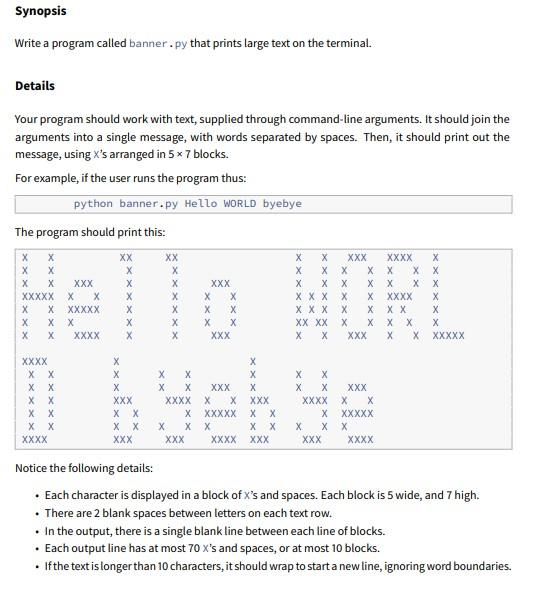
Details Your program should work with text, supplied through command-line arguments. It should join the arguments into a single message, with words separated by spaces. Then, it should print out the message, using X's arranged in 57 blocks. For example, if the user runs the program thus: python banner.py Hello wORLD byebye The program should print this: Notice the following details: - Each character is displayed in a block of X 's and spaces. Each block is 5 wide, and 7 high. - There are 2 blank spaces between letters on each text row. - In the output, there is a single blank line between each line of blocks. - Each output line has at most 70x 's and spaces, or at most 10 blocks. - If the text is longer than 10 characters, it should wrap to start a new line, ignoring word boundaries. Notice that each symbol is represented using 8 lines of the file: the first line has the symbol, and the next 7 lines have the block, using * and _ characters. You will have to convert these to " x " and " " (space) when you draw the letters
Step by Step Solution
There are 3 Steps involved in it

Get step-by-step solutions from verified subject matter experts
 Study Help