







Question: in python please Question 2: Calculator In this question, you will build a command-line-based calculator. Your program should display an interface which the user will
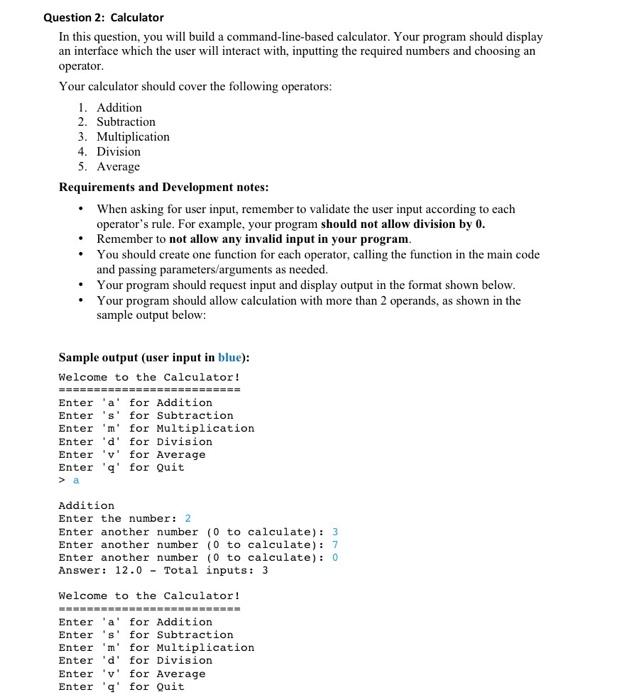
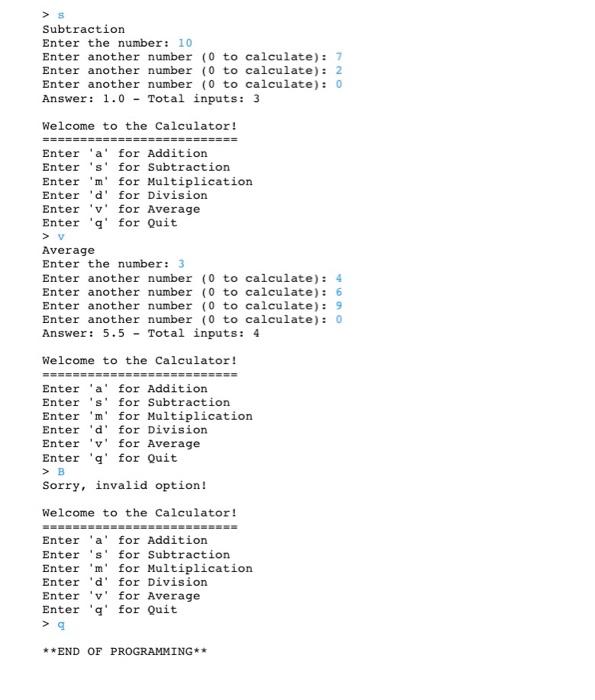
Question 2: Calculator In this question, you will build a command-line-based calculator. Your program should display an interface which the user will interact with, inputting the required numbers and choosing an operator Your calculator should cover the following operators: 1. Addition 2. Subtraction 3. Multiplication 4. Division 5. Average Requirements and Development notes: When asking for user input, remember to validate the user input according to each operator's rule. For example, your program should not allow division by 0. Remember to not allow any invalid input in your program, You should create one function for each operator, calling the function in the main code and passing parameters/arguments as needed. Your program should request input and display output in the format shown below. Your program should allow calculation with more than 2 operands, as shown in the sample output below: Sample output (user input in blue): Welcome to the Calculator! Enter 'a' for Addition Enter's' for Subtraction Enter 'm' for Multiplication Enter 'd' for Division Enter 'v' for Average Enter 'q' for Quit Addition Enter the number: 2 Enter another number (0 to calculate): 3 Enter another number (0 to calculate): 7 Enter another number (0 to calculate): 0 Answer: 12.0 - Total inputs: 3 Welcome to the Calculator! Enter 'a' for Addition Enter 's' for Subtraction Enter 'm' for Multiplication Enter 'd' for Division Enter 'v' for Average Enter 'q' for Quit Subtraction Enter the number: 10 Enter another number (0 to calculate): 7 Enter another number (0 to calculate): 2 Enter another number (0 to calculate): 0 Answer: 1.0 - Total inputs: 3 Welcome to the Calculator! ========================== Enter 'a' for Addition Enter 's' for Subtraction Enter 'm' for Multiplication Enter 'd' for Division Enter 'v' for Average Enter 'q' for Quit > Average Enter the number: 3 Enter another number (0 to calculate): 4 Enter another number (0 to calculate): 6 Enter another number (0 to calculate): 9 Enter another number (0 to calculate): 0 Answer: 5.5 - Total inputs: 4 Welcome to the Calculator! Enter 'a' for Addition Enter 's' for Subtraction Enter 'm' for Multiplication Enter 'd' for Division Enter 'v' for Average Enter 'g' for Quit > B Sorry, invalid option! Welcome to the Calculator! Enter 'a' for Addition Enter 's' for Subtraction Enter 'm' for Multiplication Enter 'd' for Division Enter 'v' for Average Enter 'q' for Quit >9 **END OF PROGRAMMING**
Step by Step Solution
There are 3 Steps involved in it

Get step-by-step solutions from verified subject matter experts
 Study Help