







Question: in python PROGRAM 2: AMORTIZATION IN CSV A common way that data is stored to be loaded into a spreadsheet or table is with a
in python
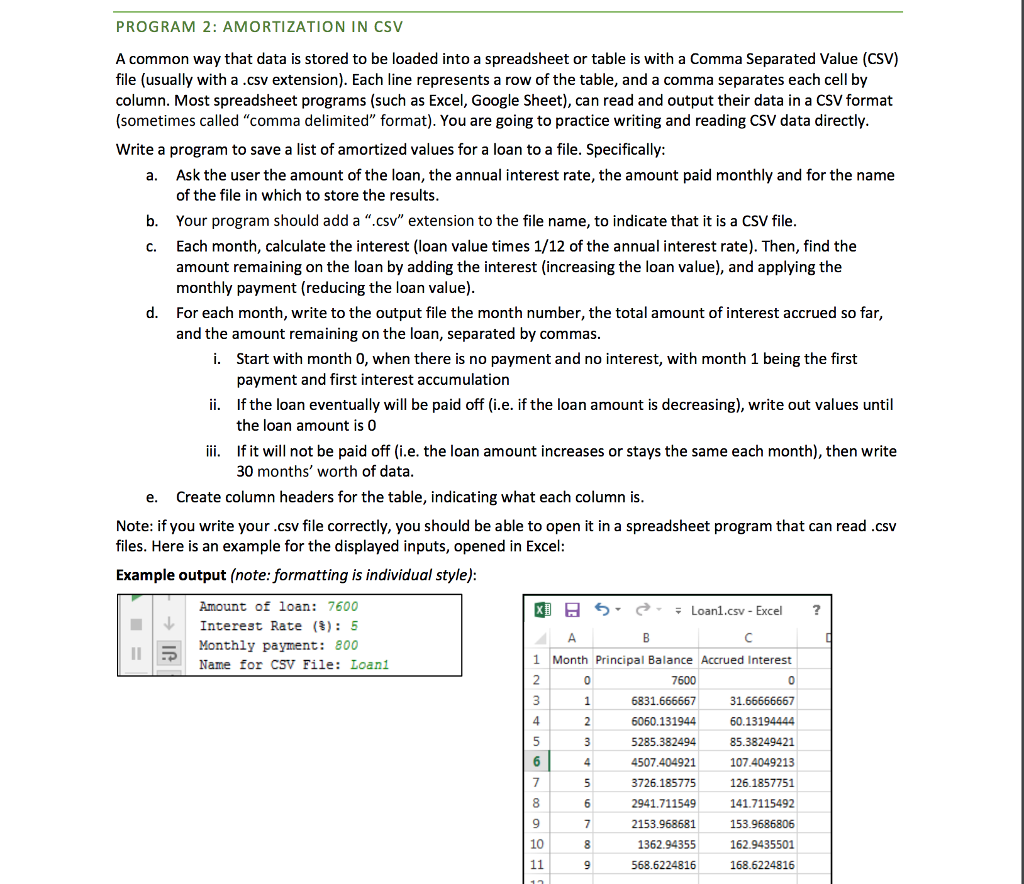
PROGRAM 2: AMORTIZATION IN CSV A common way that data is stored to be loaded into a spreadsheet or table is with a Comma Separated Value (CSV) file (usually with a.csv extension). Each line represents a row of the table, and a comma separates each cell by column. Most spreadsheet programs (such as Excel, Google Sheet), can read and output their data in a CSV format (sometimes called "comma delimited" format). You are going to practice writing and reading CSV data directly Write a program to save a list of amortized values for a loan to a file. Specifically Ask the user the amount of the loan, the annual interest rate, the amount paid monthly and for the name of the file in which to store the results a. b. Your program should add a ".csv" extension to the file name, to indicate that it is a CSV file c. Each month, calculate the interest (loan value times 1/12 of the annual interest rate). Then, find the amount remaining on the loan by adding the interest (increasing the loan value), and applying the monthly payment (reducing the loan value) For each month, write to the output file the month number, the total amount of interest accrued so far, and the amount remaining on the loan, separated by commas d. Start with month 0, when there is no payment and no interest, with month 1 being the first ii. If the loan eventually will be paid off (i.e. if the loan amount is decreasing), write out values until ii. If it will not be paid off (i.e. the loan amount increases or stays the same each month), then write i. payment and first interest accumulation the loan amount is 0 30 months' worth of data e. Create column headers for the table, indicating what each column is Note: if you write your.csv file correctly, you should be able to open it in a spreadsheet program that can read.csv files. Here is an example for the displayed inputs, opened in Excel Example output (note: formatting is individual style) Amount of loan: 7600 Interest Rate (%): 5 Monthly payment: 800 e*; Loan1.csv-Excel Name for CSV File: Loan1 1 Month Principal Balance Accrued Interest 6831.666667 6060.131944 5285.382494 4507.404921 3726.185775 2941.711549 2153.968681 1362.94355 568.6224816 31.66666667 60.13194444 85.38249421 107.4049213 126.1857751 41.7115492 153.9686806 162.9435501 168.6224816 4 10
Step by Step Solution
There are 3 Steps involved in it

Get step-by-step solutions from verified subject matter experts
 Study Help