







Question: in python Secret Decoder Ring Write a program that allows the user to encrypt or decrypt messages using different types of encryption methods. Encrypted messages
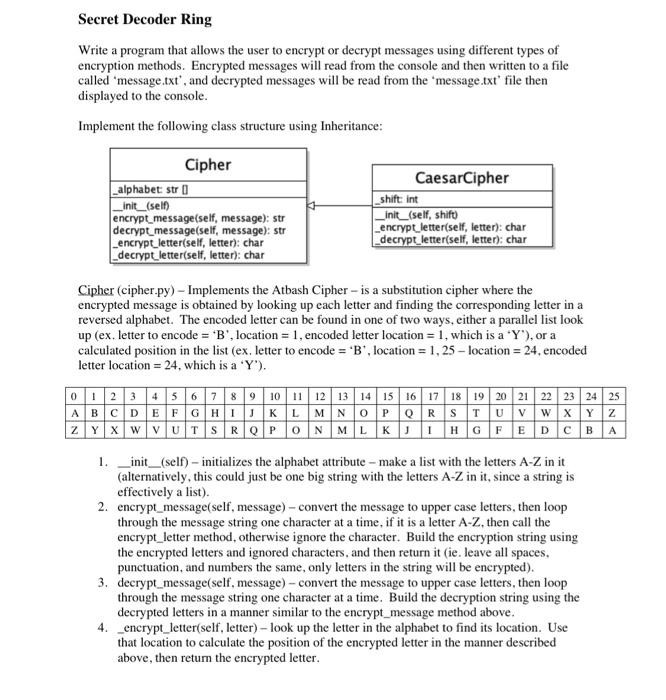
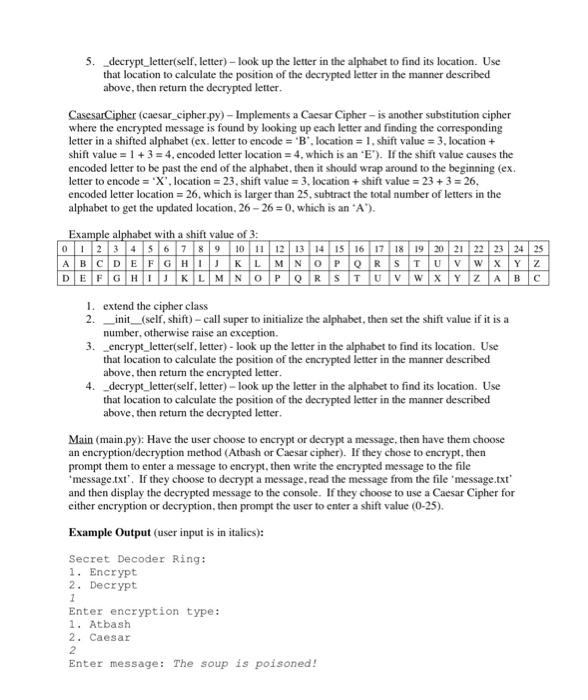
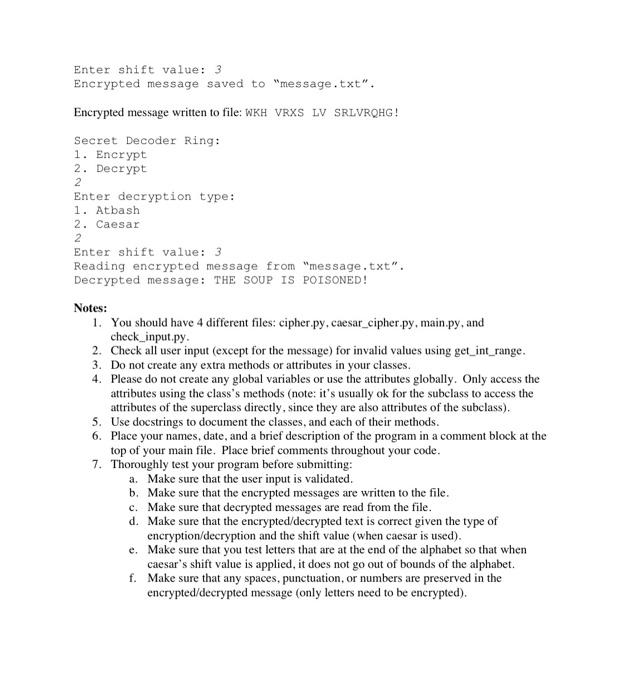
Secret Decoder Ring Write a program that allows the user to encrypt or decrypt messages using different types of encryption methods. Encrypted messages will read from the console and then written to a file called 'message.txt', and decrypted messages will be read from the 'message.txt' file then displayed to the console. Implement the following class structure using Inheritance: Cipher (cipher.py) - Implements the Atbash Cipher - is a substitution cipher where the encrypted message is obtained by looking up each letter and finding the corresponding letter in a reversed alphabet. The encoded letter can be found in one of two ways, either a parallel list look up (ex. letter to encode =B ', location =1, encoded letter location =1, which is a aY ), or a calculated position in the list (ex. letter to encode =B ', location =1,25 - location =24, encoded letter location =24, which is a ' Y '). 1. _init_(self) - initializes the alphabet attribute - make a list with the letters A- Z in it (alternatively, this could just be one big string with the letters AZ in it, since a string is effectively a list). 2. encrypt_message(self, message) - convert the message to upper case letters, then loop through the message string one character at a time, if it is a letter A-Z, then call the encrypt_letter method, otherwise ignore the character. Build the encryption string using the encrypted letters and ignored characters, and then return it (ie. leave all spaces. punctuation, and numbers the same, only letters in the string will be encrypted). 3. decrypt_message(self, message) - convert the message to upper case letters, then loop through the message string one character at a time. Build the decryption string using the decrypted letters in a manner similar to the encrypt_message method above. 4. _encrypt_letter(self, letter) - look up the letter in the alphabet to find its location. Use that location to calculate the position of the encrypted letter in the manner described above, then retum the encrypted letter. 5. _decrypt_letter(self, letter)-look up the letter in the alphabet to find its location. Use that location to calculate the position of the decrypted letter in the manner described above, then return the decrypted letter. CasesarCipher (caesar_cipher.py) - Implements a Caesar Cipher - is another substitution cipher where the encrypted message is found by looking up each letter and finding the corresponding letter in a shifted alphabet (ex. letter to encode = ' B ", location =1, shift value =3, location + shift value =1+3=4, encoded letter location =4, which is an +E ). . If the shift value causes the encoded letter to be past the end of the alphabet, then it should wrap around to the beginning (ex. letter to encode = ' X ', location =23, shift value =3, location + shift value =23+3=26, encoded letter location =26, which is larger than 25 , subtract the total number of letters in the alphabet to get the updated location, 2626=0, which is an +A ). Example alphabet with a shift value of 3 : 1. extend the cipher class 2. _init_(self, shift) - call super to initialize the alphabet, then set the shift value if it is a number, otherwise raise an exception. 3. enerypt_letter(self. letter) - look up the letter in the alphabet to find its location. Use that location to calculate the position of the encrypted letter in the manner described above, then return the encrypted letter. 4. decrypt_letter(self, letter) - look up the letter in the alphabet to find its location. Use that location to calculate the position of the decrypted letter in the manner described above, then return the decrypted letter. Main (main.py): Have the user choose to encrypt or decrypt a message, then have them choose an encryption/decryption method (Atbash or Caesar cipher). If they chose to encrypt, then prompt them to enter a message to encrypt, then write the encrypted message to the file 'message.txt'. If they choose to decrypt a message, read the message from the file 'message.txt' and then display the decrypted message to the console. If they choose to use a Caesar Cipher for either encryption or decryption, then prompt the user to enter a shift value (0-25). Example Output (user input is in italics): Secret Decoder Ring: 1. Encrypt 2. Decrypt Enter shift value: 3 Encrypted message saved to "message.txt". Encrypted message written to file: WKH VRXS LV SRLVRQHG! Secret Decoder Ring: 1. Encrypt 2. Decrypt 2 Enter decryption type: 1. Atbash 2. Caesar 2 Enter shift value: 3 Reading encrypted message from "message.txt". Decrypted message: THE SOUP IS POISONED! Notes: 1. You should have 4 different files: cipher.py, caesar_cipher.py, main.py, and check_input.py. 2. Check all user input (except for the message) for invalid values using get_int_range. 3. Do not create any extra methods or attributes in your classes. 4. Please do not create any global variables or use the attributes globally. Only access the attributes using the class's methods (note: it's usually ok for the subclass to access the attributes of the superclass directly, since they are also attributes of the subclass). 5. Use docstrings to document the classes, and each of their methods. 6. Place your names, date, and a brief description of the program in a comment block at the top of your main file. Place brief comments throughout your code. 7. Thoroughly test your program before submitting: a. Make sure that the user input is validated. b. Make sure that the encrypted messages are written to the file. c. Make sure that decrypted messages are read from the file. d. Make sure that the encrypted/decrypted text is correct given the type of encryption/decryption and the shift value (when caesar is used). e. Make sure that you test letters that are at the end of the alphabet so that when caesar's shift value is applied, it does not go out of bounds of the alphabet. f. Make sure that any spaces, punctuation, or numbers are preserved in the encrypted/decrypted message (only letters need to be encrypted)
Step by Step Solution
There are 3 Steps involved in it

Get step-by-step solutions from verified subject matter experts
 Study Help