







Question: In Python, write a function makeNoisy() that takes a two-dimensional list table and an integer numChanges as parameters. The table represents an image that the
In Python, write a function makeNoisy() that takes a two-dimensional list table and an integer numChanges as parameters. The table represents an image that the function will randomly change. In particular, it will make numChanges rounds of alterations to table. During each round, the function chooses a random row in the table. It then chooses a random column in that row. The function changes the entry in that row and column in the table to a random integer in the range [0, 255], meaning a random integer greater than or equal to 0 and less than or equal to 255. If the table is empty or the number of changes is not positive, the function immediately returns. The following shows several sample executions of the function. Please note that your function may produce different results since random rows and columns are chosen during each step of the function. Also be aware that because the row and column are chosen randomly, sometimes the function will choose the same location multiple times for changes. This will make it appear that your function is making fewer than the specified number of changes, as you can see in several examples below:
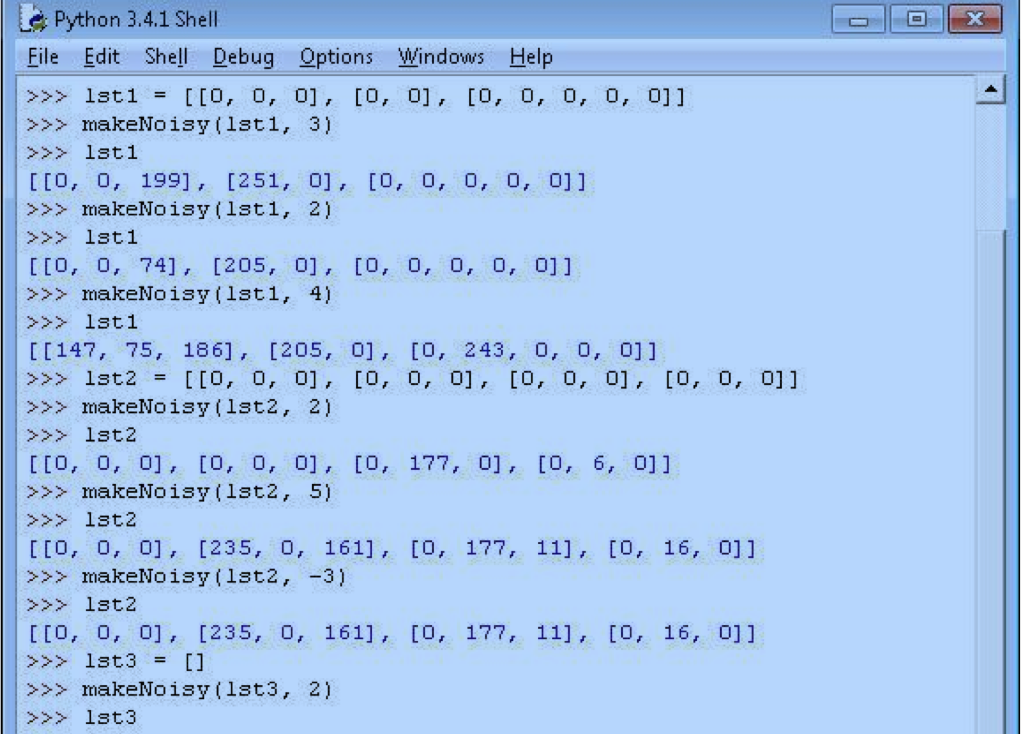
>>> lst 1 = [[0, 0, 0], [0, 0], [0, 0, 0, 0, 0]] >>> make Noisy (lst 1, 3) >>> lst 1 [[0, 0, 199], [251, 0], [0, 0, 0, 0, 0]] >>> makeNoisy (lst 1, 2) >>> lst 1 [[0, 0, 74], [205, 0], [0, 0, 0, 0, 0]] >>> makeNoisy (lst 1, 4) >>> lst 1 [[147, 75, 186], [205, 0], [0, 243, 0, 0, 0]] >>> lst2 = [[0, 0, 0], [0, 0, 0], [0, 0, 0], [0, 0, 0]] >>> makeNoisy (lst2, 2) >>> lst 2 [[0, 0, 0], [0, 0, 0], [0, 177, 0], [0, 6, 0]] >>> makeNoisy (lst2, 5) >>> lst2 [[0, 0, 0], [235, 0, 161], [0, 177, 11], [0, 16, 0]] >>> makeNoisy (lst2, -3) >>> lst2 [[0, 0, 0], [235, 0, 161], [0, 177, 11], [0, 16, 0]] >>> lst3 = [] >>> makeNoisy (lst3, 2) >>> lst3
Step by Step Solution
There are 3 Steps involved in it

Get step-by-step solutions from verified subject matter experts
 Study Help