







Question: In Racket 2. (20 Points) in class we played with some built-in functions in the image library Add the following line to the Definitions window
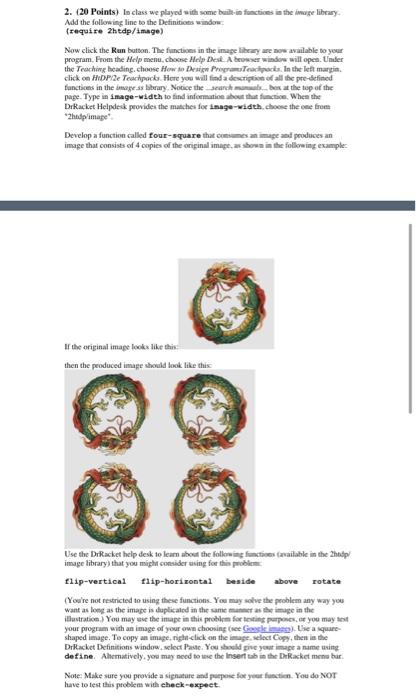
2. (20 Points) in class we played with some built-in functions in the image library Add the following line to the Definitions window (require 2htdp/image) Now click the Run button. The functions in the image lihey are now available to your program. From the Help menu, choose Help Desk A bewer window will open. Under the Teaching heading. choose How to Design Program Tecipacis. In the left margin click on HDP/2 Tearpack Here you will find a description of all the pre-defined functions in the images library Notice the search mam..bes at the top of the page. Type in image-width to find informatie out that function. When the Dekacket Helpdesk provides the matches for image-width.choose the one from hudp/image Develop a function called four-square that comes an image and produces an image that consists of 4 copies of the original images show in the following example: If the original image looks like this then the produced image should look like this Use the DrRacket help desk to leam about the following functions available in the help image library) that you might consider using for this problem flip-vertical flip-horizontal beside above rotate (You're not restricted to using these functions. You may solve the problem any way you want as long as the image is duplicated in the same manner as the image in the illustration) You may use the imupe in this problem for testing purposes. or you may test your program with an image of your own choosing se Geskie a square shaped image. To copy an image, right click on the image select Copy, then is the Dracket Definitions window, select Paste. You should give your image a name using define Ahematively, you may need to see the Insert tab in the ERacket men bar Note: Make sure you provide a signature and purpose for your function. You do NOT have to test this problem with check-expect. 2. (20 Points) in class we played with some built-in functions in the image library Add the following line to the Definitions window (require 2htdp/image) Now click the Run button. The functions in the image lihey are now available to your program. From the Help menu, choose Help Desk A bewer window will open. Under the Teaching heading. choose How to Design Program Tecipacis. In the left margin click on HDP/2 Tearpack Here you will find a description of all the pre-defined functions in the images library Notice the search mam..bes at the top of the page. Type in image-width to find informatie out that function. When the Dekacket Helpdesk provides the matches for image-width.choose the one from hudp/image Develop a function called four-square that comes an image and produces an image that consists of 4 copies of the original images show in the following example: If the original image looks like this then the produced image should look like this Use the DrRacket help desk to leam about the following functions available in the help image library) that you might consider using for this problem flip-vertical flip-horizontal beside above rotate (You're not restricted to using these functions. You may solve the problem any way you want as long as the image is duplicated in the same manner as the image in the illustration) You may use the imupe in this problem for testing purposes. or you may test your program with an image of your own choosing se Geskie a square shaped image. To copy an image, right click on the image select Copy, then is the Dracket Definitions window, select Paste. You should give your image a name using define Ahematively, you may need to see the Insert tab in the ERacket men bar Note: Make sure you provide a signature and purpose for your function. You do NOT have to test this problem with check-expect
Step by Step Solution
There are 3 Steps involved in it

Get step-by-step solutions from verified subject matter experts
 Study Help