







Question: In second step an error occurred. After I changed the account type to group heading, it shows error again and ask me to change back
In second step an error occurred. After I changed the account type to group heading, it shows error again and ask me to change back to Group total. After I change it back, the error just keep showing that I'm misssing a Group heading or a Group total. Please show me all steps that I need to do in order to solve this error. (This error is from Sage 50 2020 software, I need a way to fix the error, please don't answer the calculation process of the financial statement.)
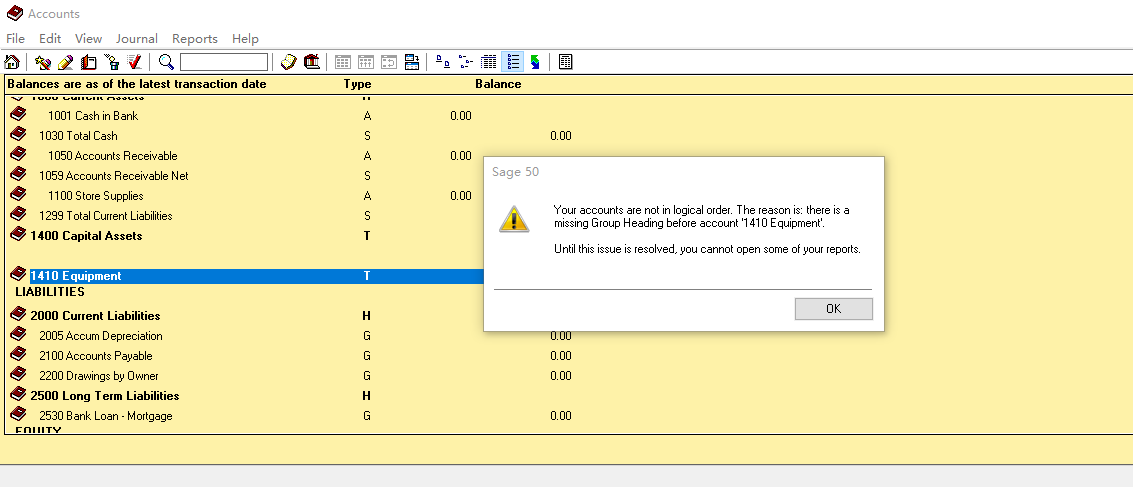
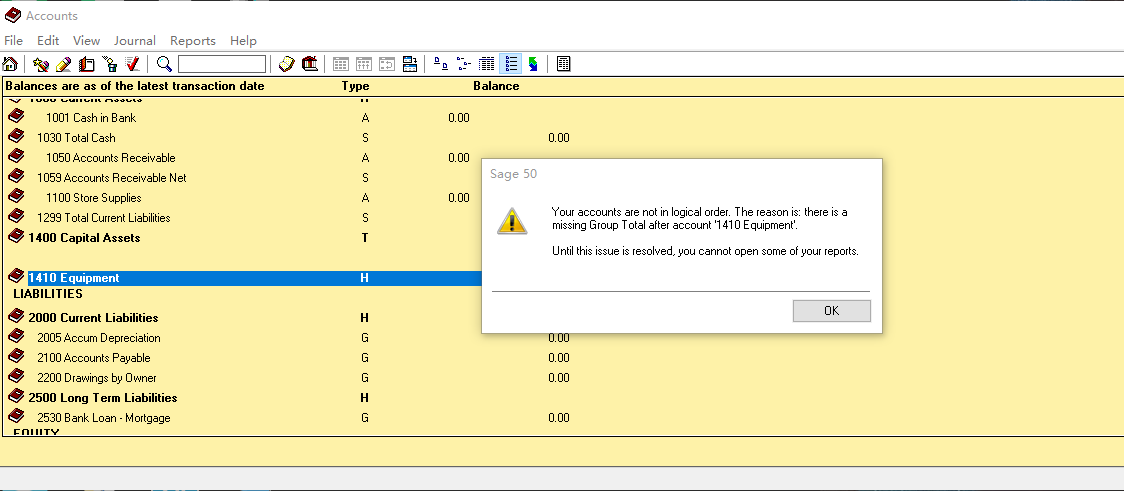
Chart of Account: It also have the same error, hope it can give you a better idea on where I got wrong. Please show me how to fix it.
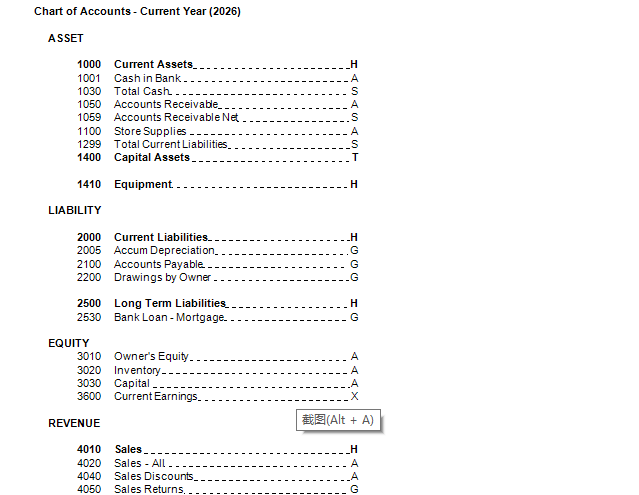
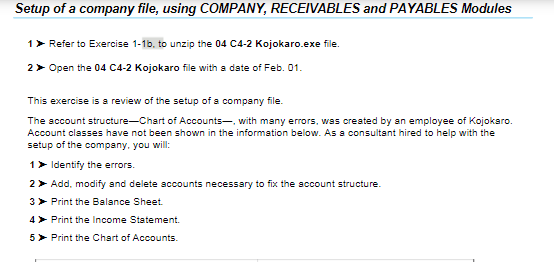
Setup of a company file, using COMPANY, RECEIVABLES and PAYABLES Modules 1> Refer to Exercise 1-16. to unzip the 04 C4-2 Kojokaro.exe file. 2 > Open the 04 C4-2 Kojokaro file with a date of Feb. 01. This exercise is a review of the setup of a company file. The account structure-Chart of Accounts with many errors, was created by an employee of Kojokero. Account classes have not been shown in the information below. As a consultant hired to help with the setup of the company, you will: 1> Identify the errors. 2 > Add, modify and delete accounts necessary to fix the account structure. 3 > Print the Balance Sheet. 4> Print the Income Statement. 5 > Print the Chart of Accounts Accounts File Edit View Journal Reports Help Type Balance A 0.00 S 0.00 Balances are as of the latest transaction date V TUUU LUITLIR 1001 Cash in Bank 1030 Total Cash 1050 Accounts Receivable 1059 Accounts Receivable Net 1100 Store Supplies 1299 Total Current Liabilities 1400 Capital Assets A 0.00 S Sage 50 4 0.00 S Your accounts are not in logical order. The reason is there is a missing Group Heading before account '1410 Equipment'. T Until this issue is resolved, you cannot open some of your reports. T 1410 Equipment LIABILITIES H OK G G 2000 Current Liabilities 2005 Accum Depreciation 2100 Accounts Payable 2200 Drawings by Owner 2500 Long Term Liabilities 2530 Bank Loan - Mortgage FOLLTY 0.00 0.00 0.00 G H G 0.00 Accounts File Edit View Journal Reports Help 209 Balances are as of the latest transaction date Type Balance V TUUU UITLIR SLIM I. A 0.00 S 0.00 A 0.00 1001 Cash in Bank 1030 Total Cash 1050 Accounts Receivable 1059 Accounts Receivable Net 1100 Store Supplies 1299 Total Current Liabilities 1400 Capital Assets S Sage 50 A 0.00 S T Your accounts are not in logical order. The reason is: there is a missing Group Total after account '1410 Equipment'. Until this issue is resolved, you cannot open some of your reports. H 1410 Equipment LIABILITIES OK H 0.00 2000 Current Liabilities 2005 Accum Depreciation 2100 Accounts Payable 2200 Drawings by Owner 2500 Long Term Liabilities 2530 Bank Loan - Mortgage - GOOI 0.00 0.00 G 0.00 FOLIITY S Chart of Accounts - Current Year (2026) ASSET 1000 Current Assets 1001 Cash in Bank. 1030 Total Cash 1050 Accounts Receivable_ 1059 Accounts Receivable Net 1100 Store Supplies 1299 Total Current Liabilities. 1400 Capital Assets 1410 Equipment . HUDUDI li A S T H LIABILITY LH G G LG LOOO 2000 Current Liabilities - 2005 Accum Depreciation.. 2100 Accounts Payable 2200 Drawings by Owner 2500 Long Term Liabilities. 2530 Bank Loan-Mortgage. EQUITY 3010 Owner's Equity. 3020 Inventory- 3030 Capital 3600 Current Earnings. H G A A A X REVENUE 2(Alt + A) _H 4010 4020 4040 4050 Sales Sales - All Sales Discounts Sales Returns G
Step by Step Solution
There are 3 Steps involved in it

Get step-by-step solutions from verified subject matter experts
 Study Help