







Question: In sql Required Databases: - Chinook - AdventureWorks - NumbersDB (Needs to be installed, see script on D2L) Instructions: Write SELECT statements to gather data
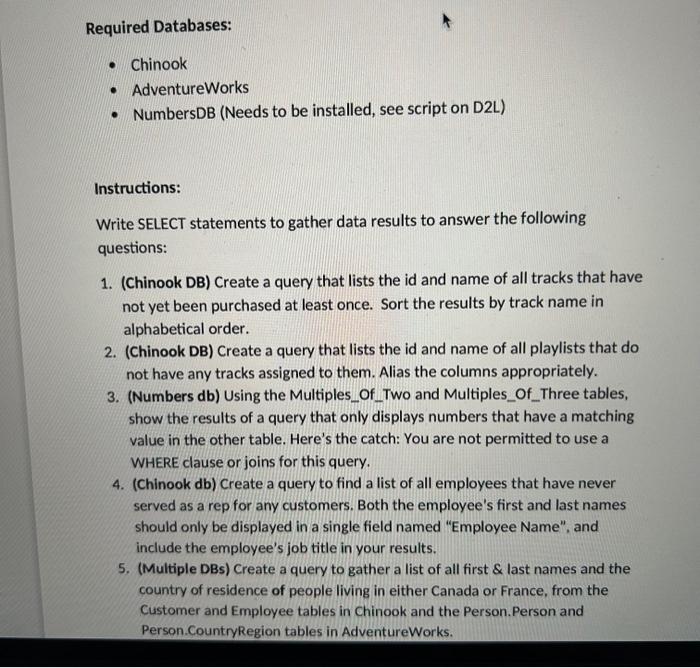
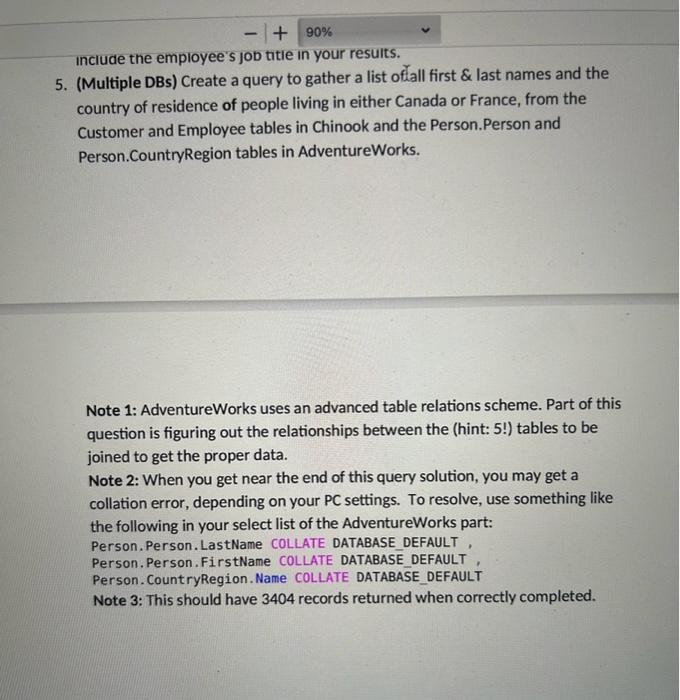
Required Databases: - Chinook - AdventureWorks - NumbersDB (Needs to be installed, see script on D2L) Instructions: Write SELECT statements to gather data results to answer the following questions: 1. (Chinook DB) Create a query that lists the id and name of all tracks that have not yet been purchased at least once. Sort the results by track name in alphabetical order. 2. (Chinook DB) Create a query that lists the id and name of all playlists that do not have any tracks assigned to them. Alias the columns appropriately. 3. (Numbers db) Using the Multiples_Of_Two and Multiples_Of_Three tables, show the results of a query that only displays numbers that have a matching value in the other table. Here's the catch: You are not permitted to use a WHERE clause or joins for this query. 4. (Chinook db) Create a query to find a list of all employees that have never served as a rep for any customers. Both the employee's first and last names should only be displayed in a single field named "Employee Name". and include the employee's job title in your results. 5. (Multiple DBs) Create a query to gather a list of all first \& last names and the country of residence of people living in either Canada or France, from the Customer and Employee tables in Chinook and the Person.Person and Person.CountryRegion tables in AdventureWorks. 5. (Multiple DBs) Create a query to gather a list offall first \& last names and the country of residence of people living in either Canada or France, from the Customer and Employee tables in Chinook and the Person.Person and Person.CountryRegion tables in AdventureWorks. Note 1: AdventureWorks uses an advanced table relations scheme. Part of this question is figuring out the relationships between the (hint: 5 !) tables to be joined to get the proper data. Note 2: When you get near the end of this query solution, you may get a collation error, depending on your PC settings. To resolve, use something like the following in your select list of the AdventureWorks part: Person.Person. LastName COLLATE DATABASE_DEFAULT , Person.Person. FirstName COLLATE DATABASE DEFAULT Person. CountryRegion. Name COLLATE DATABASE_DEFAULT Note 3: This should have 3404 records returned when correctly completed
Step by Step Solution
There are 3 Steps involved in it

Get step-by-step solutions from verified subject matter experts
 Study Help