







Question: In the clock.js file, find the functions that run the clock and move them to the private state section of the library_clock.js file. Then, in
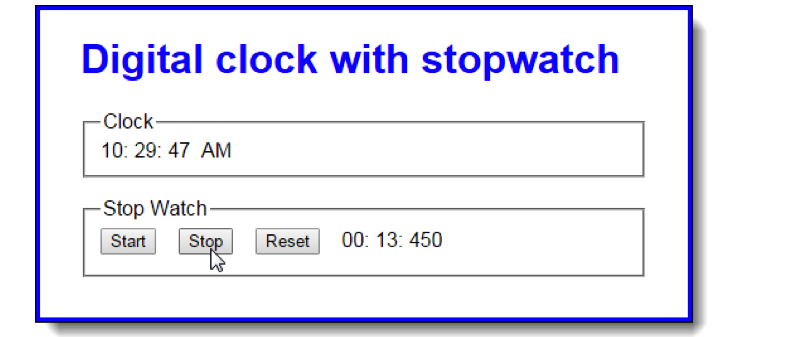
In the clock.js file, find the functions that run the clock and move them to the private state section of the library_clock.js file. Then, in the public methods section of the library file, code and return an object that contains a method named start that used the private state to start the clock. Adjust as needed to make this work.
In the clock.js file, find the variables, objects, and functions that run the stopwatch and move them to the private section of the library_stopwatch.js file. Then, in the public methods section, code and return an object that contains methods named start, stop, and reset that use the private state to start, stop, and reset the stopwatch. Adjust as needed to make this work.
Still in the clock.js file, re-write the remaining code so the onload event handler calls the functions in the library files, passes them the span tags they need, and uses the returned objects to start the clock and attach the stopwatch event handlers.
library_clock.js:
"use strict";
var createClock = function(hourSpan, minuteSpan, secondSpan, ampmSpan) {
// private state
// public methods
};
library_stopwatch.js:
"use strict";
var createStopwatch = function(minuteSpan, secondSpan, msSpan) {
// private state
// public methods
};
clock.js:
"use strict";
var $ = function(id) { return document.getElementById(id); };
//global stop watch timer variable and elapsed time object
var stopwatchTimer;
var elapsed = { minutes:0, seconds:0, milliseconds:0 };
var displayCurrentTime = function() {
var now = new Date();
var hours = now.getHours();
var ampm = "AM"; // set default value
// correct hours and AM/PM value for display
if (hours > 12) { // convert from military time
hours = hours - 12;
ampm = "PM";
} else { // adjust 12 noon and 12 midnight
switch (hours) {
case 12: // noon
ampm = "PM";
break;
case 0: // midnight
hours = 12;
ampm = "AM";
}
}
$("hours").firstChild.nodeValue = hours;
$("minutes").firstChild.nodeValue = padSingleDigit(now.getMinutes());
$("seconds").firstChild.nodeValue = padSingleDigit(now.getSeconds());
$("ampm").firstChild.nodeValue = ampm;
};
var padSingleDigit = function(num) {
return (num
};
var tickStopwatch = function() {
// increment milliseconds by 10 milliseconds
elapsed.milliseconds = elapsed.milliseconds + 10;
// if milliseconds total 1000, increment seconds by one and reset milliseconds to zero
if (elapsed.milliseconds === 1000) {
elapsed.seconds++;
elapsed.milliseconds = 0;
}
// if seconds total 60, increment minutes by one and reset seconds to zero
if (elapsed.seconds === 60) {
elapsed.minutes++;
elapsed.seconds = 0;
}
//display new stopwatch time
$("s_minutes").firstChild.nodeValue = padSingleDigit(elapsed.minutes);
$("s_seconds").firstChild.nodeValue = padSingleDigit(elapsed.seconds);
$("s_ms").firstChild.nodeValue = elapsed.milliseconds;
};
// event handler functions
var startStopwatch = function() {
// do first tick of stop watch and then set interval timer to tick
// stop watch every 10 milliseconds. Store timer object in stopwatchTimer
// variable so next two functions can stop timer.
tickStopwatch();
stopwatchTimer = setInterval(tickStopwatch, 10);
};
var stopStopwatch = function() {
// stop timer
clearInterval(stopwatchTimer);
};
var resetStopwatch = function() {
// stop timer
clearInterval(stopwatchTimer);
// clear elapsed object and stopwatch display
elapsed = { minutes:0, seconds:0, milliseconds:0 };
$("s_minutes").firstChild.nodeValue = "00";
$("s_seconds").firstChild.nodeValue = "00";
$("s_ms").firstChild.nodeValue = "000";
};
window.onload = function() {
// set initial clock display and then set interval timer to display
// new time every second. Don't store timer object because it
// won't be needed - clock will just run.
displayCurrentTime();
setInterval(displayCurrentTime, 1000);
// set up stopwatch event handlers
$("start").onclick = startStopwatch;
$("stop").onclick = stopStopwatch;
$("reset").onclick = resetStopwatch;
};
index.html:
Digital clock with stopwatch
clock.css:
body {
font-family: Arial, Helvetica, sans-serif;
background-color: white;
margin: 0 auto;
width: 450px;
border: 3px solid blue;
padding: 0 2em 1em;
}
h1 {
color: blue;
}
label {
float: left;
width: 11em;
text-align: right;
padding-bottom: .5em;
}
input {
margin-right: 1em;
margin-bottom: .5em;
}
fieldset {
margin-bottom: 1em;
}
Digital clock with stopwatch Clock 10: 29: 47 AM Stop Watch Stop Reset 00: 13: 450 Start Digital clock with stopwatch Clock 10: 29: 47 AM Stop Watch Stop Reset 00: 13: 450 Start
Step by Step Solution
There are 3 Steps involved in it

Get step-by-step solutions from verified subject matter experts
 Study Help