







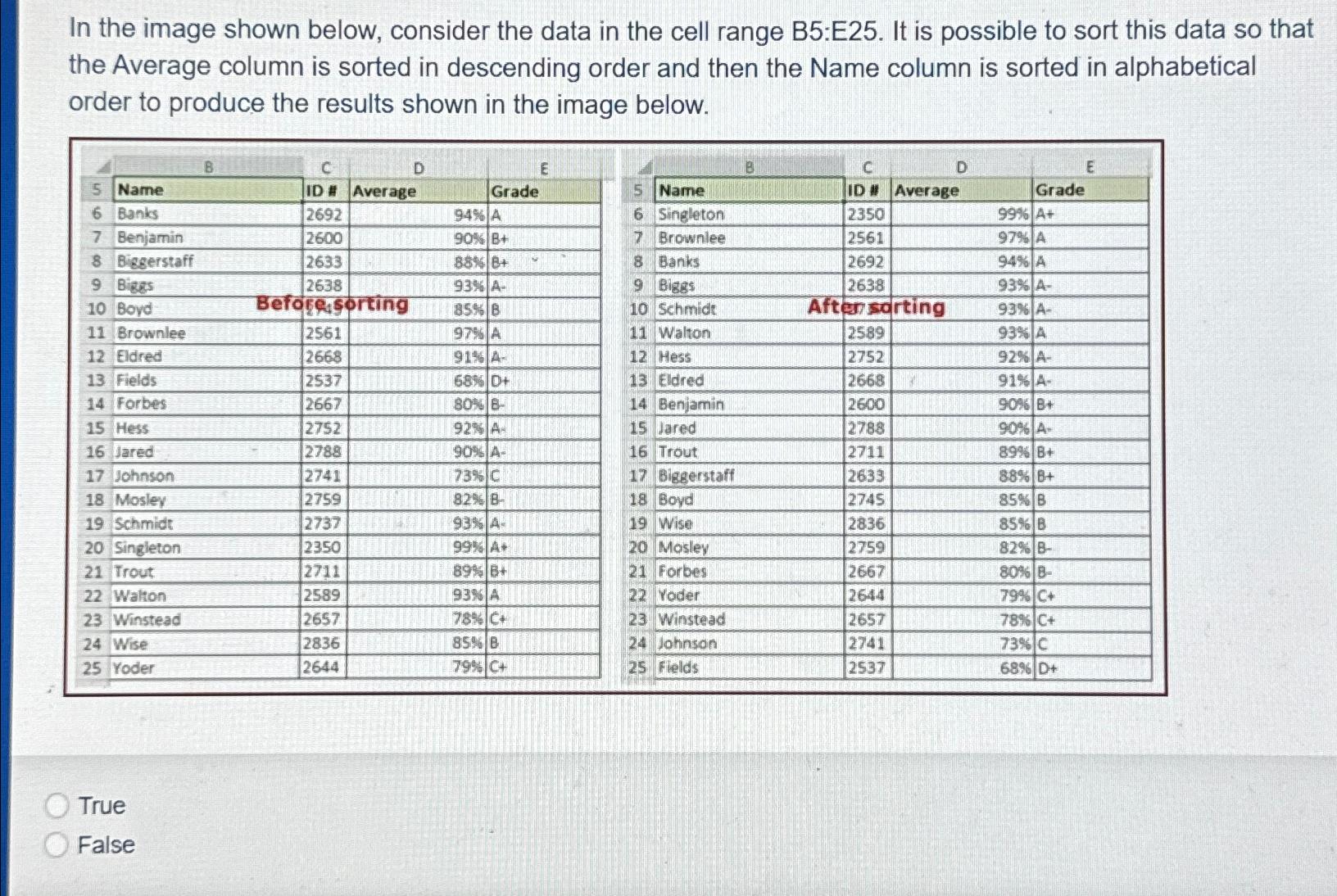
Question: In the image shown below, consider the data in the cell range B 5 :E 2 5 . It is possible to sort this data
In the image shown below, consider the data in the cell range B:E It is possible to sort this data so that the Average column is sorted in descending order and then the Name column is sorted in alphabetical order to produce the results shown in the image below.
tableCDdCDEName,ID #Average,,Grade,Name,ID #Average,GradeBanks,ASingleton,ABenjamin,Brownlee,ABieserstaff,Banks,ABiges,tableABigstableABovd,Befores seorting,Schmidt,Aftenso,rting,ABrownlee,AWalton,:AEldred,AHess,AFields,Eldred,AForbes,BBenjamin,
Step by Step Solution
There are 3 Steps involved in it
1 Expert Approved Answer
Step: 1 Unlock

Question Has Been Solved by an Expert!
Get step-by-step solutions from verified subject matter experts
Step: 2 Unlock
Step: 3 Unlock
 Study Help