







Question: In the Jupyter Notebook, type the Python code for Eulers Method* which has been e-mailed along with this assignment, modifying the code to solve the
In the Jupyter Notebook, type the Python code for Eulers Method* which has been e-mailed along with this
assignment, modifying the code to solve the following IVP:
y ' = t 2 - t2 y , y(0) = 3 , on the interval 0  t
t  5 , with a step size of .25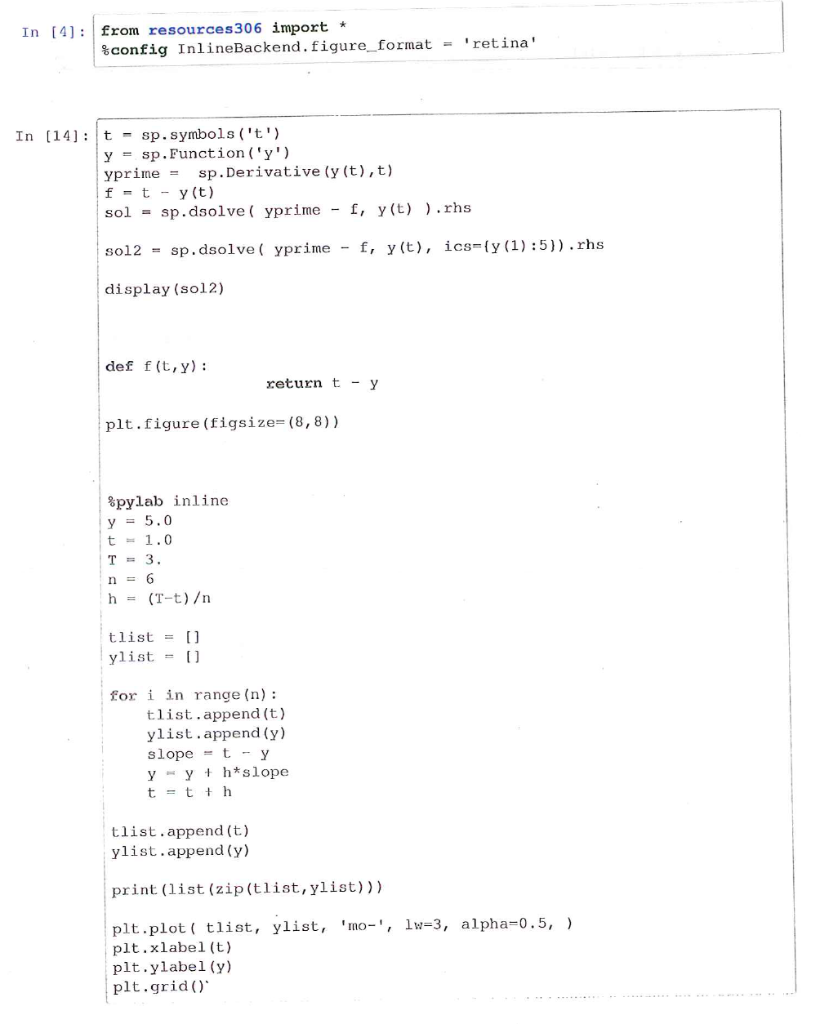
In [4] from resources306 import %config InlineBackend, figure-format 'retina ' In [14] tsp. symbols ('t') y sp. Function ('y') yprime sp . Derivative (y (t) ,t) f -ty (t) sol-sp.dsolve ( yprime , y(t).rhs : sol2 sp.dsolve ( yprime- , y(t), icsn(y(1):5)).rhs = display (sol2) def f (t,y) return t - pit. figure (figsize= (8,8) ) pylab inline y5.0 t1.0 T=3 h (T-t) = tlist = [] ylist for i in range (n): tlist.append (t) ylist.append (y) slopetY yy h*slope t=tth tlist.append (t) ylist.append (y) print (list (zip (tlist,ylist))) plt.plot ( tlist, ylist, 'mo, lw-3, alpha-0.5, ) plt.xlabel (t) plt.ylabel (y) plt.grid) In [4] from resources306 import %config InlineBackend, figure-format 'retina ' In [14] tsp. symbols ('t') y sp. Function ('y') yprime sp . Derivative (y (t) ,t) f -ty (t) sol-sp.dsolve ( yprime , y(t).rhs : sol2 sp.dsolve ( yprime- , y(t), icsn(y(1):5)).rhs = display (sol2) def f (t,y) return t - pit. figure (figsize= (8,8) ) pylab inline y5.0 t1.0 T=3 h (T-t) = tlist = [] ylist for i in range (n): tlist.append (t) ylist.append (y) slopetY yy h*slope t=tth tlist.append (t) ylist.append (y) print (list (zip (tlist,ylist))) plt.plot ( tlist, ylist, 'mo, lw-3, alpha-0.5, ) plt.xlabel (t) plt.ylabel (y) plt.grid)
Step by Step Solution
There are 3 Steps involved in it

Get step-by-step solutions from verified subject matter experts
 Study Help