







Question: In the Lab Lab 3: Using Fieldset Controls to Organize a Form Instructions: Your manager at Horizon Learning has asked you to create a Web
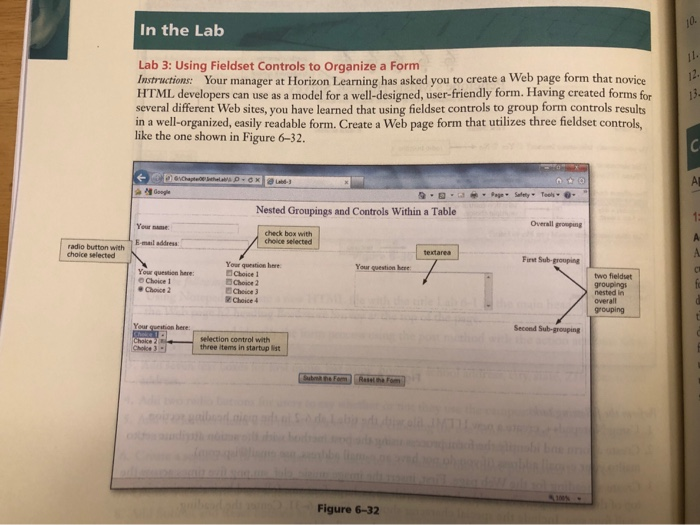
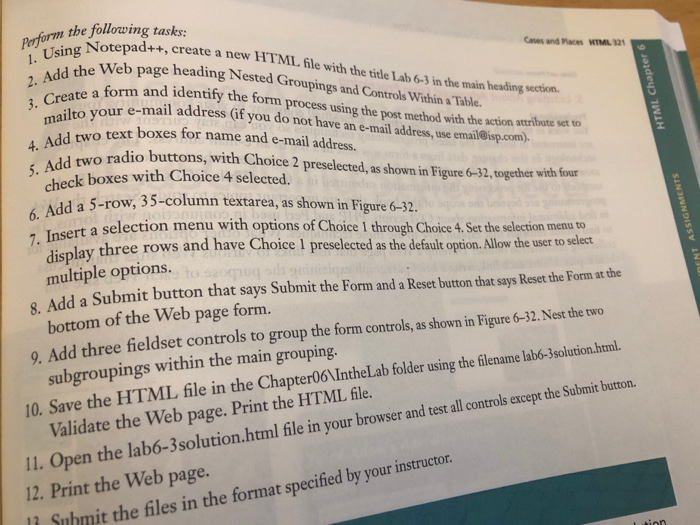
In the Lab Lab 3: Using Fieldset Controls to Organize a Form Instructions: Your manager at Horizon Learning has asked you to create a Web page form that novice HTML developers can use as a model for a well-designed, user-friendly form. Having created forms for several different Web sites, you have learned that using fieldset controls to group form controls results in a well-organized, easily readable form. Create a Web page form that utilizes three fieldset controls like the one shown in Figure 6-32. 12. Nested Groupings and Controls Within a Table Overall grouging Your name check box with choice selected E-mail address radio button with choice selected Your question here Your suestion he Your question here: O Choice 1 d Choice 1 Choice 2 two fieldset nested in overall grouping Choice4 here: selection control with three items in startup list Figure 6-32 1. Using Note adform the lotepadr+, create a new HTML fle with the tite Lab 63 in the main heading section. d the Web page heading Nested Groupings and Contrls Wihin a Tatle. 2. Addate a form and identify the form process using the post method with the action arbuste t 3 Creyr e-mail address (if you do not have an e-mail adress,use emaileisp.com) Caves and Places HTML 121 text boxes for name and e-mail address dd two radio buttons, with Choice 2 preselected, as shown in Figure 6-32, together with four check boxes with Choice 4 selected. w, 35-column textarea, as shown in Figure 6-32. 6. Add a 5-row, te 6. z. rt a selection menu with options of Choice 1 through Choice 4.Set the selection menu to display multiple options. three rows and have Choice 1 preselected as the default option. Allow the user to select . Add a Submit button that says Submit the Form and a Reset button that says Reset the Form at the 9. Add three fieldset controls to group the form controls,as shown in Figure 6-32.Nest the two 10. Save the HTML file in the Chapter06 IntheLab folder using the flenam lab-3solution.htnl. 11. Open bottom of the Web page form. subgroupings within the main grouping. Validate the Web page. Print the HTML file. Il. Open the lab-3solution.html ile in your browser and test 12. Print the Web page. nd test all controls except the Submit button uhmit the files in the format specified by your instructor
Step by Step Solution
There are 3 Steps involved in it

Get step-by-step solutions from verified subject matter experts
 Study Help