







Question: In the range E6:E14, Darius needs to enter a formula to calculate the expiration dates for the service agreements, which expire after one year. He
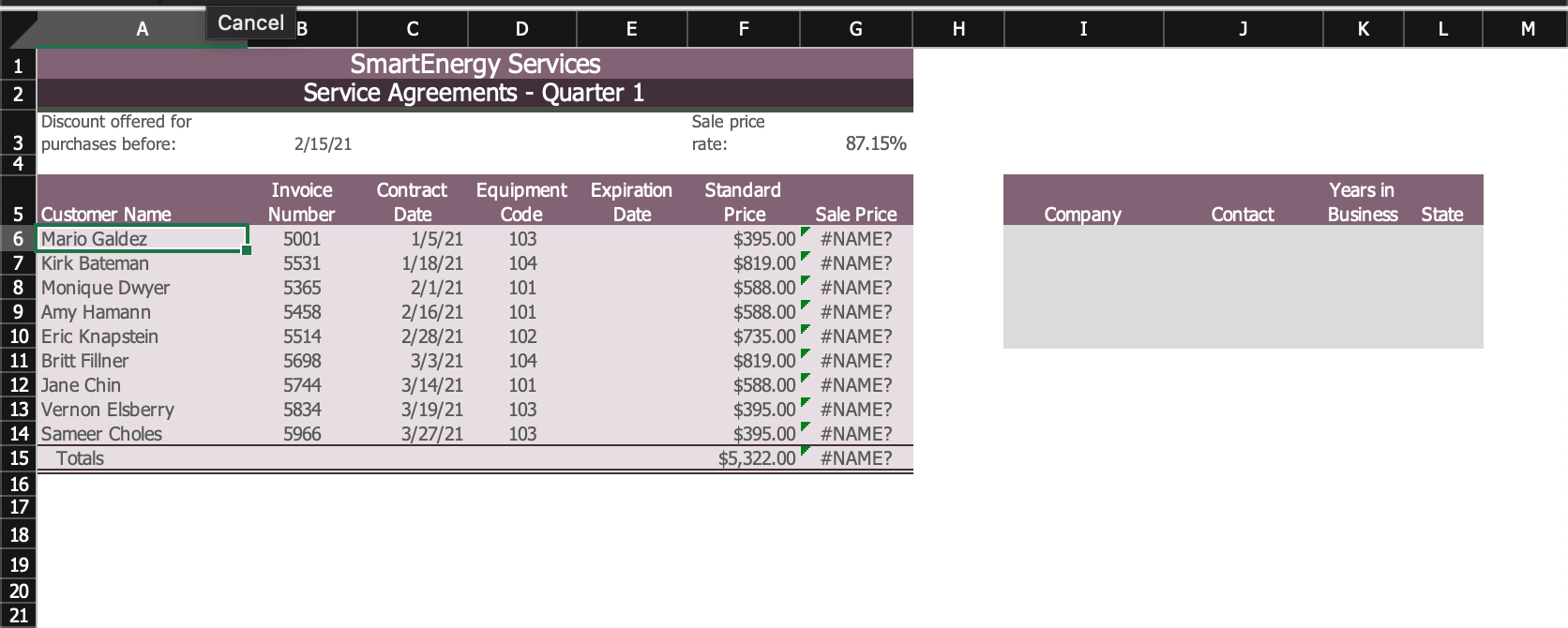
- In the range E6:E14, Darius needs to enter a formula to calculate the expiration dates for the service agreements, which expire after one year. He wants to use a defined name in the formula as he did on the Tampa worksheet. Calculate the expiration dates as follows:
- Examine the formula in cell G6, which uses a defined name to calculate the sale price.
- Assign the same defined name (Contract_Orlando) to the range C6:C14, which resolves the errors in column G.
- In cell E6, enter a formula without using a function to determine the expiration date by adding 365 to the defined name Contract_Orlando.
- Fill the range E7:E14 with the formula in cell E6.
Step by Step Solution
There are 3 Steps involved in it
1 Expert Approved Answer
Step: 1 Unlock

Question Has Been Solved by an Expert!
Get step-by-step solutions from verified subject matter experts
Step: 2 Unlock
Step: 3 Unlock
 Study Help