







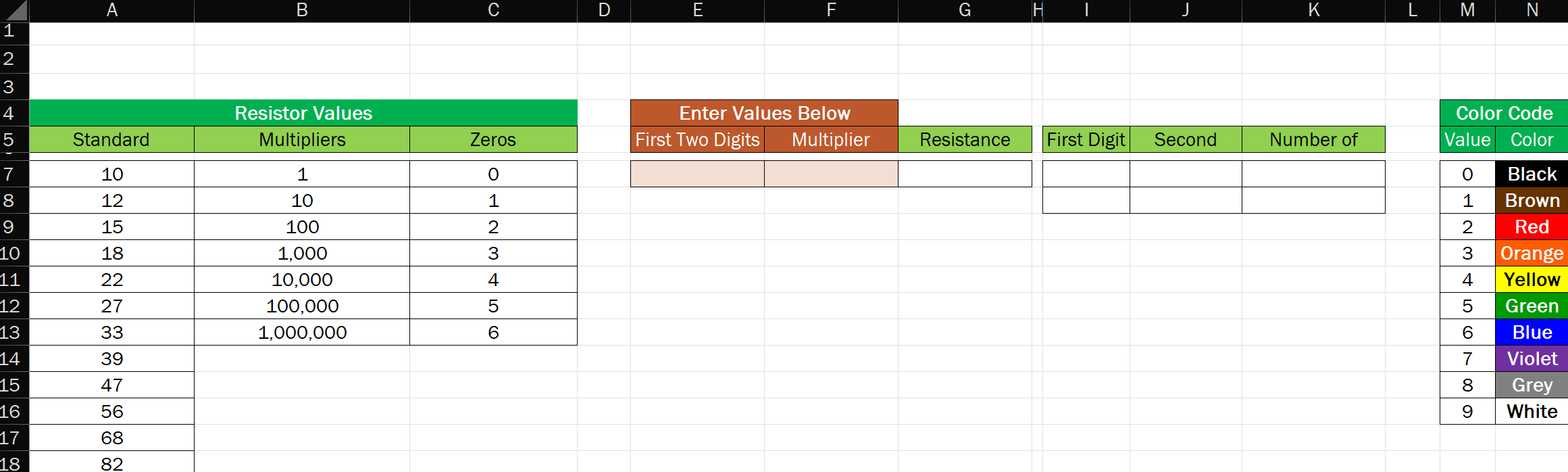
Question: In the worksheet, the user will enter a resistance value as the first two digits and a multiplier, both selected using a drop - down
In the worksheet, the user will enter a resistance value as the first two digits and a multiplier, both selected using a dropdown menu created through data validation. The resistance should be calculated as the first two digits times the multiplier.
The worksheet should automatically determine the First Digit and the Second Digit of the value entered in cell E using the builtin functions LEFT and RIGHT. The number of zeros should be determined using the lookup function.
Finally, the worksheet should determine the corresponding resistance band color using the Color Code table. The cells should automatically change to the correct color when the digits or multiplier are changed using conditional formatting.
For example, a resistance of ohms Omega has first digit yellow second digit violet and two zeros following red A resistance of ohms would be greenblue and zeros black; ohms is brownblack and zeros green Note that if the second digit is zero, it does not count in the multiplier value.
Make sure and have all of your answer in Excel.
Step by Step Solution
There are 3 Steps involved in it
1 Expert Approved Answer
Step: 1 Unlock

Question Has Been Solved by an Expert!
Get step-by-step solutions from verified subject matter experts
Step: 2 Unlock
Step: 3 Unlock
 Study Help