



Question: In this assessment, you will complete the programming of two Java class methods in a console application that registers students for courses in a term
In this assessment, you will complete the programming of two Java class methods in a console application that registers students for courses in a term of study. The application is written using the Object-Oriented features of the Java programming language. The application does compile and does run, but it does not produce the expected result as stated in its requirements. You have been hired to complete the source code of these two methods such that the application meets its stated requirements. Specifically, your added code should: In one method, prints out a list of courses available for registration and prompt the user to select a course for which to register In the second method, prints out a current list of registered courses and their total credit hours The requirements of this application are as follows: The application is register students for courses in a term of study. The assumptions used by the application are: Student enter only integers to select courses for registration from a menu. No data type validation of the user menu selection is checked or required The program terminates only when the student closes it The program must follow these registration business rules: No registration of other courses not displayed by the program No registration more than once for the same course No registration for more than 9 credit hours (e.g. no more than 3 courses) The application uses Java Object-Oriented features for its implementation. Students select from a menu of courses for which they wish to register. The program then validates the user selection against the registration business rules. If the selection is valid, the program prints out a confirmation message. Otherwise, the program prints out the current list of registered classes along with total registered credit hours. The program terminates when the user does not want to register for classes any more. The two methods that need to be completed of the U10A1_OOConsoleRegisterForCourse.java are: 1. getChoice() method. This method loops over an array of course objects and prints out their attributes, one per line according to this format: 2. WriteCurrentRegistration() method. This method also loops over the array of course objects and prints out a list of registered courses thus far. The list current registered courses are enclosed inside a { } and separated by a ,. The methods also prints out the total credit hours thus far Use these course codes, in this order, to test your application: T2230 IT2249 IT2230 IT3345 Successful completion of this assignment will display a menu of courses from which to select to register in the format of [selection number]Course Code (Course Credit Hours) In addition, the application should display and update current list of registered courses and their total credit hours. Your program interaction should look like the sample interaction video, OO Console Register for Course
package ooconsoleregisterforcourse;
/** * * */ public class Course {
private String code = ""; private int creditHour = 0; private boolean isRegisterdFor = false; public Course(String code, int creditHour){ this.code = code; this.creditHour = creditHour; } public void setCode(String code){ this.code = code; } public String getCode() { return this.code; } public void setCrditHour(int creditHour) { this.creditHour = creditHour; } public int getCreditHour() { return this.creditHour; } public void setIsRegisteredFor(boolean trueOrFalse){ this.isRegisterdFor = trueOrFalse; } public boolean getIsRegisteredFor() { return this.isRegisterdFor; } }
package ooconsoleregisterforcourse;
import java.util.Scanner;
public class OOConsoleRegisterForCourse {
/** * @param args the command line arguments */ public static void main(String[] args) { // TODO code application logic here System.out.println("Teacher's Copy");
Scanner input = new Scanner(System.in); //Courses is an array of course objects //see the Course.java source code for members of Course Course[] courses = { new Course("IT1006", 6), new Course("IT4782", 3), new Course("IT4789", 3), new Course("IT4079", 6), new Course("IT2230", 3), new Course("IT3345", 3), new Course("IT2249", 6) };
//choice is the number selected by the user int choice; int totalCredit = 0; String yesOrNo = "";
do {
choice = getChoice(courses, input); switch (ValidateChoice(choice, totalCredit, courses)) { case -1: System.out.println("**Invalid** - Your selection of " + choice + " is not a recognized course."); break; case -2: System.out.println("**Invalid** - You have already registerd for this " + courses[choice-1].getCode() + " course."); break; case -3: System.out.println("**Invalid** - You can not register for more than 9 credit hours."); break; case 0: System.out.println("Registration Confirmed for course " + courses[choice-1].getCode() ); totalCredit += courses[choice-1].getCreditHour(); courses[choice-1].setIsRegisteredFor(true); break; } WriteCurrentRegistration(courses, totalCredit); System.out.print(" Do you want to try again? (Y|N)? : "); yesOrNo = input.next().toUpperCase(); } while (yesOrNo.equals("Y"));
System.out.println("Thank you for registering with us"); }
//This method prints out the selection menu to the user in the form of //[selection number]Course Code (Course Credit Hours) //from the courses array one per line //and then prompts the user to make a number selection public static int getChoice(Course[] courses, Scanner input) { System.out.println("Please type the number inside the [] to register for a course"); System.out.println("The number inside the () is the credit hours for the course"); // TO DO // loop over the courses array and print out the attributes of its //objects in the format of //[selection number]Course Code (Course Credit Hours) //one per line
System.out.print("Enter your choice : ");
return (input.nextInt()); } //This method validates the user menu selection //against the given registration business rules //it returns the following code based on the validation result // -1 = invalid, unrecognized menu selection // -2 = invalid, alredy registered for the course // -3 = invalid, No more than 9 credit hours allowed // 0 = menu selection is valid
public static int ValidateChoice(int choice, int totalCredit, Course[] courses) { if (choice 7) return -1; else if (IsRegisteredBefore(choice, courses) ) return -2; else if ( (totalCredit + courses[choice-1].getCreditHour()) > 9) return -3; return 0; } //This method checks the courses array of course object to //see if the course has already been registered for or not public static boolean IsRegisteredBefore(int choice, Course[] courses) { for(int i = 0; i
System.out.print("Current course registration: { " ); // TO DO // loop over the courses array, determine which courses are registered //for thus and print them out in the format of //{ list of courses separated by , } System.out.println(" }" );
System.out.println("Current registration total credit = " + totalCredit); } }
This is what the output should look like:
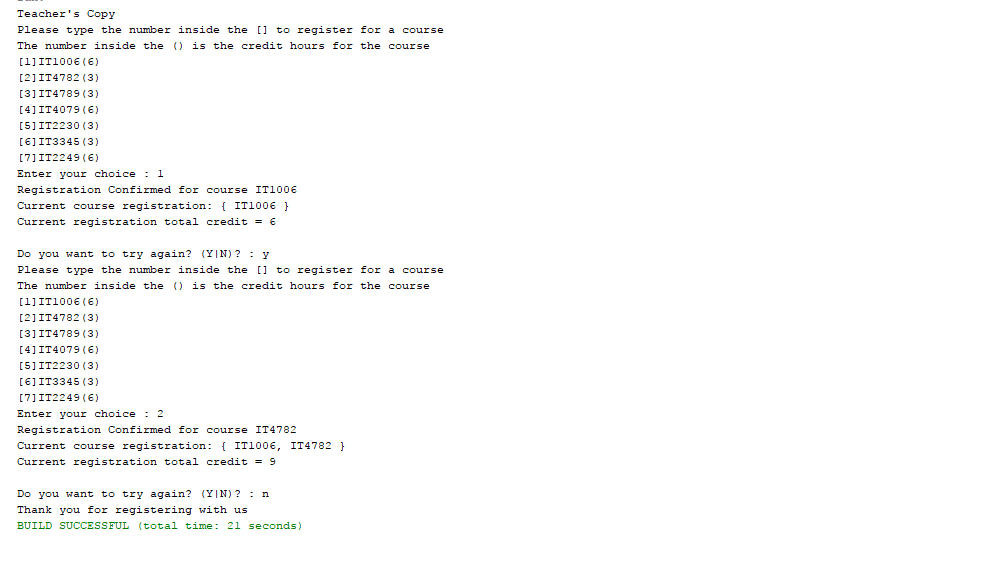
Teacher's Copy Please type the number inside the [ to register for a course The number inside the is the credit hours for the course 11IT1006 (6) 21 IT4782 (3) 31 IT4789 (3) 41IT4079 (6) 51 IT2230 (3) 6] IT3345 (3) 7 IT2249 () Enter your choice1 Registration Confirmed for course IT1006 Current course registration: IT100E Current registration total credit 6 Do you want to try again? (YIN)? Y Please type the number inside the [ to register for a course The number inside the is the credit hours for the course 11IT1006 (6) 21 IT4782 (3) 31 IT4789 (3) 41IT4079 (6) 51 IT2230 (3) 6] IT3345 (3) 7 IT2249 () Enter your choice2 Registration Confirmed for course IT4782 Current course registration: IT100 IT4782 Current registration total credit 9 Do you want to try again? (YIN)? n Thank you for registering with us BUILD SUCCESSFUL (total time: 21 seconds)
Step by Step Solution
There are 3 Steps involved in it

Get step-by-step solutions from verified subject matter experts