







Question: In this assignment, you are going to implement the following design using the interface files I_twoD.java and I_threeD.java . I_twoD.java : /* This is an
In this assignment, you are going to implement the following design using the interface files I_twoD.java
 and I_threeD.java
 .
.
I_twoD.java :
/*
This is an interface file to compute the area and the perimeter of a 2D
shape object.
*/
package assignment3;
public interface I_twoD {
float computeArea();
float computePerimeter();
}
I_threeD.java :
/*
This is an interface file to compute volume of a 3D shape object.
*/
package assignment3;
public interface I_threeD {
float computeVolume();
}
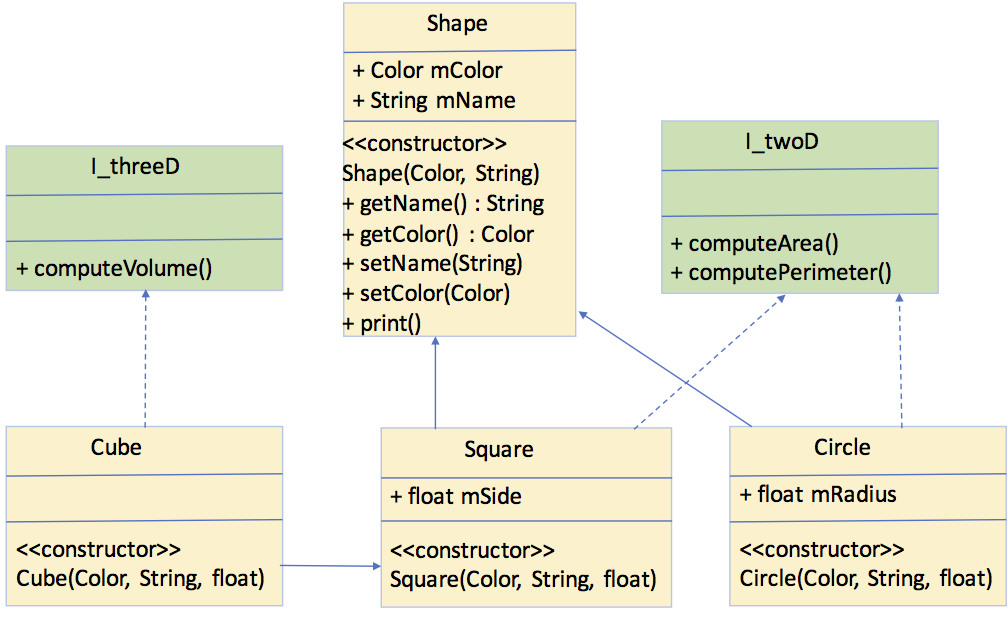
Shape class is the super abstract class in the hierarchy. And we have 2 interfaces, I_twoD and I_threeD. Cube class is a 3-dimensional object, hence it implements the I_threeD interface, in contrast Square and Circle classes are 2-dimensional objects, and they implement the I_twoD interface.
In addition, Cube is an extension of the Square class.
As an overall, you are going to implement 4 classes Shape, Cube, Square and Circle in 4 files; Shape.java, Cube.java, Square.java, and Circle.java respectively and also main test driver class in the file Assignment3.java.
In the print function, please print the type, the name, and the quantitative parameter of the shape (either radius or side).
Please use the following main function in your implementation:
public static void main(String[] args) {
// TODO code application logic here
Circle circle = new Circle(Color.RED, "myCircle", 2.f);
circle.print();
System.out.println("Area : "+circle.computeArea());
System.out.println("Perimeter : "+circle.computePerimeter());
Square square = new Square(Color.BLUE, "mySquare", 3.5f);
square.print();
System.out.println("Area : "+square.computeArea());
System.out.println("Perimeter : "+square.computePerimeter());
Cube cube = new Cube(Color.CYAN, "myCube", 2.3f);
cube.print();
System.out.println("Volume : "+cube.computeVolume());
}
Step by Step Solution
There are 3 Steps involved in it

Get step-by-step solutions from verified subject matter experts
 Study Help