







Question: In this assignment, you will be building a GameCharacters class that retrieves and processes data from a separate JavaScript file using Node.js child processes. This
In this assignment, you will be building a GameCharacters class that retrieves and processes data from a separate JavaScript file using Node.js child processes. This class will have a getCharacters method that spawns a child process to run a script, captures the data it sends back, and passes this data to a callback function.
You will also need to handle any errors that might occur during the process. If theres an error while spawning the child process, it should be logged to the console. If the child process sends any data to stderr, this should also be logged to the console and passed to the callback function. You will also create a failing script to simulate and test error handling scenarios.
Additionally, you will create a data script gamecharactersdata.js that the GameCharacters class will use to retrieve the characters. This script should log a JSON stringified array of game characters to the console. Requirements:
Project Structure: Your project should have the following structure: fantasygamecharacters src gamecharacters.js gamecharactersdata.js failingscript.js test gamecharacters.spec.js package.json
TDD: You must follow TDD principles. Write your tests first, then write the code to make them pass.
Unit Tests: You must write at least threeunit tests
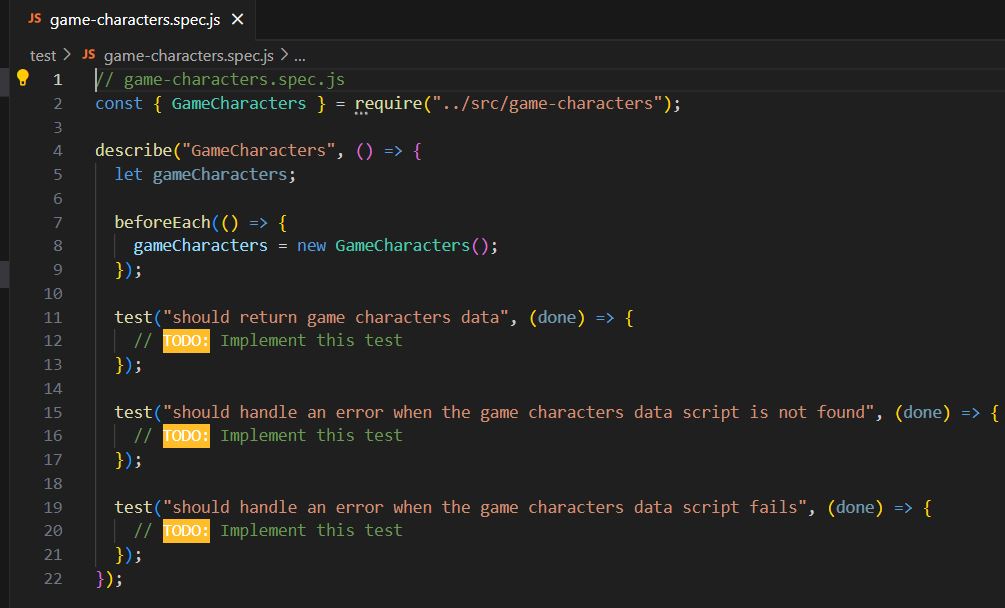
a Test that data is being returned from the gamecharactersdata script.
b Test that it handles an error when the gamecharactersdata script is not found.
c Test that it handles an error when the gamecharactersdata script fails.
Character data gamecharactersdata.js: Characters should have the following properties:
a Class Warrior Mage, Rogue
b Gender Male Female, Other
c An additional property for something neat and fun about your character.
GameCharacters module gamecharacters.js: Define the GameCharacters class with a constructor that accepts a script file name. The constructor should use the join function from the path module to create the path to the script file and store the path in an instance variable.
Package.json: Add a test script to the package.json file to run your tests with Jest.
Instructions:
Set up your project structure as described in the Requirements section.
Create the gamecharactersdata.js file. This script should log a JSON stringified array of game characters objects to the console.
Create the failingscript.js file. This script should log an error message to the stderr. This will be used to test the error handling in the GameCharacters class.
Write your first test in gamecharacters.spec.js This test should test that data is being returned from the gamecharactersdata script.
Write code in the gamecharacters.js to make the test pass.
Run your test again to confirm that the test now passes.
Repeat steps for the remaining two tests.
Make sure to handle errors properly in your code and tests.
Hints:
Use the childprocess.spawn function to run your script in a child process.
Use the path.join function to create the path to your script file.
Remember to call done in your Jest test to signal that the asynchronous test is complete.
Use the beforeEach function in Jest to create a new GameCharacters instance before each test.
Use the toEqual function in Jest to compare the data returned by the getCharacters method to the expected data.
Use the toBeNull function in Jest to check that an error is null when theres no error and that data is null when theres an error.
Remember to follow TDD principles: write your test first, then write code to make the test pass.
Refer to the examples in this chapter to complete this assignment.
JS gamecharacters.spec.js
test JS gamecharacters.spec.js
V gamecharacters.spec.js
const GameCharacters requiresrcgamecharacters";
describeGameCharacters
let gameCharacters;
beforeEach
gameCharacters new GameCharacters;
;
testshould return game characters data", done
Implement this test
;
testshould handle an error when the game characters data script is not found", done
Implement this test
;
testshould handle an error when the game characters data script fails", done
rODO: Implement this test
;
;
Js gamecharacters.js
src JS gamecharacters.js
gamecharacters.js
const spawn rrquirechildprocess";
class GameCharacters
constructor
rODO: set the script file path
getCharacterscallback
IODO: Implement this method
module.exports GameCharacters ;
package.json
"name": "fantasygamecharacters",
"version":
"description":
"main": "index.js
"directories":
"test": "test"
Debug
"scripts":
"test": "echo Error: no test specified && exit
"keywords":
"author":
"license": "ISC",
"devDependencies":
@typesjest:
"jest":
Step by Step Solution
There are 3 Steps involved in it
1 Expert Approved Answer
Step: 1 Unlock

Question Has Been Solved by an Expert!
Get step-by-step solutions from verified subject matter experts
Step: 2 Unlock
Step: 3 Unlock
 Study Help