







Question: In this assignment, you will be creating a web-based application. You will be practicing what was learnt in class regarding JavaScript class and objects, Local
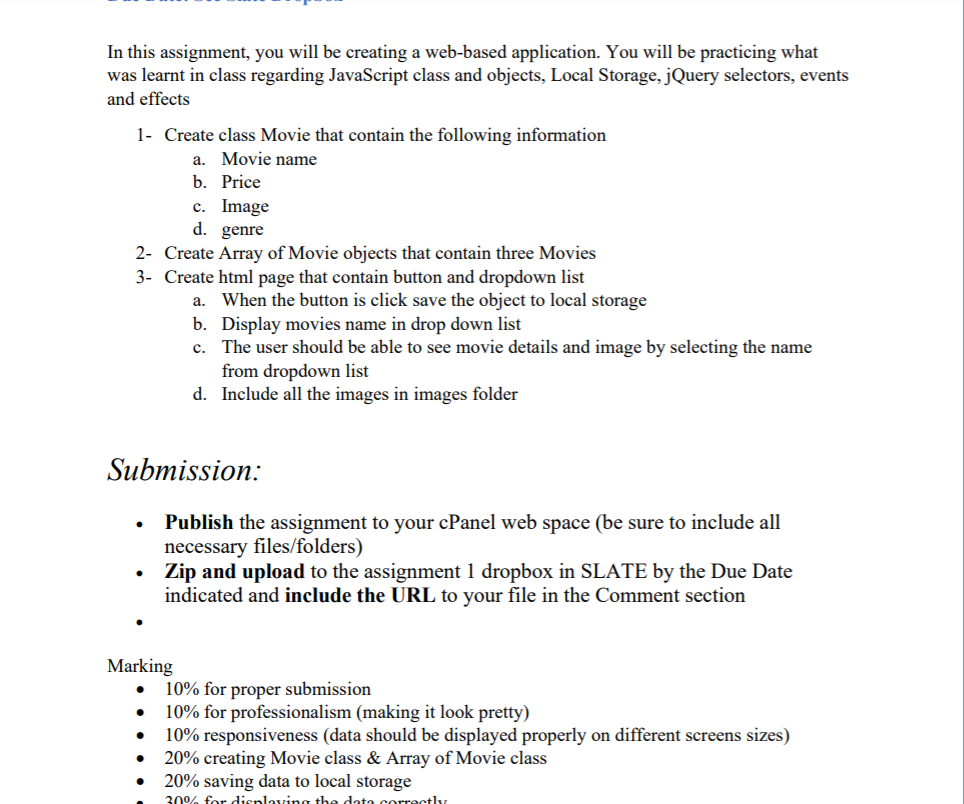
In this assignment, you will be creating a web-based application. You will be practicing what was learnt in class regarding JavaScript class and objects, Local Storage, jQuery selectors, events and effects 1- Create class Movie that contain the following information a. Movie name b. Price c. Image d. genre 2- Create Array of Movie objects that contain three Movies 3- Create html page that contain button and dropdown list a. When the button is click save the object to local storage b. Display movies name in drop down list c. The user should be able to see movie details and image by selecting the name from dropdown list d. Include all the images in images folder Submission: . Publish the assignment to your cPanel web space (be sure to include all necessary files/folders) Zip and upload to the assignment 1 dropbox in SLATE by the Due Date indicated and include the URL to your file in the Comment section Marking 10% for proper submission 10% for professionalism (making it look pretty) 10% responsiveness (data should be displayed properly on different screens sizes) 20% creating Movie class & Array of Movie class 20% saving data to local storage 30% for dirnloving the data correctly . In this assignment, you will be creating a web-based application. You will be practicing what was learnt in class regarding JavaScript class and objects, Local Storage, jQuery selectors, events and effects 1- Create class Movie that contain the following information a. Movie name b. Price c. Image d. genre 2- Create Array of Movie objects that contain three Movies 3- Create html page that contain button and dropdown list a. When the button is click save the object to local storage b. Display movies name in drop down list c. The user should be able to see movie details and image by selecting the name from dropdown list d. Include all the images in images folder Submission: . Publish the assignment to your cPanel web space (be sure to include all necessary files/folders) Zip and upload to the assignment 1 dropbox in SLATE by the Due Date indicated and include the URL to your file in the Comment section Marking 10% for proper submission 10% for professionalism (making it look pretty) 10% responsiveness (data should be displayed properly on different screens sizes) 20% creating Movie class & Array of Movie class 20% saving data to local storage 30% for dirnloving the data correctly
Step by Step Solution
There are 3 Steps involved in it

Get step-by-step solutions from verified subject matter experts
 Study Help