







Question: In this assignment you will be learning and implementing NavigationView along with Lists NavigationView: These are used to navigate around different views in conjunction with
In this assignment you will be learning and implementing NavigationView along with Lists
NavigationView: These are used to navigate around different views in conjunction with NavigationLinks NavigationLinks are in the next assignment, hint hint
List: These are containers that contain Rows of Views The above blue text is clickable, official docs to both NavigationView and List
Description:
This is the first part of ShopApp. In this part you will be setting up the project, creating a navigation view, and a list that contains cells that display different items in your shop.
Below I have provided the file structure that the app should follow. Not required to be the same, just best practice
setup
App: This should contain all of the base files from starting the project
Views: This contains all of your views
ContentView: Contains the NavigationView along with the List of item cells
ItemCell: Contains the styling and how the items cells will look like
TextView: Not required, I used it for the different text styling throughout the app
Models: This contains your item model
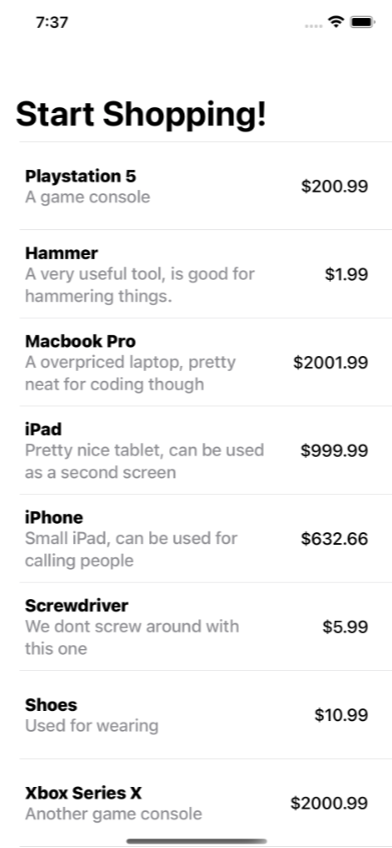
Item: This is going to be where your Item struct will be For ContentView, make sure that the ListStyle of the List is PlainListStyle. Along with that make sure the navigationBarTitle says Start Shopping! and the displayMode is large. The List MUST iterate through an array of Items using ForEach
For ContentView, make sure that the ListStyle of the List is PlainListStyle. Along with that make sure the navigationBarTitle says Start Shopping! and the displayMode is large. The List MUST iterate through an array of Items using ForEach
Below is what the app should look like: in image provided
example
For Item, this will be a struct with variables along with an initializer to new up the struct. The variables are as followed: name : String description : String price : Double
Step by Step Solution
There are 3 Steps involved in it
1 Expert Approved Answer
Step: 1 Unlock

Question Has Been Solved by an Expert!
Get step-by-step solutions from verified subject matter experts
Step: 2 Unlock
Step: 3 Unlock
 Study Help