







Question: In this assignment, you will complete a Customer class and Vector to store Customers. One simple way to implement the Customer class is to define
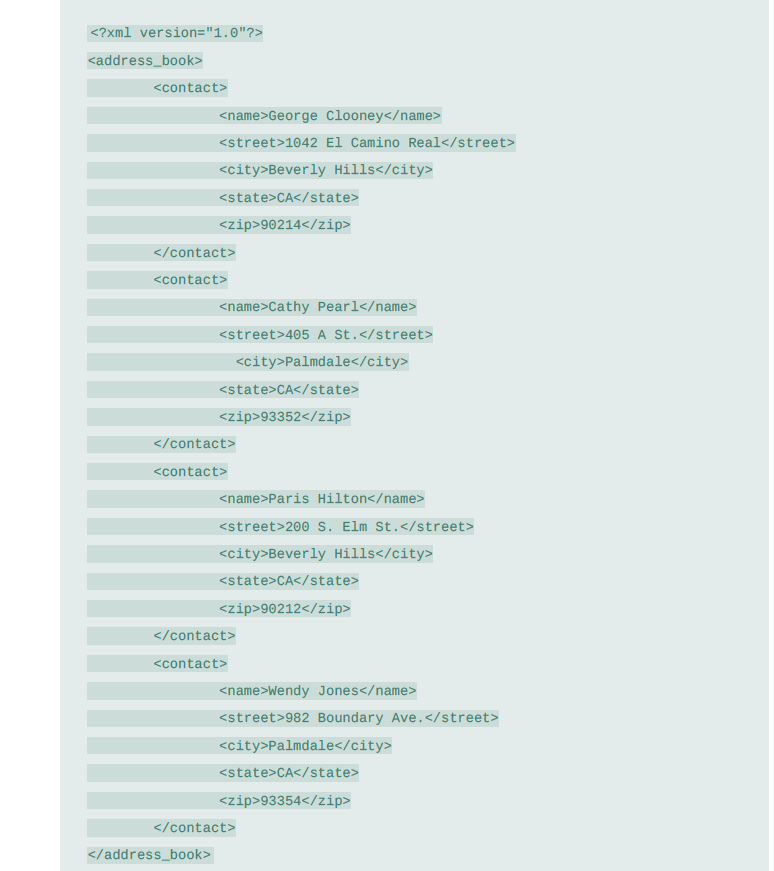
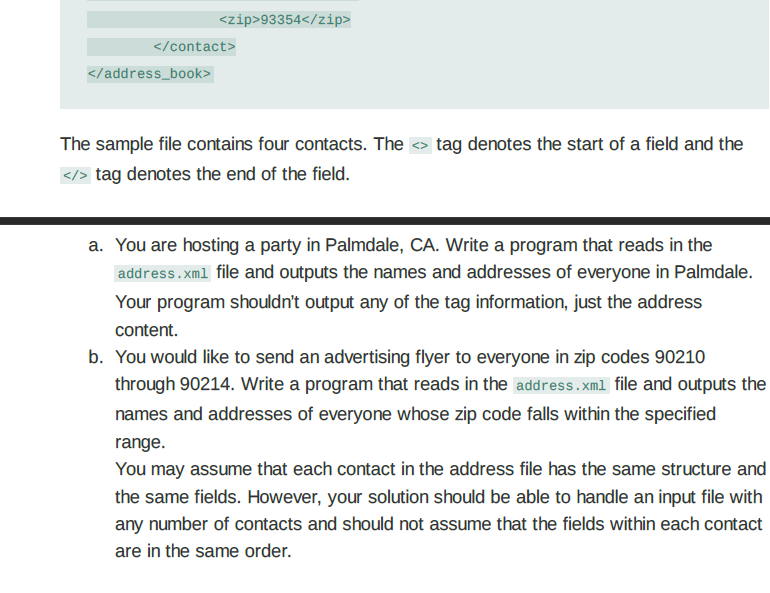
In this assignment, you will complete a Customer class and Vector to store Customers. One simple way to implement the Customer class is to define strings to store the information related to a person (name, street, city, state, zip). See the class provided in the template, with these data members, you will complete the class constructors and member functions and add any other member or friend functions that you may consider necessary. You must use the template file and only add your code where you see /*your code here*/. Do not modify other parts of the code. Do not use C/C++ libraries other than the ones provided in the template.
Must use the following template:
#include
#include
#include
#include
#include
using namespace std;
// Do NOT modify the class header.
class Customer
{
private:
// Data members
string name; // name of the contact
string street; // street
string city; // city
string state; // state
string zip; // zip code
public:
// Default Class constructor
//
Customer();
// Copy constructor
Customer (const Customer &aContact);
// Destructor
// Destroy a poly object by freeing the dynamically allocated array
~Customer();
// Add any other constructor or member function that you need in your implementation
};
// Reads all the records in one xml file, storing the data in a vector with each customer
// Reads all records available
vector
// Reads the next contact record, returning true if found or false if no
// more records are available
bool read_next_contact(ifstream &in, string &name, string &street,
string &city, string &state, string &zip);
// Prints the given contact
void print_contact(string &name, string &street,
string &city, string &state, string &zip);
// Prints all of the addresses with the given city
void find_city(vector
// Prints all of the addresses in the given range of zip codes (inclusive)
void find_in_zip_range(vector
// Returns true if tofind is a substring of str. Will return false if
// tofind is empty.
//
bool contains(string str, string tofind);
int main()
{
vector
string filename, city;
int zip1, zip2;
// prompt user for the file name with customer contact information
cout
cin >> filename;
// Reads all the customer contact information from the file and store it into a customer
// All the customers are stored in the contacts vector
// ....
contacts = read_contacts(filename, contacts);
// ....
// Look for addresses in certain city
// Provide the vector and the city
cout
// ....
// .....
cout
find_city(contacts, city);
// Then look for addresses with zip codes between zip1 and zip2
cout
cin >> zip1;
cin >> zip2;
cout
cout
find_in_zip_range(contacts, zip1, zip2);
/* Sample test cases for constructors and member functions, including any operator overloading.
Include test cases for your constructors and member functions
......
Include other test cases to test your implementation thoroughly */
return 0;
}
// Prints the given contact
void print_contact(string &name, string &street,
string &city, string &state, string &zip);
// Prints all of the addresses with the given city
void find_city(vector
{
}
// Prints all of the addresses in the given range of zip codes (inclusive)
void find_in_zip_range(vector
{
}
// Reads all the records in an xml file, storing the data in a vector with each customer
// Reads all records available calling read_next_contact() function
vector
{
// ....
// Reads the next contact record, returning true if found or false if no
// more records are available
// bool read_next_contact(ifstream &in, string &name, string &street,
// ....
}
void print_contact(string &name, string &street,
string &city, string &state, string &zip)
{
}
// Returns true if tofind is a substring of str. Will return false if
// tofind is empty.
bool contains(string str, string tofind)
{
}
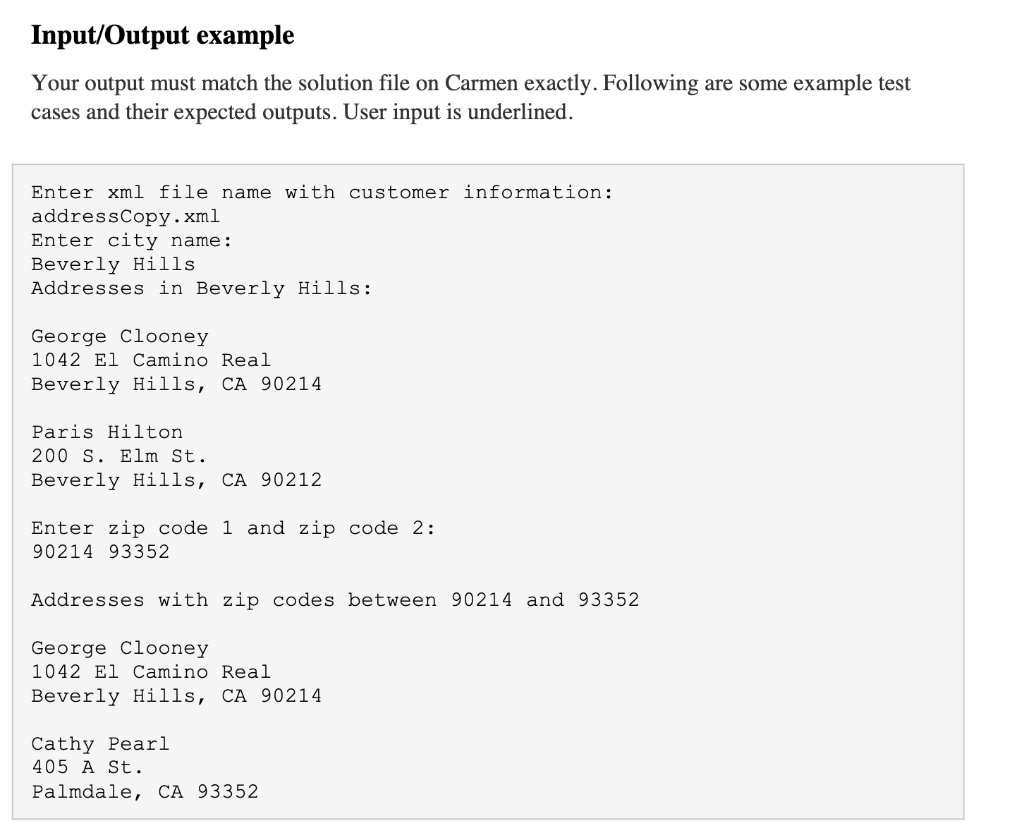
The sample file contains four contacts. The tag denotes the start of a field and the > tag denotes the end of the field. a. You are hosting a party in Palmdale, CA. Write a program that reads in the address.xml file and outputs the names and addresses of everyone in Palmdale. Your program shouldn't output any of the tag information, just the address content. b. You would like to send an advertising flyer to everyone in zip codes 90210 through 90214. Write a program that reads in the address.xml file and outputs the names and addresses of everyone whose zip code falls within the specified range. You may assume that each contact in the address file has the same structure and the same fields. However, your solution should be able to handle an input file with any number of contacts and should not assume that the fields within each contact are in the same order. Input/Output example Your output must match the solution file on Carmen exactly. Following are some example test cases and their expected outputs. User input is underlined. Enter xml file name with customer information: addressCopy.xml Enter city name: Beverly Hills Addresses in Beverly Hills: George Clooney 1042 El Camino Real Beverly Hills, CA 90214 Paris Hilton 200 S. Elm St. Beverly Hills, CA 90212 Enter zip code 1 and zip code 2: 90214 93352 Addresses with zip codes between 90214 and 93352 George Clooney 1042 El Camino Real Beverly Hills, CA 90214 Cathy Pearl 405 A St. Palmdale, CA 93352
Step by Step Solution
There are 3 Steps involved in it

Get step-by-step solutions from verified subject matter experts
 Study Help