







Question: In this assignment you will create a Chef dashboard that displays information about a chef and handles errors when a chef s data cannot be
In this assignment you will create a Chef dashboard that displays information about a chef and handles errors when a chefs data cannot be retrieved using JavaScript promises, HTML and CSS
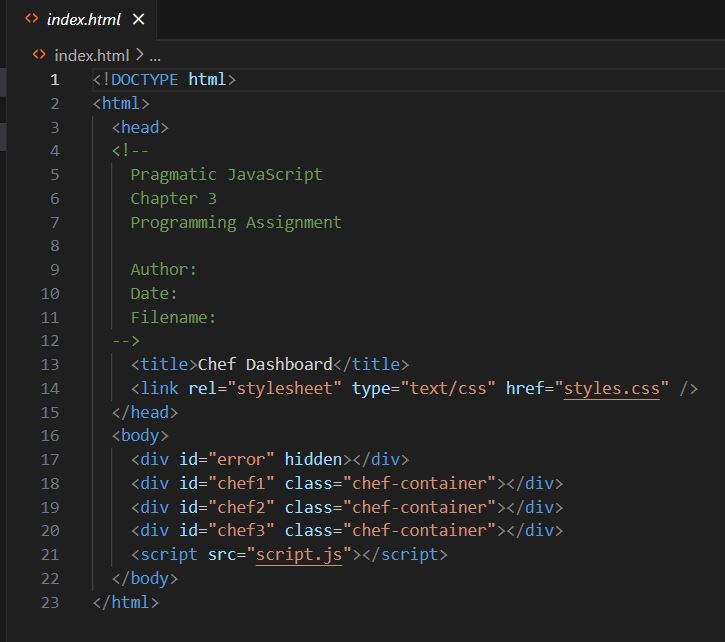
Create an HTML page with three sections. Each section will display the information for a diDerent chef. Use CSS styling to bring your dashboard to life.
In your JavaScript code, create an array of chef objects. Each object should contain properties for name, specialty, weakness, and restaurant location.
Create three functions, each function should return a promise that retrieves the data for a diDerent chef in the object array. Use the setTimeout to simulate a delay in retrieving the data. Set each functions timer to a diDerent value starting with seconds and expanding from there. Use Promise.allSettled to make sure all chef data is retrieved before updating the webpage. The function should handle both fulfilled promises and rejected promises.
If a promise is fulfilled, update the webpage with the chef data. If a promise is rejected, display an error message in the webpage under the section where the promise failed. For example, if the first promise fails, the error message should be placed under the first section in the webpage. If the second promise fails, the error message should be placed under the second section in the webpage, and so on
Hint:
To simulate a promise rejection, you can randomly reject promises in your retrieve functions using Math.random or you could replace one of the resolves with a rejection. Just make sure you uncomment the resolve line and comment the reject line when you want to rest fulfilled states.
index.html
index.html
Step by Step Solution
There are 3 Steps involved in it
1 Expert Approved Answer
Step: 1 Unlock

Question Has Been Solved by an Expert!
Get step-by-step solutions from verified subject matter experts
Step: 2 Unlock
Step: 3 Unlock
 Study Help