







Question: In this assignment, you will write a program that: Converts the bubble sort, changing the outer loop from a for loop to a while loop,
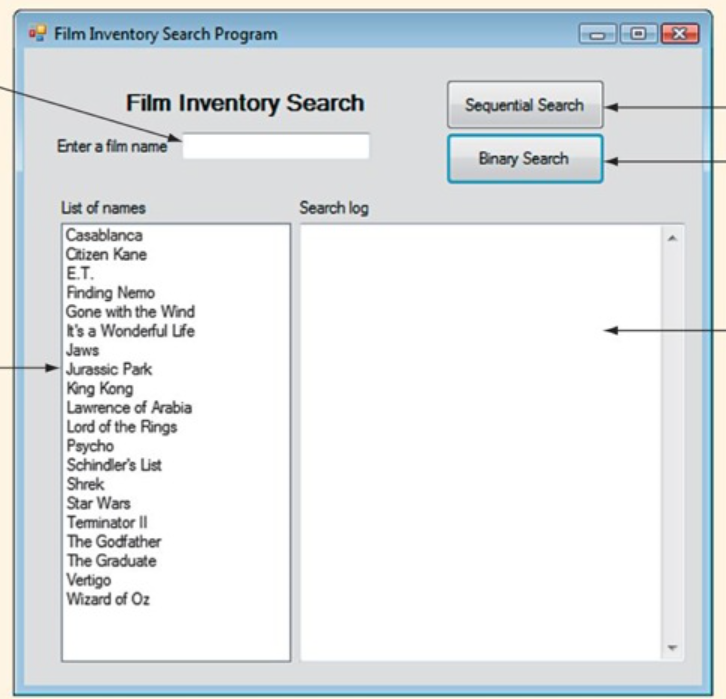
In this assignment, you will write a program that:
Converts the bubble sort, changing the outer loop from a for loop to a while loop, so that an early exit is possible when the film names list becomes sorted.
Uses a Boolean variable to control the outer loop.
Save the program as Application.cpp.
#pragma once
namespace Elementary {
using namespace System;
using namespace System::ComponentModel;
using namespace System::Collections;
using namespace System::Windows::Forms;
using namespace System::Data;
using namespace System::Drawing;
///
/// Summary for Form1
///
public ref class Form1 : public System::Windows::Forms::Form
{
public:
Form1(void)
{
InitializeComponent();
//
//TODO: Add the constructor code here
//
}
protected:
///
/// Clean up any resources being used.
///
~Form1()
{
if (components)
{
delete components;
}
}
private: System::Windows::Forms::Label^ label1;
private: System::Windows::Forms::Button^ btnSeqSearch;
private: System::Windows::Forms::Button^ btnBinSearch;
protected:
private: System::Windows::Forms::Label^ label2;
private: System::Windows::Forms::TextBox^ textBox1;
private: System::Windows::Forms::ListView^ lstNames;
private: System::Windows::Forms::TextBox^ textBox2;
private:
///
/// Required designer variable.
///
System::ComponentModel::Container ^components;
#pragma region Windows Form Designer generated code
///
/// Required method for Designer support - do not modify
/// the contents of this method with the code editor.
///
void InitializeComponent(void)
{
this->label1 = (gcnew System::Windows::Forms::Label());
this->btnSeqSearch = (gcnew System::Windows::Forms::Button());
this->btnBinSearch = (gcnew System::Windows::Forms::Button());
this->label2 = (gcnew System::Windows::Forms::Label());
this->textBox1 = (gcnew System::Windows::Forms::TextBox());
this->lstNames = (gcnew System::Windows::Forms::ListView());
this->textBox2 = (gcnew System::Windows::Forms::TextBox());
this->SuspendLayout();
//
// label1
//
this->label1->AutoSize = true;
this->label1->Font = (gcnew System::Drawing::Font(L"Modern No. 20", 16.2F, System::Drawing::FontStyle::Bold, System::Drawing::GraphicsUnit::Point,
static_cast<:byte>(0)));
this->label1->Location = System::Drawing::Point(25, 33);
this->label1->Name = L"label1";
this->label1->Size = System::Drawing::Size(292, 30);
this->label1->TabIndex = 0;
this->label1->Text = L"Film Inventory Search";
//
// btnSeqSearch
//
this->btnSeqSearch->Font = (gcnew System::Drawing::Font(L"Microsoft Sans Serif", 7.8F, System::Drawing::FontStyle::Bold, System::Drawing::GraphicsUnit::Point,
static_cast<:byte>(0)));
this->btnSeqSearch->Location = System::Drawing::Point(456, 33);
this->btnSeqSearch->Name = L"btnSeqSearch";
this->btnSeqSearch->Size = System::Drawing::Size(150, 45);
this->btnSeqSearch->TabIndex = 1;
this->btnSeqSearch->Text = L"Sequential Search";
this->btnSeqSearch->UseVisualStyleBackColor = true;
this->btnSeqSearch->Click += gcnew System::EventHandler(this, &Form1::btnSeqSearch_Click);
//
// btnBinSearch
//
this->btnBinSearch->Font = (gcnew System::Drawing::Font(L"Microsoft Sans Serif", 7.8F, System::Drawing::FontStyle::Bold, System::Drawing::GraphicsUnit::Point,
static_cast<:byte>(0)));
this->btnBinSearch->Location = System::Drawing::Point(456, 84);
this->btnBinSearch->Name = L"btnBinSearch";
this->btnBinSearch->Size = System::Drawing::Size(150, 45);
this->btnBinSearch->TabIndex = 2;
this->btnBinSearch->Text = L"Binary Search";
this->btnBinSearch->UseVisualStyleBackColor = true;
this->btnBinSearch->Click += gcnew System::EventHandler(this, &Form1::btnBinSearch_Click);
//
// label2
//
this->label2->AutoSize = true;
this->label2->Font = (gcnew System::Drawing::Font(L"Microsoft Sans Serif", 7.8F, System::Drawing::FontStyle::Bold, System::Drawing::GraphicsUnit::Point,
static_cast<:byte>(0)));
this->label2->Location = System::Drawing::Point(30, 112);
this->label2->Name = L"label2";
this->label2->Size = System::Drawing::Size(142, 17);
this->label2->TabIndex = 3;
this->label2->Text = L"Enter A Film Name";
//
// textBox1
//
this->textBox1->Location = System::Drawing::Point(178, 112);
this->textBox1->Name = L"textBox1";
this->textBox1->Size = System::Drawing::Size(260, 22);
this->textBox1->TabIndex = 4;
//
// lstNames
//
this->lstNames->Location = System::Drawing::Point(33, 165);
this->lstNames->Name = L"lstNames";
this->lstNames->Size = System::Drawing::Size(262, 398);
this->lstNames->TabIndex = 5;
this->lstNames->UseCompatibleStateImageBehavior = false;
this->lstNames->View = System::Windows::Forms::View::List;
//
// textBox2
//
this->textBox2->Location = System::Drawing::Point(301, 165);
this->textBox2->Multiline = true;
this->textBox2->Name = L"textBox2";
this->textBox2->ScrollBars = System::Windows::Forms::ScrollBars::Vertical;
this->textBox2->Size = System::Drawing::Size(305, 398);
this->textBox2->TabIndex = 6;
//
// Form1
//
this->AutoScaleDimensions = System::Drawing::SizeF(8, 16);
this->AutoScaleMode = System::Windows::Forms::AutoScaleMode::Font;
this->ClientSize = System::Drawing::Size(638, 591);
this->Controls->Add(this->textBox2);
this->Controls->Add(this->lstNames);
this->Controls->Add(this->textBox1);
this->Controls->Add(this->label2);
this->Controls->Add(this->btnBinSearch);
this->Controls->Add(this->btnSeqSearch);
this->Controls->Add(this->label1);
this->Name = L"Form1";
this->Text = L"Films Inventory Search Program";
this->Load += gcnew System::EventHandler(this, &Form1::Form1_Load);
this->ResumeLayout(false);
this->PerformLayout();
}
#pragma endregion
private: array
private: String^ strTarget;
private: String^ strLog;
private: System::Void Form1_Load(System::Object^ sender, System::EventArgs^ e) {
void sortA(String[], ListView);
void sortD(String[], ListView)
int main()
{
String arr[20];
ListView lstnames;
cout
for (int i = -; i { cin >> arr[i]; } sortA(arr[], lstNames); sortD(arr[], lstNames); return 0; } void sortA(String arr[], ListView lstNamet) { String temp; for (int i = 0; i { for (int j = i + 1; j { if (strcmp((arr[i], arr[j])>0)) { strcpy(temp, arr[i]); strcpy(arr[i], arr[j]); strcpy(arr[j], temp); } } } lstname->Itmes->Add(arr); } void sortD(String arr[], ListView lstName) { String temp; for (int i = 0; i { for (int j = i + 1; j { if (strcmp((arr[i], arr[j]) { strcpy(temp, arr[i]); strcpy(arr[i], arr[j]); strcpy(arr[j], temp); } } } lstname->Itmes->Add(arr); } } private: System::Void btnSeqSearch_Click(System::Object^ sender, System::EventArgs^ e) { int i; bool found = false; strTarget = txtTarget->Text; strLog = "SEQUENTIAL SEARCH LOG " + " "; for (i = 0; i Length; ++) strLog += "checking location " + i + " (" + nameArr[i] + ") "; if (String::Compare(strTarget, nameArr[i]) == 0) { found = true; break; } } if (found) strLog += strTarget + "FOUND!-"; else strLog += strTarget + "NOT FOUND!"; txtLog->Text = strLog + " " + "comparisons were made"; private: System::Void btnBinSearch_Click(System::Object^ sender, System::EventArgs^ e) { } } int low, high, mid, compareresult; int comparisions = 0; low = 0; high = 19; strTarget = txtTarget->Text; while (low { comparisions++; mid = (low + high) / 2; compareresult = String::Compare(strTarget, nameArr[mid]); if (compareresult else if(compareresult > 0) low = mid + 1; else low = high + 1; txtLog->Text = strLog + " " + comparisions + "comparisions were made"; } }; }
Step by Step Solution
There are 3 Steps involved in it

Get step-by-step solutions from verified subject matter experts
 Study Help