







Question: In this assignment, you will write a simple assembly language program to estimate the values of the mathematical constant . Pi can be calculated by
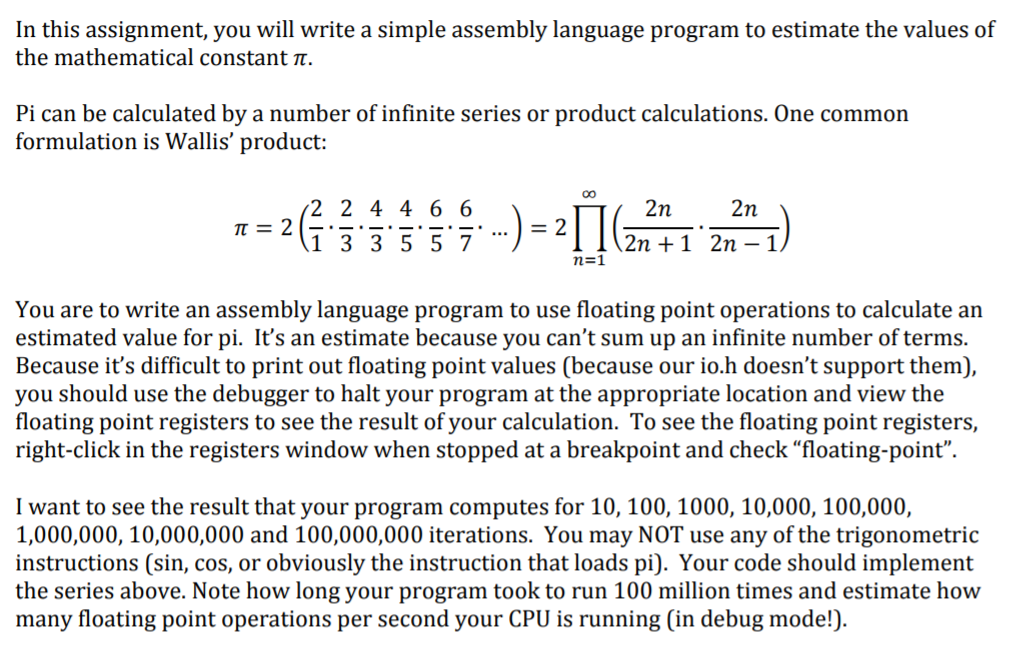
In this assignment, you will write a simple assembly language program to estimate the values of the mathematical constant . Pi can be calculated by a number of infinite series or product calculations. One common formulation is Wallis' product: 2 2 44 6 6 2( )-21 2n 2n 2n +1 2n -1 ) n=1 You are to write an assembly language program to use floating point operations to calculate an estimated value for pi. It's an estimate because you can't sum up an infinite number of terms. Because it's difficult to print out floating point values (because our io.h doesn't support them), you should use the debugger to halt your program at the appropriate location and view the floating point registers to see the result of your calculation. To see the floating point registers, right-click in the registers window when stopped at a breakpoint and check "floating-point". I want to see the result that your program computes for 10, 100, 1000, 10,000, 100,000, 1,000,000, 10,000,000 and 100,000,000 iterations. You may NOT use any of the trigonometric instructions (sin, cos, or obviously the instruction that loads pi). Your code should implement the series above. Note how long your program took to run 100 million times and estimate how many floating point operations per second your CPU is running [in debug mode!). In this assignment, you will write a simple assembly language program to estimate the values of the mathematical constant . Pi can be calculated by a number of infinite series or product calculations. One common formulation is Wallis' product: 2 2 44 6 6 2( )-21 2n 2n 2n +1 2n -1 ) n=1 You are to write an assembly language program to use floating point operations to calculate an estimated value for pi. It's an estimate because you can't sum up an infinite number of terms. Because it's difficult to print out floating point values (because our io.h doesn't support them), you should use the debugger to halt your program at the appropriate location and view the floating point registers to see the result of your calculation. To see the floating point registers, right-click in the registers window when stopped at a breakpoint and check "floating-point". I want to see the result that your program computes for 10, 100, 1000, 10,000, 100,000, 1,000,000, 10,000,000 and 100,000,000 iterations. You may NOT use any of the trigonometric instructions (sin, cos, or obviously the instruction that loads pi). Your code should implement the series above. Note how long your program took to run 100 million times and estimate how many floating point operations per second your CPU is running [in debug mode!)
Step by Step Solution
There are 3 Steps involved in it

Get step-by-step solutions from verified subject matter experts
 Study Help