







Question: In this chapter you learned how to dynamically change an image using the getElementById ( ' id ' ) . src expression along with the
In this chapter you learned how to dynamically change an image using the getElementByIdidsrc
expression along with the onclick event handler. In this project you will use the onclick event handler to
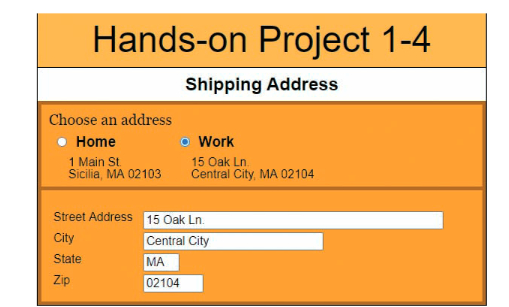
automatically fill delivery address input boxes with preassigned values using the expression:
document.getElementByIdidvalue variable;
where id is the value of the id attribute of a web form element and variable is the variable value to write
into the element. A preview of the completed project is shown in Figure
Do the following:
Use your code editor to open projecttxthtml and projecttxtjs from the js c project
folder. Enter your name and the date in the comment section of each document and save them as
projecthtml and projectjs respectively.
Go to the projectjs file in your code editor. Below the comment section declare the following variables and
initial values: homeStreet Main St homeCity Sicilia homeState MA homeCode
workStreet Oak Ln workCity Central City workState MA workCode
Close the file, saving your changes.
Go to the projecthtml file in your code editor. Directly below the closing tag insert a script
element accessing the projectjs file. Do not include the defer or async attributes so that the code in the
external file loads as the HTML is loaded.
Directly below the closing
Step by Step Solution
There are 3 Steps involved in it
1 Expert Approved Answer
Step: 1 Unlock

Question Has Been Solved by an Expert!
Get step-by-step solutions from verified subject matter experts
Step: 2 Unlock
Step: 3 Unlock
 Study Help