







Question: in this code the equation is hard coded i want to change this code like user can give any kind of equation like that:- (code
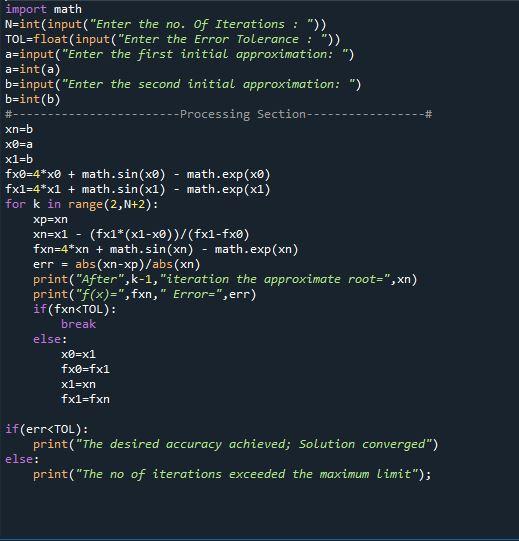
in this code the equation is hard coded i want to change this code like user can give any kind of equation like that:-
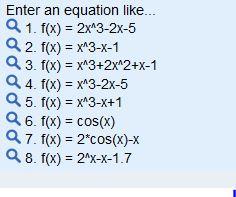
(code is the secant method.)
i want the code not suggestion do like this.
written form of code:
import math N=int(input("Enter the no. Of Iterations : ")) TOL=float(input("Enter the Error Tolerance : ")) a=input("Enter the first initial approximation: ") a=int(a) b=input("Enter the second initial approximation: ") b=int(b) #------------------------Processing Section-----------------# xn=b x0=a x1=b fx0=4*x0 + math.sin(x0) - math.exp(x0) fx1=4*x1 + math.sin(x1) - math.exp(x1) for k in range(2,N+2): xp=xn xn=x1 - (fx1*(x1-x0))/(fx1-fx0) fxn=4*xn + math.sin(xn) - math.exp(xn) err = abs(xn-xp)/abs(xn) print("After",k-1,"iteration the approximate root=",xn) print("f(x)=",fxn," Error=",err) if(fxn break else: x0=x1 fx0=fx1 x1=xn fx1=fxn
if(err print("The desired accuracy achieved; Solution converged") else: print("The no of iterations exceeded the maximum limit");
what specification u need i just want the user will give equation which is hardcoded means in program equation is already given i want changes like that.
#- import math N=int(input("Enter the no. of Iterations : ")) TOL=float(input("Enter the Error Tolerance : ")) a=input("Enter the first initial approximation:") a=int(a) b=input("Enter the second initial approximation: ") b=int(b) --Processing Section-- xn=b x@=a x1=b fx0=4*x + math.sin(x0) - math.exp(x0) fx1=4*x1 + math.sin(x1) - math.exp(x1) for k in range(2,N+2): xp=xn xn=x1 - (fx1*(x1-x))/(fx1-fxo) fxn=4*xn + math.sin(x) math.exp(xn) err = abs(xn-xp)/abs(xn) print("After", k-1, "iteration the approximate root=",xn) print("f(x)=", fxn," Error=", err) if(fxn
Step by Step Solution
There are 3 Steps involved in it

Get step-by-step solutions from verified subject matter experts
 Study Help