







Question: In this exercise, you create an application that calculates a customer's cable bill. Create a Windows Forms application. Use the following names for the project
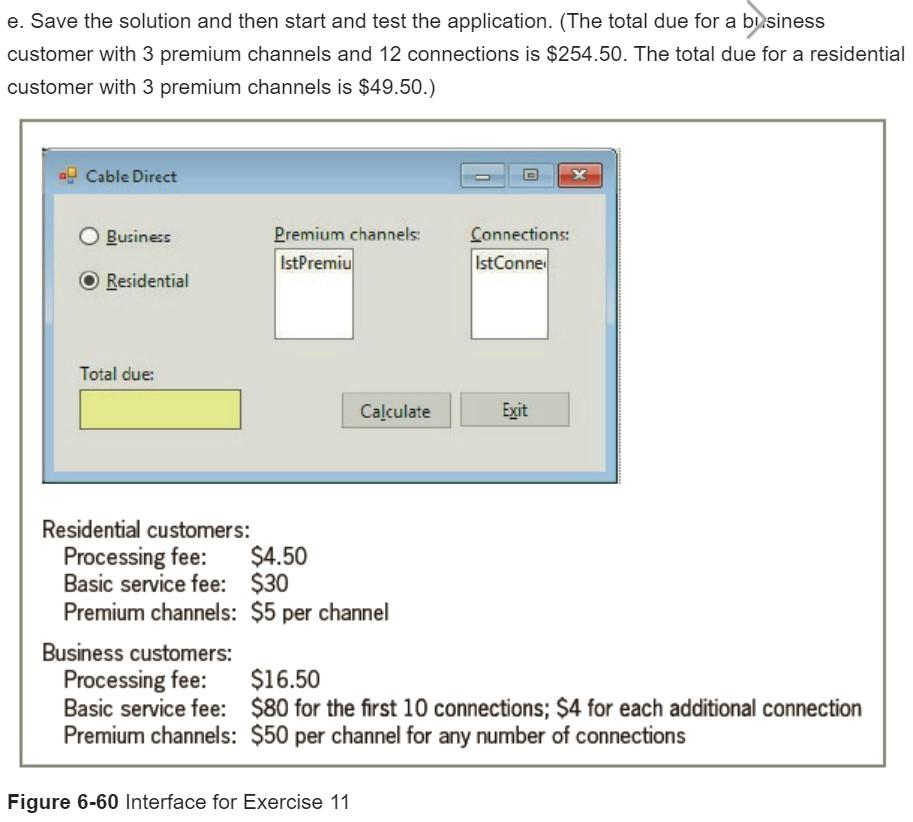
In this exercise, you create an application that calculates a customer's cable bill. Create a Windows Forms application. Use the following names for the project and solution, respectively: Cable Direct Project and Cable Direct Solution. Save the application in the VB2017\Chap06 folder. a. Create the interface shown in Figure 6-60. Display numbers from 0 through 20 in the IstPremium control. Display numbers from 0 through 100 in the IstConnections control. When the interface appears, the first item in each list box should be selected. b. The Calculate button's Click event procedure should calculate and display a customer's cable bill. The cable rates are included in Figure 6-60. Business customers must have at least one connection. Use two functions: one to calculate and return the total due for business customers, and one to calculate and return the total due for residential customers. c. The form's FormClosing event procedure should verify that the user wants to close the application. d. The total due should be cleared when a change is made to a radio button or list box. e. Save the solution and then start and test the application. (The total due for a business customer with 3 premium channels and 12 connections is $254.50. The total due for a residential customer with 3 premium channels is $49.50.) Cable Direct Business Premium channels: IstPremiu Connections: IstConne Residential Total due Calculate Exit Residential customers: Processing fee: $4.50 Basic service fee: $30 Premium channels: $5 per channel Business customers: Processing fee: $16.50 Basic service fee: $80 for the first 10 connections; $4 for each additional connection Premium channels: $50 per channel for any number of connections Figure 6-60 Interface for Exercise 11
Step by Step Solution
There are 3 Steps involved in it

Get step-by-step solutions from verified subject matter experts
 Study Help