







Question: In this exercise, you modify the highest number program from the chapter. If necessary, create a new project named ModifyThis20 Project and save it in
In this exercise, you modify the highest number program from the chapter. If necessary, create a new project named ModifyThis20 Project and save it in the Cpp8\Chap11 folder. Enter the C++ instructions shown earlier in Figure 11-27 into a new source file named ModifyThis20.cpp. Change the filename in the first comment to ModifyThis20.cpp. Modify the program to also display the lowest number in the array. Use a value-returning function named get Lowest. Save and then run the program. Test the program appropriately.
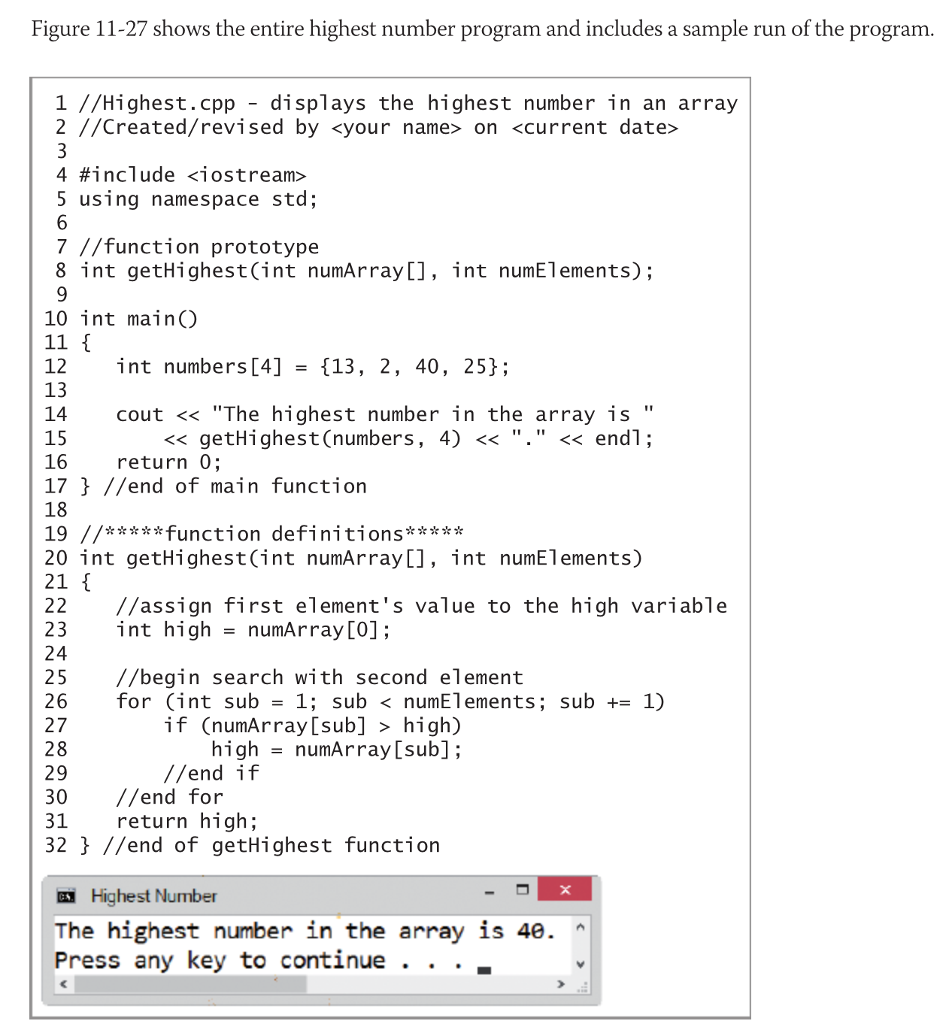
Figure 11-27 shows the entire highest number program and includes a sample run of the program 1 //Highest.cpp - displays the highest number in an array 2 //Created/revised by
Step by Step Solution
There are 3 Steps involved in it

Get step-by-step solutions from verified subject matter experts
 Study Help