







Question: In this exercise you will create a Visual C# program using a windows forms app, you will use nested if statements and arithmetic expressions to
In this exercise you will create a Visual C# program using a windows forms app, you will use nested if statements and arithmetic expressions to calculate the federal income tax that is owed for a taxable income amount entered by the user.
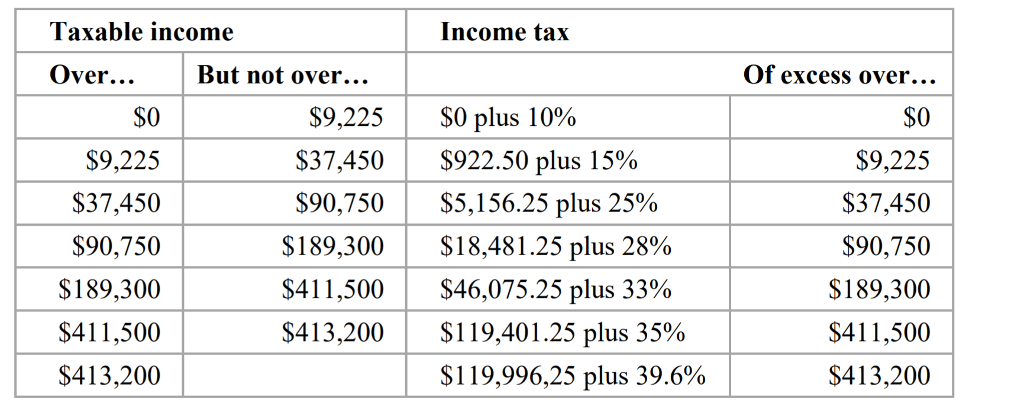
This is the 2015 table for the federal income tax on individuals that you should use for calculating the tax:
1. Start a new project named TaxCalculator.
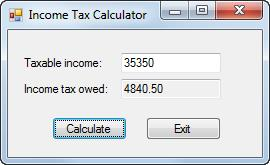
2. Add labels, text boxes, and buttons to the default form and set the properties of the form and its controls so they appear as shown above. When the user presses the Enter key, the Click event of the Calculate button should fire. When the user presses the Esc key, the Click event of the Exit button should fire.
3. Create an event handler for the Click event of the Exit button that closes the form.
4. Create an event handler for the Click event of the Calculate button. Then, write the code for calculating and displaying the tax owed for any amount within the first two brackets in the table above. This code should provide for decimal entries, but you can assume that the user will enter valid decimal values. To test this code, use income values of 8700 and 35350, which should display taxable amounts of 870 and 4840.50.
5. Add the code for the next tax bracket. Then, if you have the time, add the code for the remaining tax brackets.
Income Tax Calculator | Taxable income: 35350 Income tax owed: 4840.50 Calculate Exit
Step by Step Solution
There are 3 Steps involved in it

Get step-by-step solutions from verified subject matter experts
 Study Help