







Question: In this exercise, you will create two users and a role. You will grant privileges directly to the first user, but you will grant
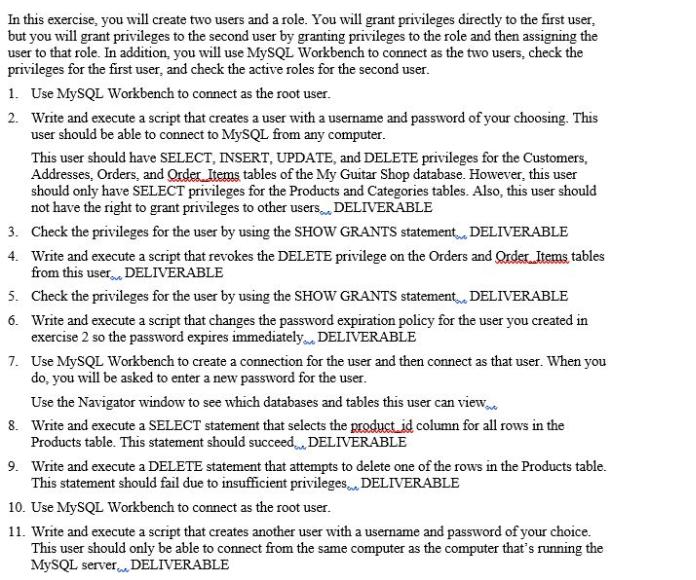
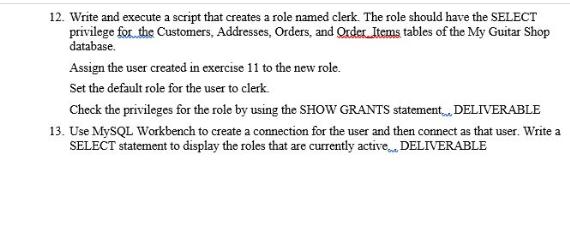
In this exercise, you will create two users and a role. You will grant privileges directly to the first user, but you will grant privileges to the second user by granting privileges to the role and then assigning the user to that role. In addition, you will use MySQL Workbench to connect as the two users, check the privileges for the first user, and check the active roles for the second user. 1. Use MySQL Workbench to connect as the root user. 2. Write and execute a script that creates a user with a username and password of your choosing. This user should be able to connect to MySQL from any computer. This user should have SELECT, INSERT, UPDATE, and DELETE privileges for the Customers, Addresses, Orders, and Order Items tables of the My Guitar Shop database. However, this user should only have SELECT privileges for the Products and Categories tables. Also, this user should not have the right to grant privileges to other users. DELIVERABLE 3. Check the privileges for the user by using the SHOW GRANTS statement DELIVERABLE 4. Write and execute a script that revokes the DELETE privilege on the Orders and Order Items tables from this user DELIVERABLE 5. Check the privileges for the user by using the SHOW GRANTS statement DELIVERABLE 6. Write and execute a script that changes the password expiration policy for the user you created in exercise 2 so the password expires immediately... DELIVERABLE 7. Use MySQL Workbench to create a connection for the user and then connect as that user. When you do, you will be asked to enter a new password for the user. Use the Navigator window to see which databases and tables this user can view 8. Write and execute a SELECT statement that selects the product_id column for all rows in the Products table. This statement should succeed. DELIVERABLE 9. Write and execute a DELETE statement that attempts to delete one of the rows in the Products table. This statement should fail due to insufficient privileges... DELIVERABLE 10. Use MySQL Workbench to connect as the root user. 11. Write and execute a script that creates another user with a username and password of your choice. This user should only be able to connect from the same computer as the computer that's running the MySQL server DELIVERABLE 12. Write and execute a script that creates a role named clerk. The role should have the SELECT privilege for the Customers, Addresses, Orders, and Order Items tables of the My Guitar Shop database. Assign the user created in exercise 11 to the new role. Set the default role for the user to clerk. Check the privileges for the role by using the SHOW GRANTS statement DELIVERABLE 13. Use MySQL Workbench to create a connection for the user and then connect as that user. Write a SELECT statement to display the roles that are currently active..., DELIVERABLE
Step by Step Solution
There are 3 Steps involved in it

Get step-by-step solutions from verified subject matter experts
 Study Help