







Question: In this exercise, youll improve the Number Guessing Game. Modify the loop statement 1. Open the project named ch08_ex3_GuessingGame in the extra_ex_starts directory. 2. Open
In this exercise, youll improve the Number Guessing Game.
Modify the loop statement
1. Open the project named ch08_ex3_GuessingGame in the extra_ex_starts directory.
2. Open the Main class. Modify the loop that prompts the user for a number so that its an infinite while loop. When you do that, you only need to code the two statements that get input from the user at the top of the loop.
3. Modify the if/else statement so it uses a break statement to jump out of the loop if the user guesses the correct number.
4. Run the application to make sure it works correctly.
Add some if/else statements
5. Within the loop, modify the if/else statement so the application says, "Way too high!" if the users guess is more than 10 higher than the random number. Otherwise, the application should just say, Your guess is too high.
6. After the loop, add an if/else statement that displays a message that depends on the users number of guesses. For example:
7. Run the application to make sure it works correctly.
Add a try/catch statement to get a valid integer
8. In the Main class, add a try/catch statement so it catches the NumberFormatException thats thrown by the parseInt method. If this exception is thrown, display a message to the console that says, Invalid number and jump to the top of the loop. This should prompt the user to enter the number again.
9. Run the application to make sure it works correctly.
Add an if/else statement to make sure the integer is within a range
10. Add an if/else statement to make sure the user enters a value between the minimum and maximum values. If the user enters a value thats less than or equal to 0, display a user-friendly error message and jump to the top of the loop. Conversely, if the user enters a value thats greater than or equal to the games upper limit, display a user-friendly error message and jump to the top of the loop.
11. Run the application to make sure it works correctly
Code:
Main.java
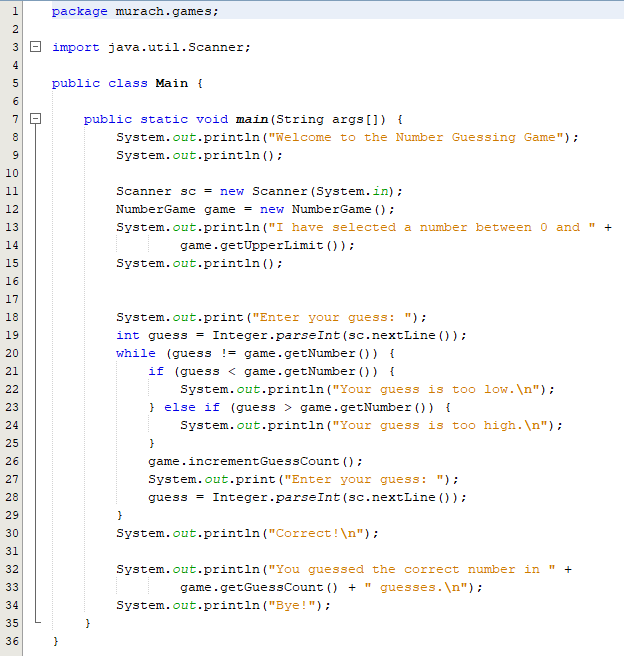
package murach.games;
import java.util.Scanner;
public class Main {
public static void main(String args[]) { System.out.println("Welcome to the Number Guessing Game"); System.out.println();
Scanner sc = new Scanner(System.in); NumberGame game = new NumberGame(); System.out.println("I have selected a number between 0 and " + game.getUpperLimit()); System.out.println(); System.out.print("Enter your guess: "); int guess = Integer.parseInt(sc.nextLine()); while (guess != game.getNumber()) { if (guess game.getNumber()) { System.out.println("Your guess is too high. "); } game.incrementGuessCount(); System.out.print("Enter your guess: "); guess = Integer.parseInt(sc.nextLine()); } System.out.println("Correct! "); System.out.println("You guessed the correct number in " + game.getGuessCount() + " guesses. "); System.out.println("Bye!"); } }
NumberGame.java:
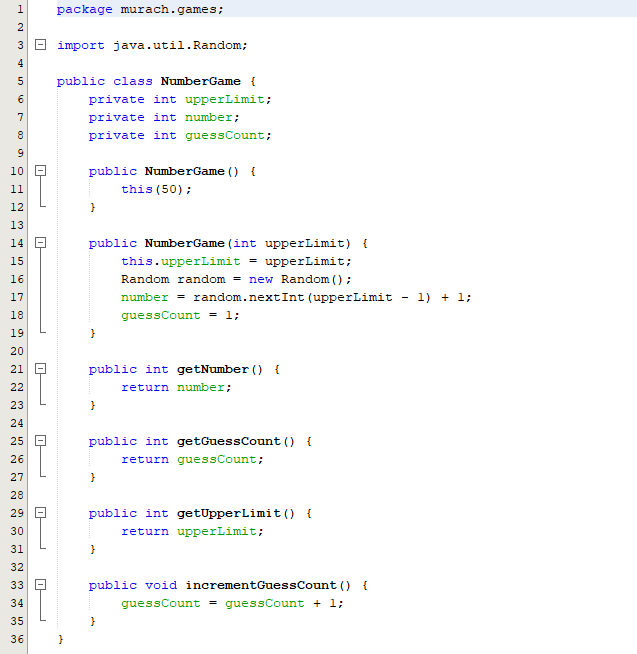
package murach.games;
import java.util.Random;
public class NumberGame { private int upperLimit; private int number; private int guessCount; public NumberGame() { this(50); } public NumberGame(int upperLimit) { this.upperLimit = upperLimit; Random random = new Random(); number = random.nextInt(upperLimit - 1) + 1; guessCount = 1; }
public int getNumber() { return number; }
public int getGuessCount() { return guessCount; } public int getUpperLimit() { return upperLimit; } public void incrementGuessCount() { guessCount = guessCount + 1; } }
Need this as soon as possible. Thanks so much guys!
Number of guesses Message 3 and >7 Great work! You are a mathematical wizard. Not too bad! You've got some potential What took you so long? Maybe you should take some lessons 3 and >7 Great work! You are a mathematical wizard. Not too bad! You've got some potential What took you so long? Maybe you should take some lessons
Step by Step Solution
There are 3 Steps involved in it
To correct the code based on the rejection reason adjust the feedback messages related to the number ... View full answer

Get step-by-step solutions from verified subject matter experts
 Study Help