







Question: In this exercise, youll work with an array and youll add nodes to the DOM to display the Results and the Scores. Then, run the
In this exercise, youll work with an array and youll add nodes to the DOM to display the Results and the Scores.
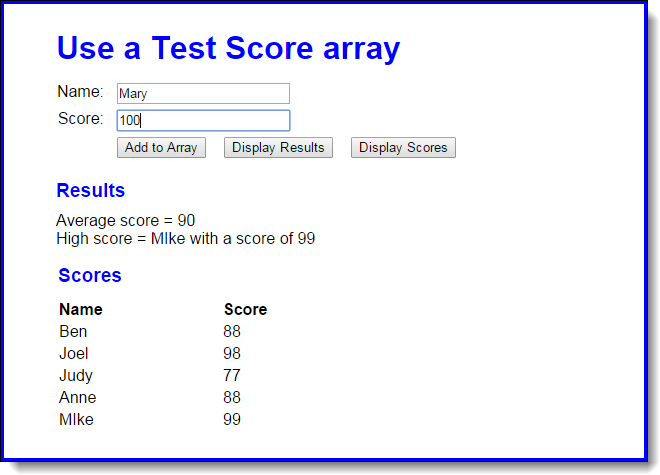
Then, run the application to see the user interface shown above, although that interface wont do anything until you develop the JavaScript for it.
As the start of the JavaScript file, youll see the declarations for two arrays: one for names and one for scores, and each array contains four elements. Youll also see the code for the $ function as well as an onload event handler that attaches three functions name addScore, displayResults, and displayScores to the click events of the buttons.
Write the displayResults function. It should derive the average score and the highest score from the arrays and then display the results in the div element with results as its id, as shown above. To display the results, you need to add nodes to the DOM with the heading as an h2 element and the average and highest scores as
elements. The easiest way to do that is to use the innerHTML property as shown in figure 5-14.
I did everything I was supposed to do but the problem is when I enter mike score as 99 I don't get the above results.
HTML file
Use a Test Score array
CSS file
body {
font-family: Arial, Helvetica, sans-serif;
background-color: white;
margin: 0 auto;
padding: 10px 20px;
width: 600px;
border: 3px solid blue;
}
h1 {
color: blue;
margin-top: 0;
margin-bottom: .5em;
}
h2 {
color: blue;
font-size: 120%;
padding: 0;
margin-bottom: .5em;
}
main {
padding: 1em 2em;
}
label {
float: left;
width: 3em;
text-align: right;
}
input {
margin-left: 1em;
margin-bottom: .5em;
}
p {
margin: 0;
}
td {
width: 10em;
}
Javascript file
var names = ["Ben", "Joel", "Judy", "Anne"]; var scores = [88, 98, 77, 88]; var n=4; var size=10; var $ = function (id) { return document.getElementById(id); };
function addScore() { var name=$('name').value; var score=$('score').value; if(name=="" || score=="" || isNaN(score))alert("Invalid data "); else if(n scores[0]) { h=scores[z]; name=names[z] } avg=avg+scores[z]; } avg=avg; var con="Results Average Score= "+avg+" High Score = "+name+" with a score of "+h; $('results').innerHTML=con; } function displayScores() { var con="
Scores
"; for(z=0;z window.onload = function () { $("add").onclick = addScore; $("display_results").onclick = displayResults; $("display_scores").onclick = displayScores; }; "+names[z]+" "+scores[z]+" " } $('scores_table').innerHTML=con; }
Step by Step Solution
There are 3 Steps involved in it

Get step-by-step solutions from verified subject matter experts
 Study Help