







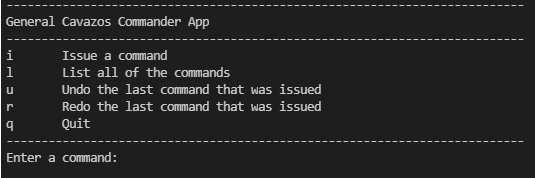
Question: In this Java example code, how do I get this menu to display and function based on user commands? The screenshot shows how the menu
In this Java example code, how do I get this menu to display and function based on user commands?
The screenshot shows how the menu should be formatted, and the goal is so that the program can accept and respond accordingly to each command. This is the example code I have so far:
package com.app;
import java.util.Random;
import org.json.simple.JSONArray;
public class CavazosExample
public static void mainString args
String fileName
UsersenvyiDocumentsGitHubGeneralCavazosAppcavazosappsrcmainjavacomappcommandsjson";
read commands
JSONArray commandJSONArray JSONFile.readArrayfileName;
String commandArray getCommandArraycommandJSONArray;
System.out.printlncommandArray;
print list of all commands
System.out.println List of all commands ;
printcommandArray;
System.out.println
Issuing random commands from General Cavazos
;
randomCommandcommandArray;
randomly issue commands from General Cavazos
public static void randomCommandString commandArray, int numCommand
Random rand new Random;
System.out.printfNumbertCommand
;
System.out.printft
;
for int i ; i numCommand; i
int randIndex rand.nextIntcommandArraylength;
System.out.printfdts
i commandArrayrandIndex;
print command array
public static void printString commandArray
System.out.printfNumbertCommand
;
System.out.printft
;
for int i ; i commandArray.length; i
System.out.printfdts
i commandArrayi;
get array of commands
public static String getCommandArrayJSONArray commandArray
String arr new StringcommandArraysize;
get names from json object
for int i ; i commandArray.size; i
String command commandArray.getitoString;
arri command;
return arr;
General Cavazos Commander App
Issue a command
List all of the commands
Undo the last command that was issued
Redo the last command that was issued
Quit
Enter a command:
Step by Step Solution
There are 3 Steps involved in it
1 Expert Approved Answer
Step: 1 Unlock

Question Has Been Solved by an Expert!
Get step-by-step solutions from verified subject matter experts
Step: 2 Unlock
Step: 3 Unlock
 Study Help