







Question: In this lab, we will learn to: Use lists to store data Import modules Read from and write to files Call functions with arguments Implement
In this lab, we will learn to:
Use lists to store data
Import modules
Read from and write to files
Call functions with arguments
Implement algorithms to compute statistics
Start by downloading DayFruitData.txt from DL Next you will need to create two files. The names should be
FirstNameLastNameMyProgram.py
FirstNameLastNameStats.py
In FirstNameLastNameStats.py create two functions named Mean and Median that calculate the mean and median, respectively. Each one should accept a list of numbers as an argument and return a single number.
Your FirstNameLastNameMyProgram.py should
Get the information from the DayFruitData.txt file.
Use the functions defined in FirstNameLastNameStats.py to calculate
The mean number of apples eaten. Only include days were apples were eaten
The median number of apples eaten. Only include days were apples were eaten
You don't need to make any calculations for bananas or strawberries.
Output the mean and median values to a file named FirstNameLastNameOutput.txt
You should get the following
tableMattPriemoutput.btNotepadFile Edit Format View HelpThe mean number of apples eaten is The median number of apples eaten is tableLn Col Windows CRLFUTF
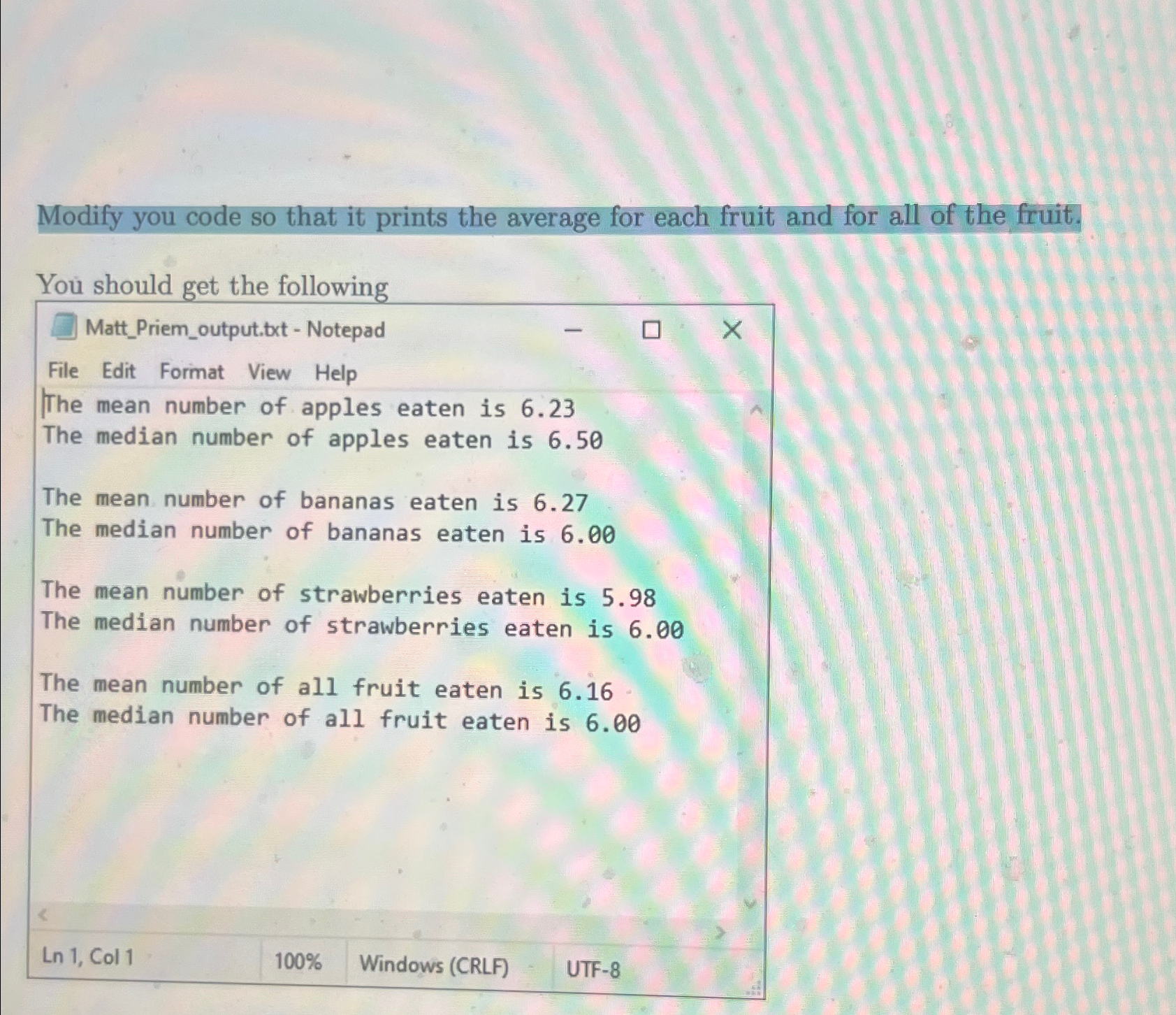
Modify you code so that it prints the average for each fruit and for all of the fruit.
You should get the following
tableMattPriemoutput.txt NotepadFile Edit Format View HelpThe mean number of apples eaten is The median number of apples eaten is The mean number of bananas eaten is The median number of bananas eaten is The mean number of strawberries eaten is The median number of strawberries eaten is The mean number of all fruit eaten is The median number of all fruit eaten is Ln Col Windows CRLF
Step by Step Solution
There are 3 Steps involved in it
1 Expert Approved Answer
Step: 1 Unlock

Question Has Been Solved by an Expert!
Get step-by-step solutions from verified subject matter experts
Step: 2 Unlock
Step: 3 Unlock
 Study Help