







Question: In this lab you need to write a MIPS program to count the number of occurrences of an integer X in a string of integers
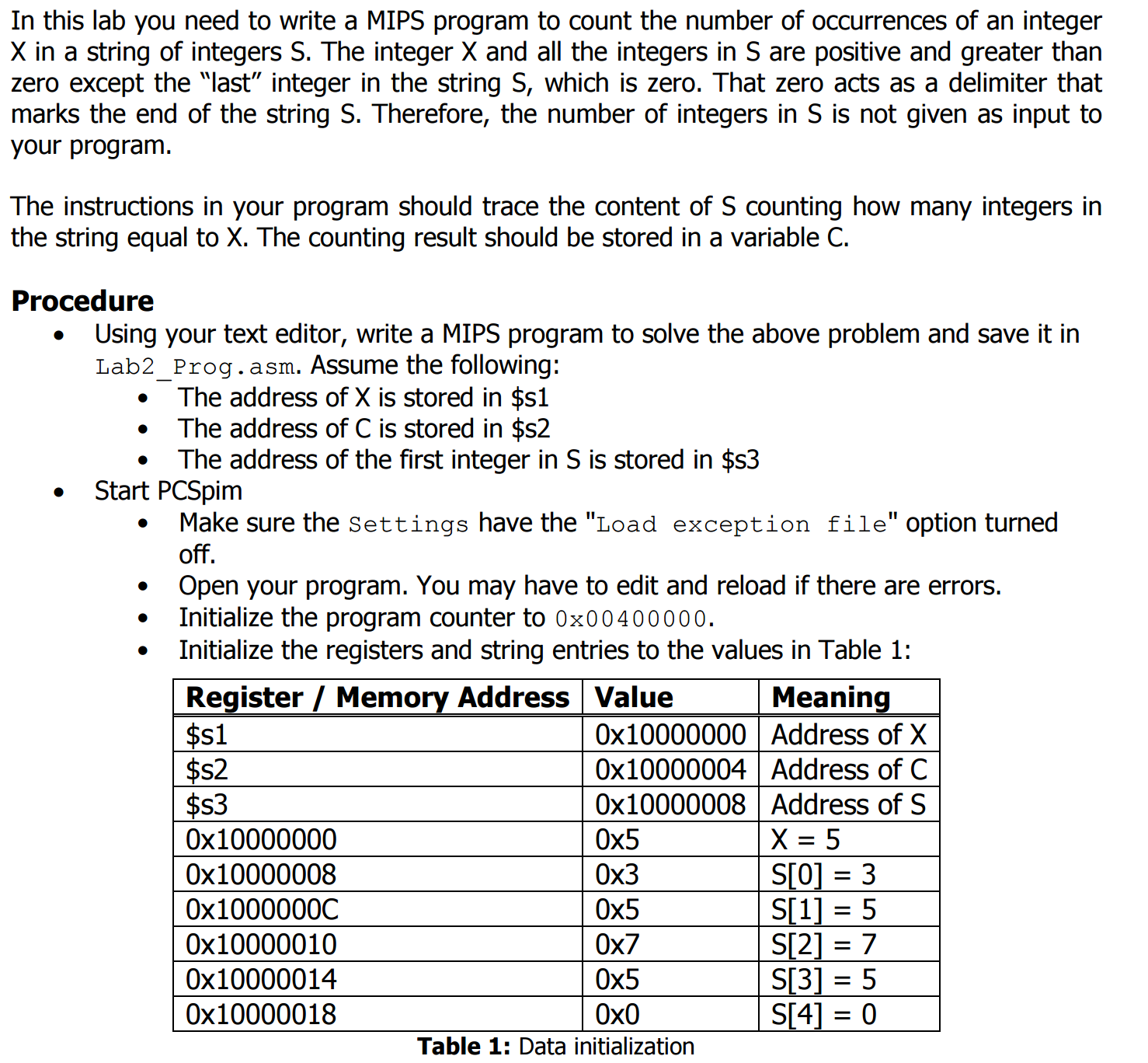
In this lab you need to write a MIPS program to count the number of occurrences of an integer X in a string of integers S. The integer X and all the integers in S are positive and greater than zero except the "last" integer in the string S, which is zero. That zero acts as a delimiter that marks the end of the string S. Therefore, the number of integers in S is not given as input to your program. The instructions in your program should trace the content of S counting how many integers in the string equal to X. The counting result should be stored in a variable C. Using your text editor, write a MIPS program to solve the above problem and save it in Lab2_Prog. asm. Assume the following: The address of X is stored in $sl The address of C is stored in $s2 The address of the first integer in S is stored in $s3 Make sure the Settings have the "Load exception file" option turned off. Start PCSpim Open your program. You may have to edit and reload if there are errors. Initialize the program counter to 0x00 4 00 000. Initialize the registers and string entries to the values in Table 1: In this lab you need to write a MIPS program to count the number of occurrences of an integer X in a string of integers S. The integer X and all the integers in S are positive and greater than zero except the "last" integer in the string S, which is zero. That zero acts as a delimiter that marks the end of the string S. Therefore, the number of integers in S is not given as input to your program. The instructions in your program should trace the content of S counting how many integers in the string equal to X. The counting result should be stored in a variable C. Using your text editor, write a MIPS program to solve the above problem and save it in Lab2_Prog. asm. Assume the following: The address of X is stored in $sl The address of C is stored in $s2 The address of the first integer in S is stored in $s3 Make sure the Settings have the "Load exception file" option turned off. Start PCSpim Open your program. You may have to edit and reload if there are errors. Initialize the program counter to 0x00 4 00 000. Initialize the registers and string entries to the values in Table 1
Step by Step Solution
There are 3 Steps involved in it

Get step-by-step solutions from verified subject matter experts
 Study Help