







Question: In this lab you will be creating a prefix calculator. The user will enter an expression in prefix form and your program will calculate and
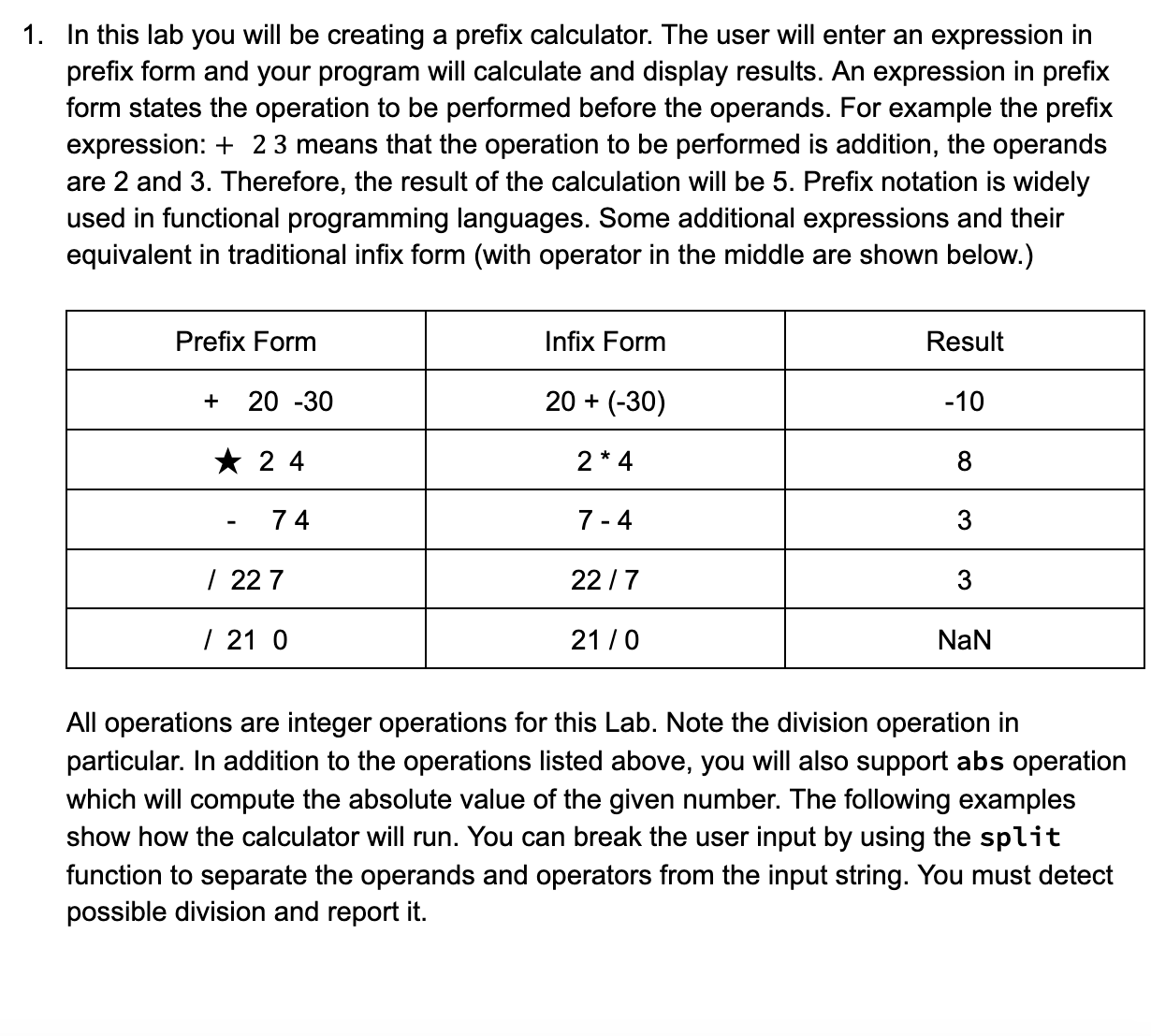
In this lab you will be creating a prefix calculator. The user will enter an expression in prefix form and your program will calculate and display results. An expression in prefix form states the operation to be performed before the operands. For example the prefix expression: means that the operation to be performed is addition, the operands are and Therefore, the result of the calculation will be Prefix notation is widely used in functional programming languages. Some additional expressions and their equivalent in traditional infix form with operator in the middle are shown below.
Prefix Form
Infix Form
Result
NaN
All operations are integer operations for this Lab. Note the division operation in particular. In addition to the operations listed above, you will also support abs operation which will compute the absolute value of the given number. The following examples show how the calculator will run. You can break the user input by using the split function to separate the operands and operators from the input string. You must detect possible division and report itIn this lab you will be creating a prefix calculator. The user will enter an expression in prefix form and your program will calculate and display results. An expression in prefix form states the operation to be performed before the operands. For example the prefix expression: means that the operation to be performed is addition, the operands are and Therefore, the result of the calculation will be Prefix notation is widely used in functional programming languages. Some additional expressions and their equivalent in traditional infix form with operator in the middle are shown below.
tablePrefix Form,Infix Form,Result
All operations are integer operations for this Lab. Note the division operation in particular. In addition to the operations listed above, you will also support abs operation which will compute the absolute value of the given number. The following examples show how the calculator will run. You can break the user input by using the split function to separate the operands and operators from the input string. You must detect possible division and report it
Step by Step Solution
There are 3 Steps involved in it
1 Expert Approved Answer
Step: 1 Unlock

Question Has Been Solved by an Expert!
Get step-by-step solutions from verified subject matter experts
Step: 2 Unlock
Step: 3 Unlock
 Study Help