







Question: In this lab, you will create a program that uses methods to graph a quadratic equation using the GDIDrawer. The program will plot a graph
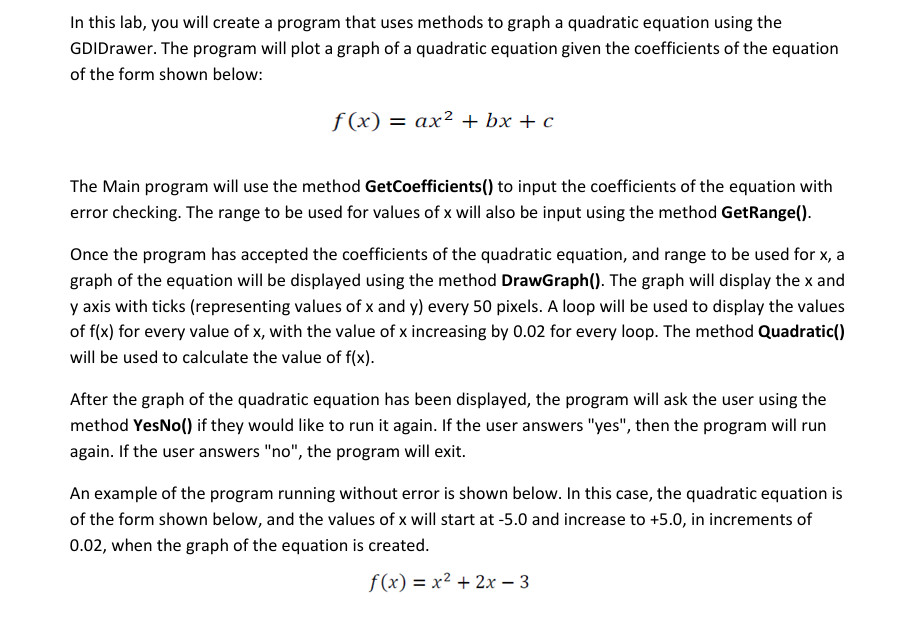
In this lab, you will create a program that uses methods to graph a quadratic equation using the GDIDrawer. The program will plot a graph of a quadratic equation given the coefficients of the equation of the form shown below:
fxa xb xc
The Main program will use the method GetCoefficients to input the coefficients of the equation with error checking. The range to be used for values of x will also be input using the method GetRange
Once the program has accepted the coefficients of the quadratic equation, and range to be used for x a graph of the equation will be displayed using the method DrawGraph The graph will display the x and y axis with ticks representing values of x and y every pixels. A loop will be used to display the values of fx for every value of x with the value of x increasing by for every loop. The method Quadratic will be used to calculate the value of fx
After the graph of the quadratic equation has been displayed, the program will ask the user using the method YesNo if they would like to run it again. If the user answers "yes", then the program will run again. If the user answers no the program will exit.
An example of the program running without error is shown below. In this case, the quadratic equation is of the form shown below, and the values of x will start at and increase to in increments of when the graph of the equation is created.
fxx x
Step by Step Solution
There are 3 Steps involved in it
1 Expert Approved Answer
Step: 1 Unlock

Question Has Been Solved by an Expert!
Get step-by-step solutions from verified subject matter experts
Step: 2 Unlock
Step: 3 Unlock
 Study Help