





Question: In this lab you will use the Tone js (https:/tonejs.github.io) library to synthesize and play some basic audio signals on a web page. This lab
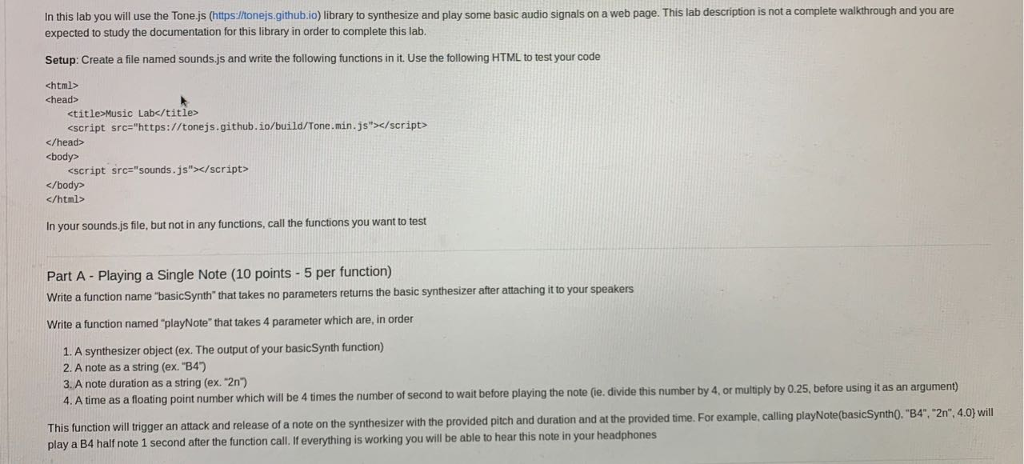
 In this lab you will use the Tone js (https:/tonejs.github.io) libraryto synthesize and play some basic audio signals on a web page.

In this lab you will use the Tone js (https:/tonejs.github.io) library to synthesize and play some basic audio signals on a web page. This lab description is not a complete walkthrough and you are expected to study the documentation for this library in order to complete this lab. Setup: Create a file named sounds.js and write the following functions in it. Use the following HTML to test your code chead>

<script src io> /head> body> sscript sre"sounds. js"/script> c/htnl> In your soundsjs file, but not in any functions, call the functions you want to test Part A - Playing a Single Note (10 points -5 per function) Write a function name 'basicSynth" that takes no parameters returns the basic synthesizer after attaching it to your speakers Write a function named "playNote" that takes 4 parameter which are, in order 1. A synthesizer object (ex. The output of your basicSynth tunction) 2. A note as a string (ex. "B4) 3. A note duration as a string (ex. "2n') 4. A time as a floating point number which will be 4 times the number of second to wait before playing the note (le. divide this number by 4, or multply by 0.25, before using it as an argument) This function will trigger an attack and release of a note on the synthesizer with the provided pitch and duration and at the pr play a B4 half note 1 second after the function call. I everything is working you will be able to hear this note in your headphones of a note on the synthesizer with the provided pitch and duration and at the provided time. For example,calling playNote(basicSyntho. "B4. 2nt , 4.0) will</script>

Step by Step Solution

There are 3 Steps involved in it

1 Expert Approved Answer
Step: 1 Unlock blur-text-image

Question Has Been Solved by an Expert!

Get step-by-step solutions from verified subject matter experts

Step: 2 Unlock
Step: 3 Unlock

Students Have Also Explored These Related Databases Questions!