







Question: In this lab you will write a JAVA program that will simulate an operating systems job scheduling policy to determine which process will be assigned
In this lab you will write a JAVA program that will simulate an operating systems job scheduling policy to determine which process will be assigned the CPU when it becomes available. We will utilize a system of queues to simulate a sophisticated job scheduling mechanism, the multi-level feedback queue (MFQ).
The input to this simulation will consist of job requests, each composed of three elements: -Arrival time Time job is initially submitted to the pattern -Process identifier (pid) Identifies each process as it travels through the system -CPU time CPU time required by the process to complete its job
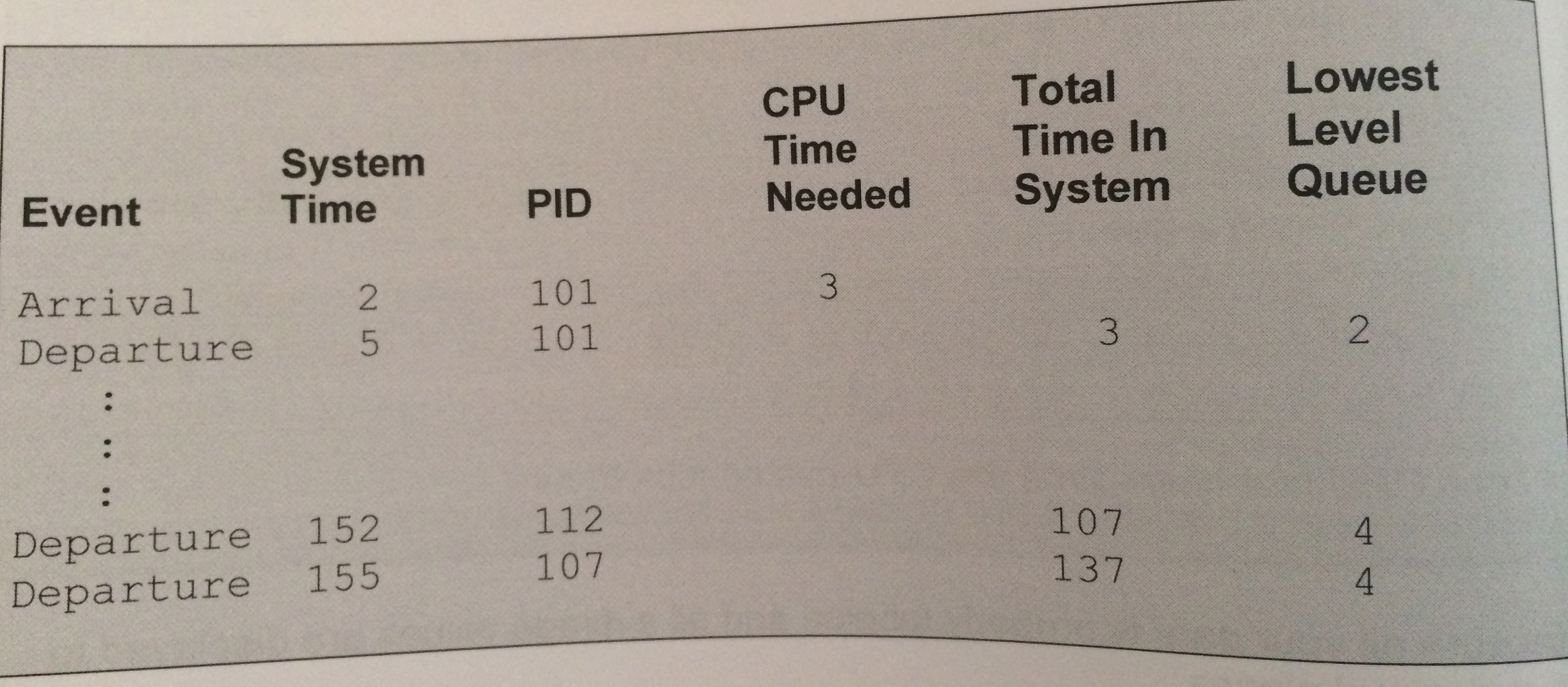
The output, displayed in a tabular format, should include a table entry each time a job enters the system indicating the: -Event -System time-Processor identifier (pid) CPU time needed
When a process completes and leaves the system, an appropriate tabel entery should be output to indicate the: -Event -System time -Process identifier (pid) -Total time in the system -Identity of the lowest-level queue in which the process resided
Be sure the program sends the output to a file called csis.txt.
When the simulation is complete, you should also output the following: -Total number of jobs -Total time of all jobs in system sum of the time each job is in the system -Average response time where response time is defines as the interval from the time a process enters the system to the time of first response, or the time it starts running -Average turnaround time for the jobs where turnaround time is defined as the interval from the time a process enters the system to the time of its completion -Average waiting time where waiting is the amount of time that a process is kept waiting in a queue -Average throughout for the system as a whole the number of jobs divided by the sum of total time of all jobs in the system -Total CPU idle time time the CPU has no jobs to run
Be sure all your data is properly labeled and all average values are displaed to two decimal places. If possible, display a visual display of the simulation.
Here is the data set, mfq.txt which your program should run on: ArrialTime Process ID CPU Time 2 101 3
7 102 1
9 103 7
12 104 5
14 105 1
17 106 1
18 107 50
24 108 2
34 109 12
37 110 3
44 111 10
45 112 48
50 113 1
56 114 1
71 115 3
81 116 2
Here are the first and last couple of lines of output your program should generate:
Note: Classes
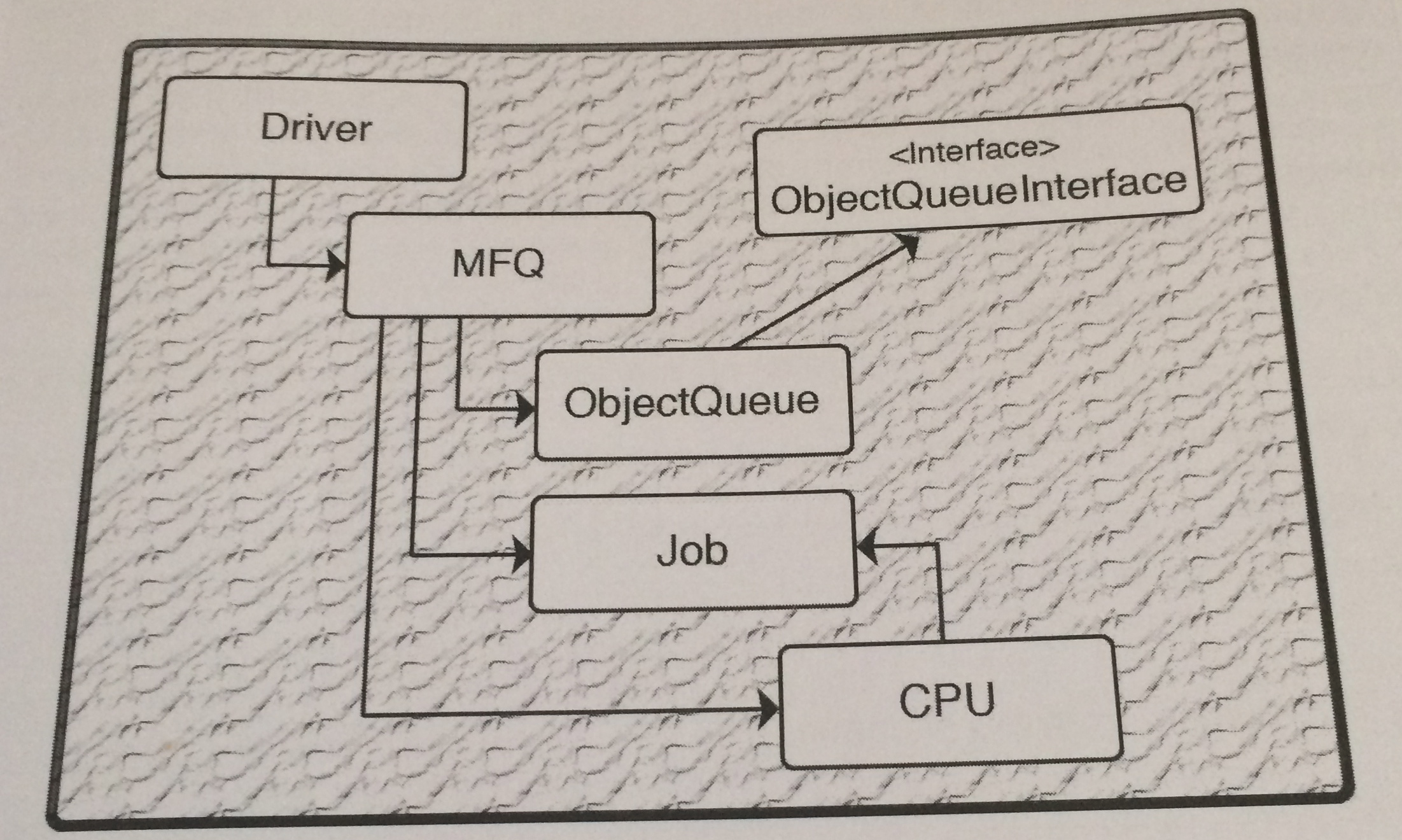
You should use at least the following classes in the lab: Driver Job MFQ CPU ObjectQueue
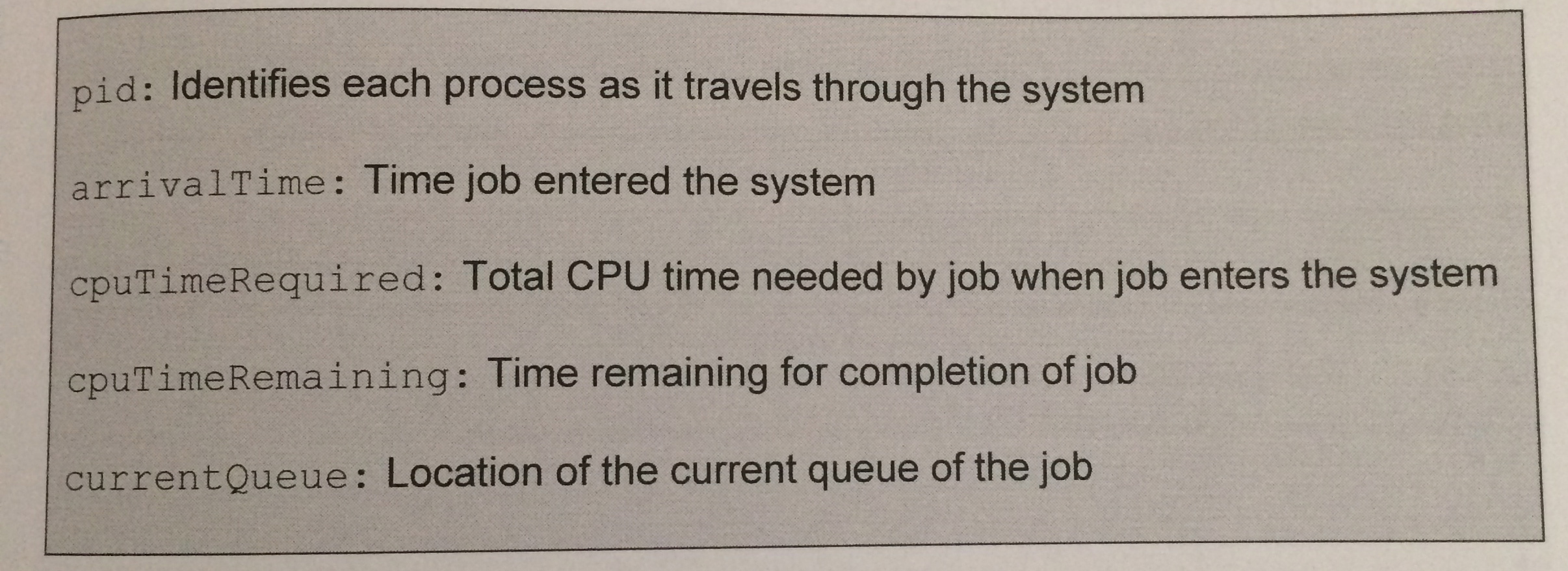
Note: Job class The job class should include these variables:
Note: CPU class
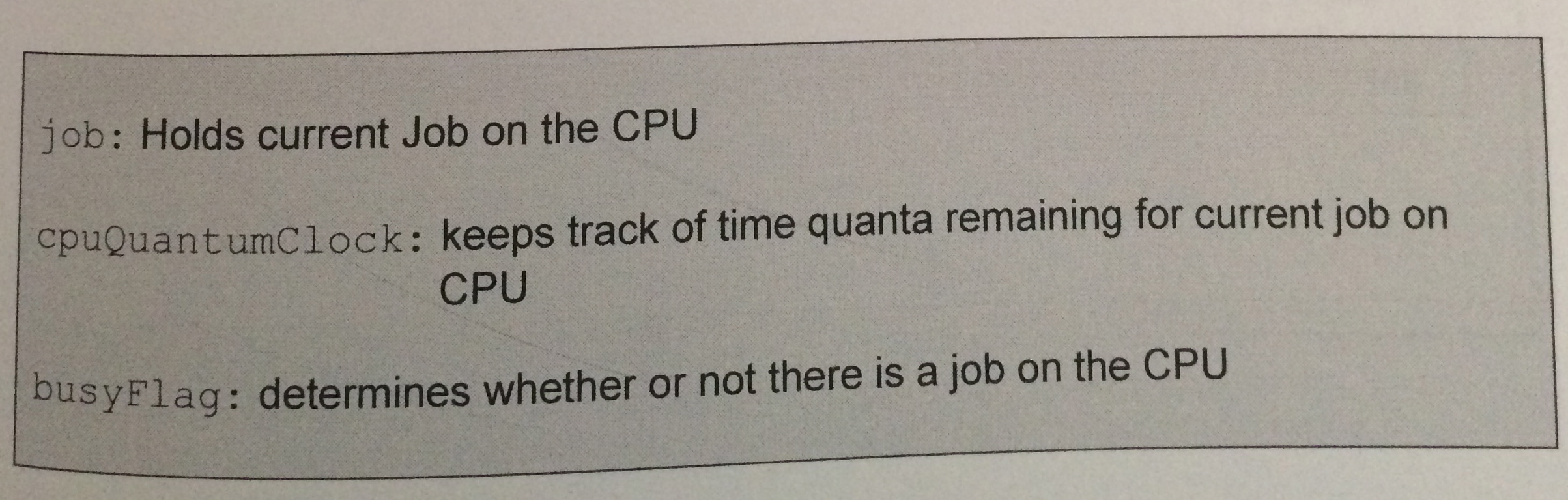
The CPU class should include these variables:
Note: Driver class Please use this driver class: //Driver Import java.io*; public class Driver{ public static void(String []args) throws IOException{ PrintWriter pw = new PrintWriter(new FileWriter("csis.txt")); MFQ mfq = new MFQ(pw); mfq.getJobs(); mfq.outputHeader(); mfq.runSimulation(); mfq.outStats(); pw.close(); } }
Note: ObjectQueue class Here is an ObjectQueue class you may use if it works with your program, however, it is optional. //ObjectQueue.java
public class ObjectQueue { private Object[] item; private int front; private int rear; private int count;
public ObjectQueue() { item = new Object[1]; front = 0; rear = -1; count = 0; }
public boolean isEmpty() { return count == 0; } public boolean isFull() { return count == item.length; } public void clear() { item = new Object[1]; front = 0; rear = -1; count = 0; } public void insert(Object o) { if (isFull()) resize(2 * item.length); rear = (rear+1) % item.length; item[rear] = o; ++count; }
public Object remove() { if (isEmpty()) { System.out.println("Queue Underflow"); System.exit(1); } Object temp = item[front]; item[front] = null; front = (front+1) % item.length; --count; if (count == item.length/4 && item.length != 1) resize(item.length/2); return temp; } public Object query() { if (isEmpty()) { System.out.println("Queue Underflow"); System.exit(1); } return item[front]; }
private void resize(int size) { Object[] temp = new Object[size]; for (int i = 0; i
Note: Input Queue Along with the four queues that you will be using for this lab, I would also recommend creating an input queue. Before the lab simulation begins, read each line of input from mfq.txt, insert data into a newly created Job object, and then insert the Job object at the front of the queue to determine whether or not its time for the Job object at the front of the input queue to determine whether or not its time for the Job object to enter the simulation, i.e., is the system time equal to the arrival time of the Job object at the front of the queue?
Here is a diagram as well:
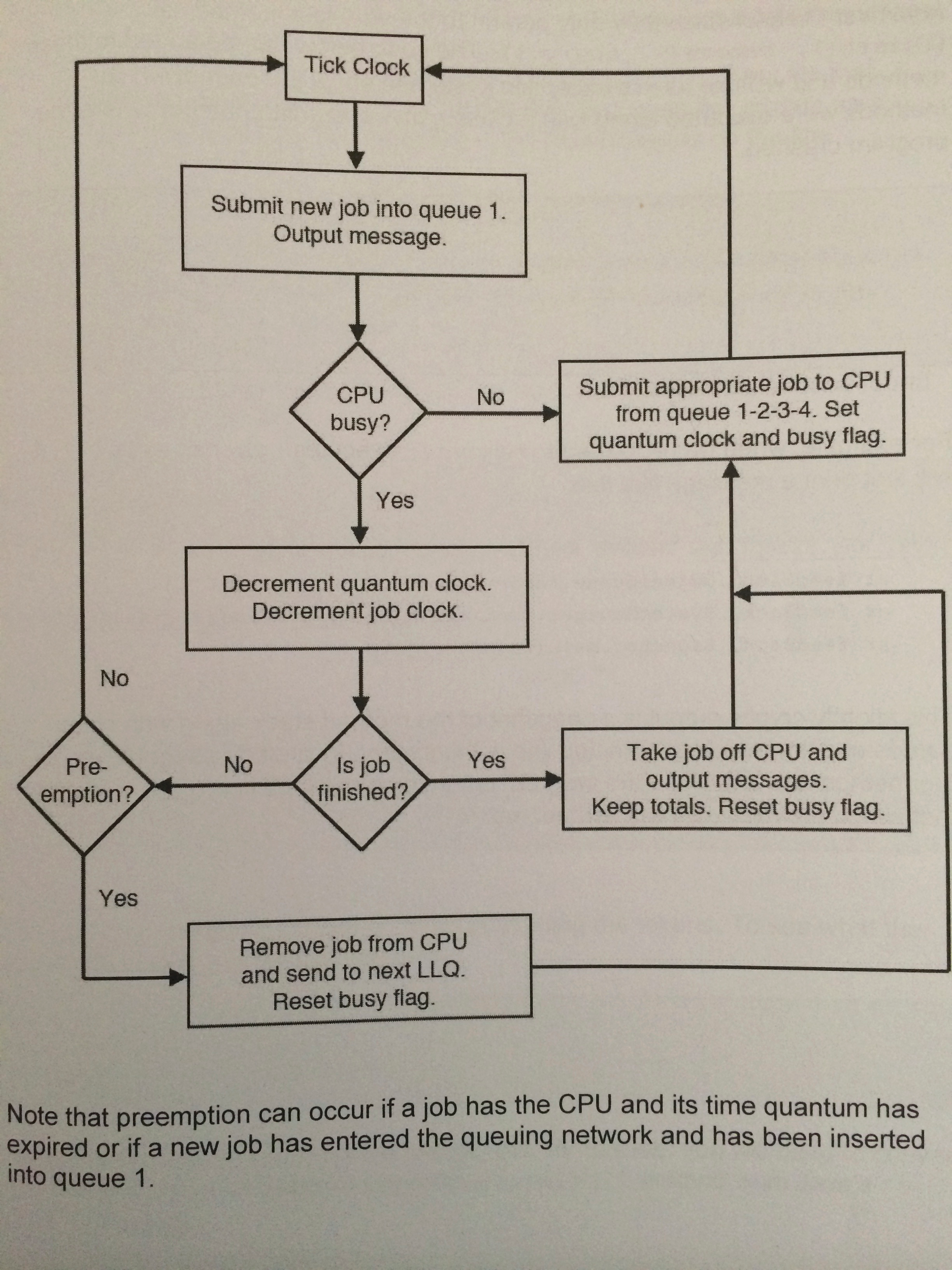
Also a flowchart:
Step by Step Solution
There are 3 Steps involved in it

Get step-by-step solutions from verified subject matter experts
 Study Help