







Question: In this problem, youill be introduced to pygames-a nice module that has features to make games. The code we're giving has a bouncing square. When
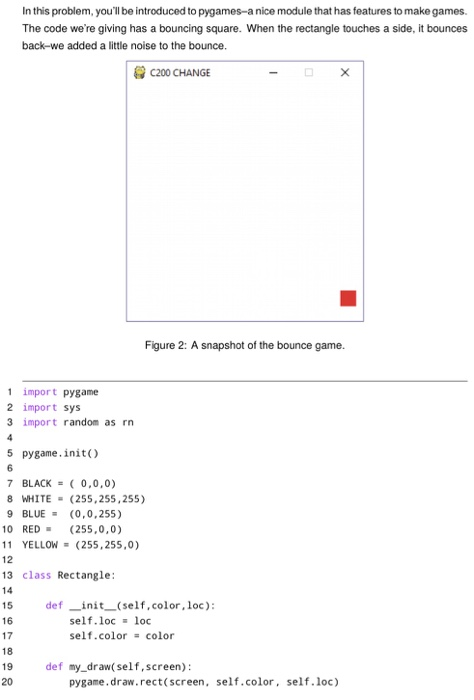
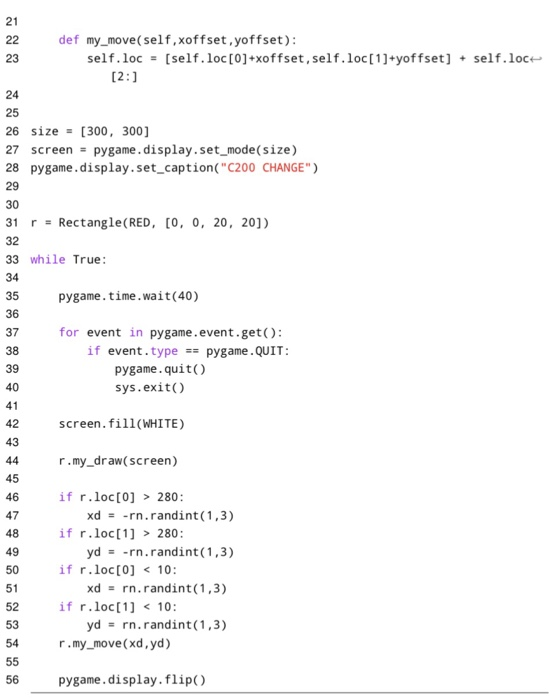
In this problem, youill be introduced to pygames-a nice module that has features to make games. The code we're giving has a bouncing square. When the rectangle touches a side, it bounces back-we added a little noise to the bounce C200 CHANGE Figure 2: A snapshot of the bounce game. 1 import pygame 2 import sys 3 import random as rn 5 pygame.init) 7 BLACK ( 0,0,0) 8 WHITE (255,255,255) 9 BLUE(0,0,255) 10 RED(255,0,0) 11 YELLOW= (255,255,0) 13 class Rectangle 14 def init (self,color, loc): self.locloc self.color color 16 17 18 19 20 def my_draw(self,screen) pygame.draw.rect(screen, self.color, self.loc)
Step by Step Solution
There are 3 Steps involved in it
1 Expert Approved Answer
Step: 1 Unlock

Question Has Been Solved by an Expert!
Get step-by-step solutions from verified subject matter experts
Step: 2 Unlock
Step: 3 Unlock
 Study Help