



Question: In this project, you will create header and footer pages that you will add to a Web page with the include statement. 1. Create a
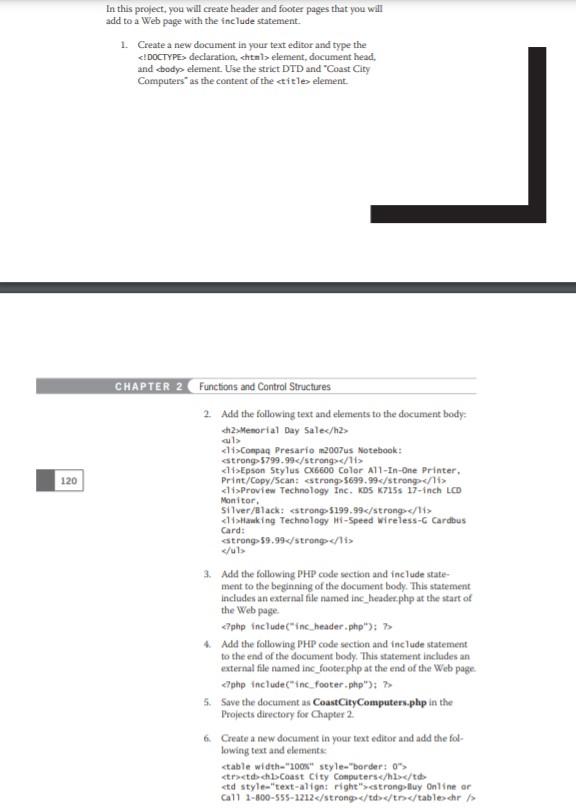
In this project, you will create header and footer pages that you will add to a Web page with the include statement. 1. Create a new document in your text editor and type the declaration element, document head, and body> element. Use the strict DTD and "Coast City Computers as the content of the title> element CHAPTER 2 Functions and Control Structures 2. Add the following text and elements to the document body
Menorial Day Sale
culs cli>Compaq Presario 12007 us Notebook: strong>5799.99
di Proview Technology Inc. KDS K715s 17-inch LCD Monitor Silver/Black: $199.99
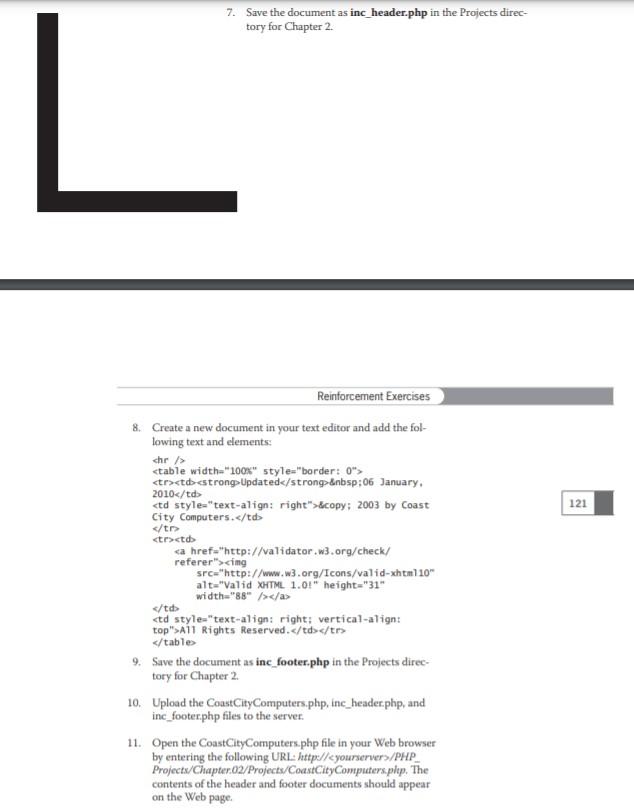
120 3. Add the following PHP code section and include state ment to the beginning of the document body. This statement Includes an external file named ine_header.php at the start of the Web page > 4. Add the following PHP code section and include statement to the end of the document body. This statement includes an external file named inc_footer.php at the end of the Web page S. Save the document us CoastCityComputers.php in the Projects directory for Chapter 2 6. Create a new document in your text editor and add the fol- lowing text and elements
| Coast City Computers | trong-luy Online or Call 1-800-555-1212 | /> 7. Save the document as inc_header.php in the Projects direc- tory for Chapter 2 L Reinforcement Exercises 121 8. Create a new document in your text editor and add the fol- lowing text and elements: che >
| Updated :06 January, 2010 | © 2003 by Coast City Computers. |
| All Rights Reserved. |
Step by Step Solution
There are 3 Steps involved in it

Get step-by-step solutions from verified subject matter experts