







Question: In this question you will develop a desktop date display program with four wheels, one for the day of the week, one for the month,
In this question you will develop a desktop date display program with four wheels, one for the day of the week, one for the month, one for the day, and one for the year.
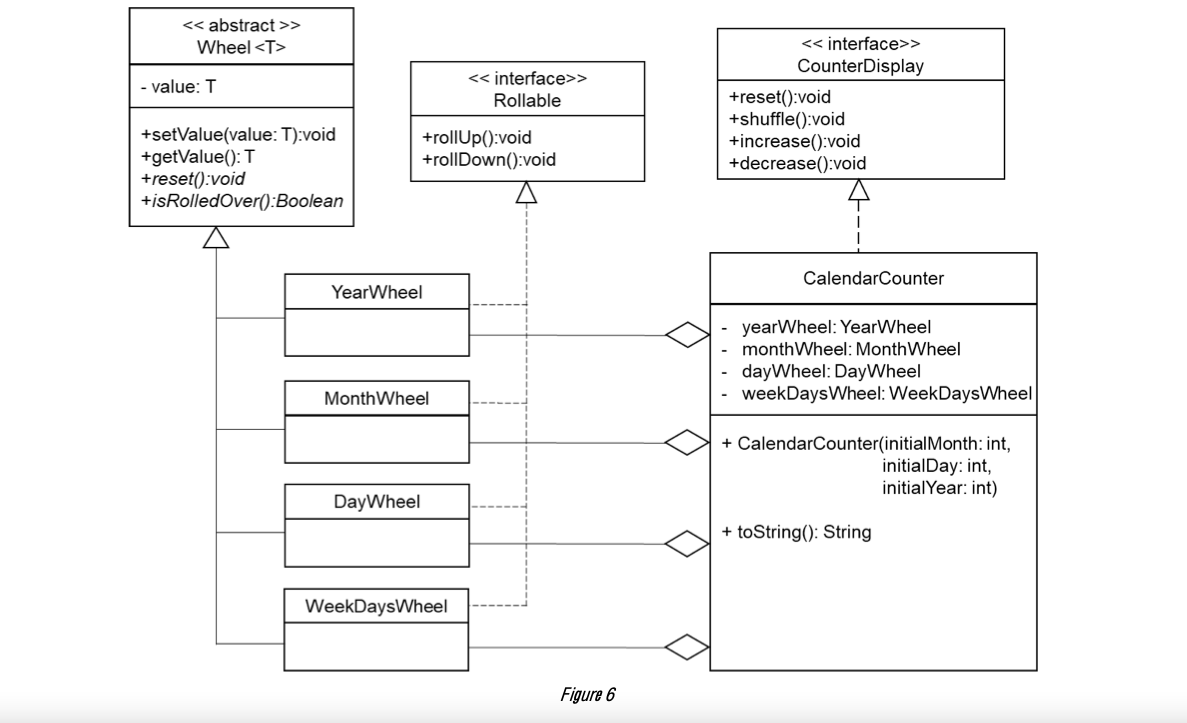
You will use the abstract class Wheel and the interface Rollable to create four new classes: YearWheel, MonthYear, DayYear, and WeekDaysWheel. In addition, you will use the interface CounterDisplay to create one more class called CalendarCounter. These five new class should follow the UML class diagram shown in Figure 6.
In the same project, create a new package and name it Question3. In this package you will write these five classes.
The class diagram shown in Figure 6, will help you to construct your program quickly, however, the numbers and the names of the fields and the methods of the four wheels are not given. So, you will implementation these four wheels on your own, but again it should follow this UML diagram.
-
Note that, the YearWheel class should be able to tell whether it is a leap year, while a MonthWheel class can report the months length, i.e., 28, 29, 30, or 31. The DayWheel class needs to know the last day of a month so it can rollover correctly. The WeekDaysWheel class uses Zeller's congruence (see Wikipedia) to determine the day on which a given date falls.
-
The constructor of CalendarCounter class takes the values of the month, year and day as parameters and initializes the four objects yearWheel, monthWheel, dayWheel, and weekDaysWheel.
-
The toString() method of the CalendarCounter class should return a string that represent the date format as shown in Figure 7 below.
-
The reset() method of the CalendarCounter class should reset the four wheels to their initial values.
-
To test your program,
 DesktopCalendar.java to your project, then compile and
 run you should have an output like the one shown below in Figure 7.
-
Note that, it is not allowed to change, delete, or add any code of the DesktopCalendar.java file.
DesktopCalender.java file:
package Question3; public class DesktopCalendar { public static void main(String[] args) { // Rolling up and prints from Feb 28 to Mar 3 2016 CalendarCounter aDay = new CalendarCounter(2, 28, 2016); for (int i = 0; i 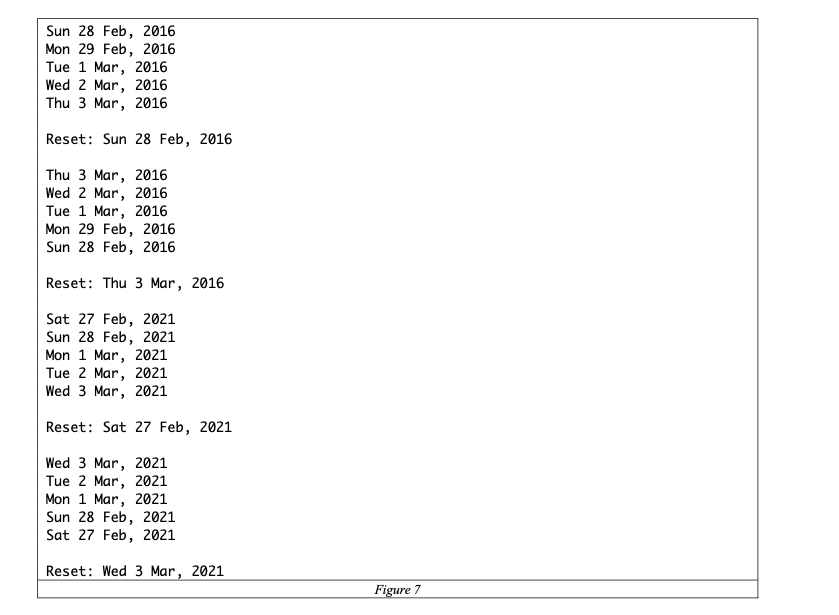
> Wheel - value: T > Rollable > Counter Display +reset():void +shuffle():void +increase():void +decrease():void +setValue(value: T):void +getValue(): T +reset():void +isRolledOver():Boolean +rollUp():void +rollDown():void Calendar Counter Year Wheel year Wheel: Year Wheel month Wheel: Month Wheel - dayWheel: DayWheel weekDaysWheel: WeekDays Wheel Month Wheel + Calendar Counter(initialMonth: int, initialDay:int, initial Year: int) DayWheel + toString(): String WeekDaysWheel Figure 6 add the given Java class Sun 28 Feb, 2016 Mon 29 Feb, 2016 Tue 1 Mar, 2016 Wed 2 Mar, 2016 Thu 3 Mar, 2016 Reset: Sun 28 Feb, 2016 Thu 3 Mar, 2016 Wed 2 Mar, 2016 Tue 1 Mar, 2016 Mon 29 Feb, 2016 Sun 28 Feb, 2016 Reset: Thu 3 Mar, 2016 Sat 27 Feb, 2021 Sun 28 Feb, 2021 Mon 1 Mar, 2021 Tue 2 Mar, 2021 Wed 3 Mar, 2021 Reset: Sat 27 Feb, 2021 Wed 3 Mar, 2021 Tue 2 Mar, 2021 Mon 1 Mar, 2021 Sun 28 Feb, 2021 Sat 27 Feb, 2021 Reset: Wed 3 Mar, 2021 Figure 7 > Wheel - value: T > Rollable > Counter Display +reset():void +shuffle():void +increase():void +decrease():void +setValue(value: T):void +getValue(): T +reset():void +isRolledOver():Boolean +rollUp():void +rollDown():void Calendar Counter Year Wheel year Wheel: Year Wheel month Wheel: Month Wheel - dayWheel: DayWheel weekDaysWheel: WeekDays Wheel Month Wheel + Calendar Counter(initialMonth: int, initialDay:int, initial Year: int) DayWheel + toString(): String WeekDaysWheel Figure 6 add the given Java class Sun 28 Feb, 2016 Mon 29 Feb, 2016 Tue 1 Mar, 2016 Wed 2 Mar, 2016 Thu 3 Mar, 2016 Reset: Sun 28 Feb, 2016 Thu 3 Mar, 2016 Wed 2 Mar, 2016 Tue 1 Mar, 2016 Mon 29 Feb, 2016 Sun 28 Feb, 2016 Reset: Thu 3 Mar, 2016 Sat 27 Feb, 2021 Sun 28 Feb, 2021 Mon 1 Mar, 2021 Tue 2 Mar, 2021 Wed 3 Mar, 2021 Reset: Sat 27 Feb, 2021 Wed 3 Mar, 2021 Tue 2 Mar, 2021 Mon 1 Mar, 2021 Sun 28 Feb, 2021 Sat 27 Feb, 2021 Reset: Wed 3 Mar, 2021 Figure 7 Step by Step Solution
There are 3 Steps involved in it

Get step-by-step solutions from verified subject matter experts
 Study Help