







Question: In this report, you will use the Secant Method to get the roots for function in the interval (0, 10]. f(x) = ax - x^b
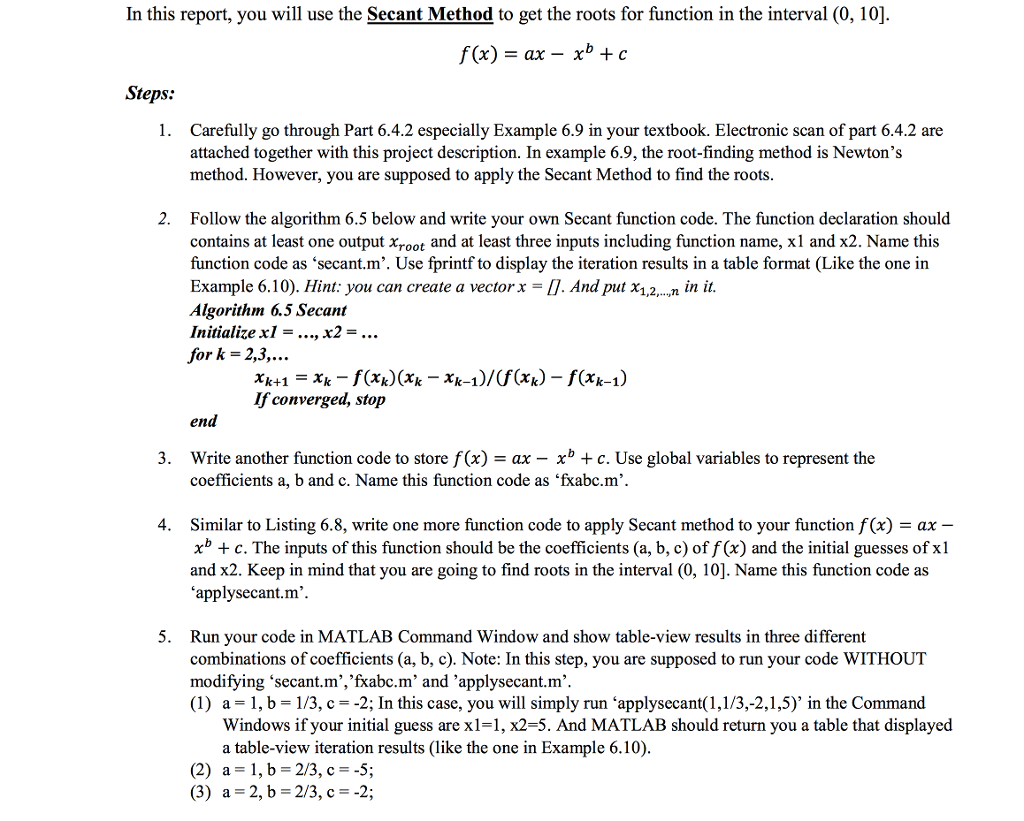
In this report, you will use the Secant Method to get the roots for function in the interval (0, 10]. f(x) = ax - x^b + c Steps: 1. Carefully go through Part 6.4.2 especially Example 6.9 in your textbook. Electronic scan of part 6.4.2 are attached together with this project description. In example 6.9, the root-finding method is Newton's method. However, you are supposed to apply the Secant Method to find the roots. 2. Follow the algorithm 6.5 below and write your own Secant function code. The function declaration should contains at least one output x_root and at least three inputs including function name, x1 and x2. Name this function code as 'secant.m'. Use fprintf to display the iteration results in a table format (Like the one in Example 6.10). Algorithm 6.5 Secant Initialize x1 = x2 =. for k = 2, 3, . x_k + 1 = x_k - f(x_k)(x_k - x_k - 1)/(f (x_k) - f(x_k - 1) If converged, stop end 3. Write another function code to store f(x) = ax - x^b + c. Use global variables to represent the coefficients a, b and c. Name this function code as 'fxabc.m'. 4. Similar to Listing 6.8, write one more function code to apply Secant method to your function f(x) = ax - x^b + c. The inputs of this function should be the coefficients (a, b, c) of f(x) and the initial guesses of x1 and x2. Keep in mind that you are going to find roots in the interval (0, 10]. Name this function code as 'applysecant.m'. 5. Run your code in MATLAB Command Window and show table-view results in three different combinations of coefficients (a, b, c). (1) a = 1, b = 1/3, c = -2: In this case, you will simply run 'applysecant (1, 1/3, -2, 1, 5)' in the Command Windows if your initial guess are x1 = 1, x2 = 5. And MATLAB should return you a table that displayed a table-view iteration results (like the one in Example 6.10). (2) a = 1, b = 2/3, c = -5: (3) a = 2, b = 2/3, c = -2
Step by Step Solution
There are 3 Steps involved in it

Get step-by-step solutions from verified subject matter experts
 Study Help