







Question: In visual basic, I need help adding code to make a error message when the user inputs value incorrectly. Must enter a Description. Year Purchased
In visual basic, I need help adding code to make a error message when the user inputs value incorrectly. "Must enter a Description." "Year Purchased is not numeric." "Year Purchased is not between 1900 and 9999" "Purchase Amount is not numeric." "Years to Depreciate is not numeric." "Number of years must be between 1 and 999."
Here is my code:
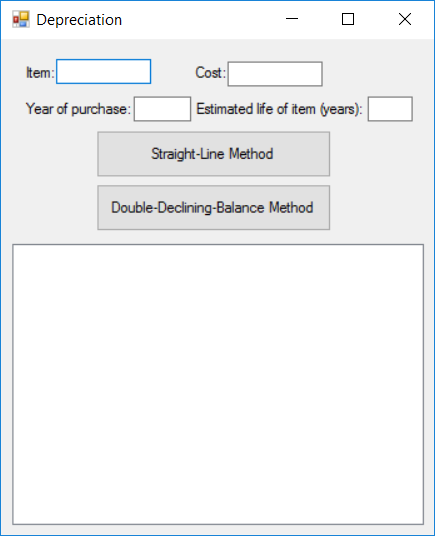
Public Class Form1 Dim description As String Dim method As String Dim dblAmountToDepr As Double Dim intNumberYears As Integer Dim dblCurrentYearAmountToDepr As Double Dim dblCurrentYearStart As Double
Private Sub btnStraight_Click(sender As Object, e As EventArgs) Handles btnStraight.Click method = "straight-line" writeDescription() dblCurrentYearAmountToDepr = dblAmountToDepr / intNumberYears YearlyDescription() End Sub
Private Sub btnDoubleDecline_Click(sender As Object, e As EventArgs) Handles btnDoubleDecline.Click method = "double-declining-balance" writeDescription() dblCurrentYearAmountToDepr = dblCurrentYearStart * (2 / intNumberYears) YearlyDescription() End Sub
Public Sub writeDescription() description = txtDescription.Text dblCurrentYearStart = CInt(txtStartYear.Text) dblAmountToDepr = CDbl(txtAmountToDepre.Text) intNumberYears = CInt(txtYearstoDepr.Text)
lstOutput.Items.Clear() lstOutput.Items.Add("Description: " & description) lstOutput.Items.Add("Year of purchase: " & dblCurrentYearStart) lstOutput.Items.Add("Cost: " & FormatCurrency(dblAmountToDepr)) lstOutput.Items.Add("Estimated life: " & intNumberYears) lstOutput.Items.Add("Method of depreciation: " & method) lstOutput.Items.Add("") End Sub
Public Sub YearlyDescription() Dim dblCurrentYearEnd As Double = 0 Dim intCalYearStart As Integer = dblCurrentYearStart + intNumberYears For intYr As Integer = dblCurrentYearStart To intCalYearStart lstOutput.Items.Add("Value at beginning of " & intYr & ": " & FormatCurrency(dblAmountToDepr)) dblAmountToDepr -= dblCurrentYearAmountToDepr lstOutput.Items.Add("Amount of depreciation during " & intYr & ": " & FormatCurrency(dblCurrentYearAmountToDepr)) dblCurrentYearEnd += dblCurrentYearAmountToDepr lstOutput.Items.Add("Total depreciation at end of " & intYr & ": " & FormatCurrency(dblCurrentYearEnd)) lstOutput.Items.Add("") Next End Sub End Class
Depreciation term Cost Year of purchase Estimated life of item years): Straight-Line Method Double-Declining-Balance Method
Step by Step Solution
There are 3 Steps involved in it

Get step-by-step solutions from verified subject matter experts
 Study Help